
The Everything Key is a powerful utility app designed to unlock the hidden potential of your device's hardware button. With its intuitive remapping capabilities, users can transform their underutilized physical buttons into instant productivity tools.
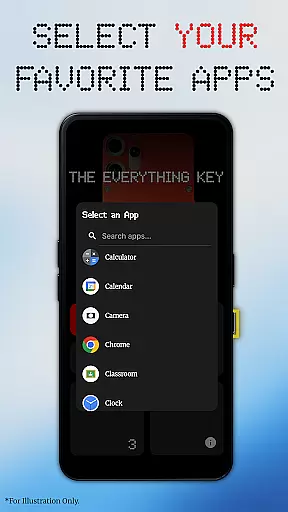
This app allows you to assign specific actions to both double and triple presses, giving you quick access to your most-used apps like the camera or messaging services. The minimalist UI ensures ease of use while providing advanced control options such as enabling, disabling, or un-mapping actions with simple taps.
Whether you're using a Nothing Phone or other supported devices, The Everything Key offers a personalized experience without requiring root access, making it an essential tool for power users seeking enhanced device control.
The Everything Key stands out with its powerful remapping feature that supports both double and triple press actions. This functionality enables users to launch frequently used apps instantly, streamlining their mobile experience.
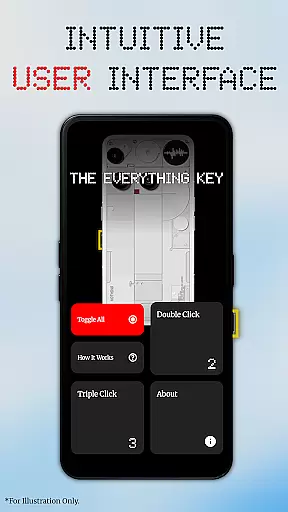
The app's intuitive UI follows a minimalist design philosophy inspired by the Nothing aesthetic. It provides clear visual feedback on active mappings and includes advanced controls such as quick enable/disable toggles and a 'Toggle All' feature for managing multiple mappings efficiently.
Notably, The Everything Key respects user privacy by utilizing Android's Accessibility Service solely to detect hardware key presses without accessing personal information. Its compatibility with standard Android features means no rooting or complex setup is required, making it accessible to all users.
The Everything Key excels in providing precise and effective core functionality by enabling users to remap their device's special hardware button. This app transforms a limited-use button into a powerful productivity tool, allowing for both double and triple press actions to launch frequently used apps like the camera or messaging services.
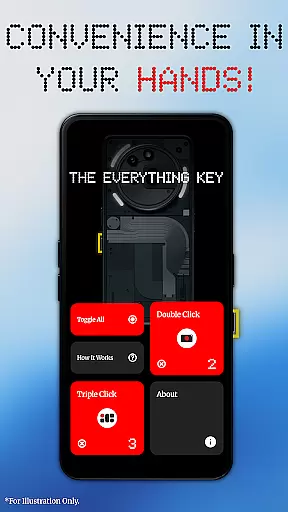
With an intuitive user interface inspired by minimalist design principles, the app ensures that users can easily understand which applications are mapped to specific actions. The simplicity of the UI belies its power; users can quickly enable or disable actions with a tap on a mapped card, and permanently un-map an app using the 'X' icon.
This remapping tool leverages standard Android features, eliminating the need for root access or complex ADB commands. As such, it offers advanced control without compromising device security or simplicity. The Everything Key also provides a personalized experience by prompting users to select their device model and color upon first launch, ensuring seamless integration with their specific hardware.
Simplicity and intuitiveness are at the heart of The Everything Key's design philosophy. With a clean, minimalist interface, this tool makes it easy for users to see which apps are mapped to their deviceu2019s special button and whether these mappings are active. This straightforward approach reduces the learning curve typically associated with utility applications.
The app employs an Accessibility Service to detect hardware key presses but assures users of their privacy. It does not read, log, or access any on-screen content, passwords, or personal information. Instead, its sole purpose is to listen for specific hardware key events, ensuring that user data remains secure while delivering a responsive and reliable service.
Additionally, The Everything Key offers advanced controls through simple taps within the interface. Users can toggle all mappings at once or manage individual ones with ease, thanks to clearly marked interactive elements like the 'X' icon for un-mapping apps. Such thoughtful design choices result in an application that feels right at home on any device, enhancing usability without overwhelming the user.
Intuitive interface
No root required
Advanced remapping
Privacy-focused
Device optimized
Limited device support
Requires accessibility
No official affiliation
Potential battery use
Learning curve

Connect instantly to a fast, encrypted VPN with one tap
 4.60
4.60
Just swipe the edge to do something!
4.40
App that Recover your pictures, videos or files after you delete them.
4.20
An open-source APK explorer for Android!
4.10
An easy-to-use calculator designed to save time calculating and bending conduit
4.30
WiFi Signal Strength Meter help you detect WiFi Signal Strength in real time.
4.80
Game Booster, GFX Tool is now compatible with newer game update
4.50
fast and easy mp3 music downloader
4.80
The ideal app to be the digital eye of your family
3.40
The one-and-only remote control for PC, Mac, and Linux
4.70
App to pay for FUTO Keyboard
4.60
Quickly switch to an encrypted DNS server on Android TV
4.50
Quickly check the frequency of the Earth
4.30
Quickly & easily calculate the spacing of handrail balusters
4.20
1-Click close all background apps on Android TV
3.90
Create your own custom widget with endless possibilities
3.90
Safely recover deleted photos, videos, and files with a single easy tap.
3.70
This app unlocks the Pro features of the Central for DayZ app
3.60
Clean the junk files on your device
3.40


User Reviews