
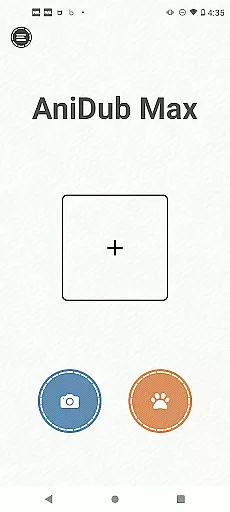
AniDub Max is a feature-rich photography app designed to enhance your mobile photography experience. The app offers advanced camera controls, allowing users to capture professional-quality photos with ease. With its intuitive interface and powerful editing tools, AniDub Max caters to both amateur and experienced photographers.
One of the standout features is the specialized pet camera mode, which is designed based on pets' visual and auditory preferences. This makes it easier to capture high-quality images of your furry friends. Additionally, the app includes various themes and sound effects that create an immersive photography experience.
Whether you're looking to improve your photography skills or simply want to capture memorable moments with your pets, AniDub Max provides the tools you need to take your mobile photography to the next level.
AniDub Max boasts a wide array of features that set it apart from other photography apps. First and foremost, the app includes a dedicated pet camera mode, which takes into account the unique visual and auditory preferences of pets. This ensures that you can capture clear and engaging photos of your pets without any hassle.
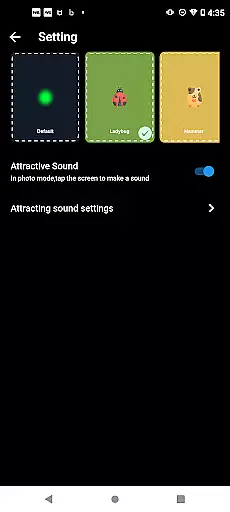
In addition to the pet camera, AniDub Max offers a variety of themes and sound effects. These features are carefully designed to provide a scenario-based exclusive experience, making each photo session unique and enjoyable. Users can choose from different themes to match the mood and setting of their photos.
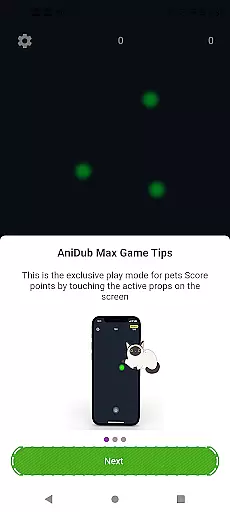
The app also includes small pet toys that allow pets to play independently. This feature not only entertains your pets but also helps in capturing candid and playful moments. Overall, AniDub Max combines functionality with creativity to deliver a comprehensive photography tool for pet lovers.
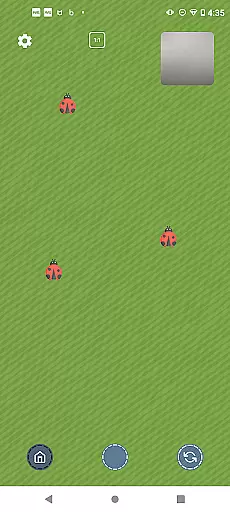
Real-time capture and preview functionality is essential for photography applications as it allows users to frame and adjust their shots accurately. AniDub Max offers a specialized camera feature designed with pets in mind, catering to their unique visual and auditory preferences.
The app's pet camera provides a live view that ensures you never miss a moment of your pet's antics. With real-time preview capabilities, users can adjust settings such as lighting and angle to perfectly capture their pet's activities from the best perspective.
This feature benefits pet owners by enabling them to take high-quality photos and videos of their pets without needing professional equipment or skills. The intuitive interface makes it easy for anyone to use, ensuring that all pet moments are captured with clarity and precision.
AI beauty and enhancement features have become a staple in modern photography apps, allowing users to refine and beautify images instantly. AniDub Max incorporates advanced AI algorithms to enhance pet photos naturally, without over-processing or distorting the image.
The app includes rich themes and sound effects tailored to create an exclusive scenario-based experience for pets. These enhancements are carefully designed to complement the natural beauty of animals, providing a polished yet authentic look.
Users benefit from this feature by being able to create stunning visuals that highlight their pet's unique characteristics while maintaining a natural appearance. This ensures that every photo taken with AniDub Max is both beautiful and true to life, preserving precious memories in the best possible way.
User-friendly interface
Advanced camera controls
Specialized pet camera mode
Variety of themes and sound effects
Includes pet toys for independent play
Limited to pet photography
Some features may require in-app purchases
Occasional performance issues
Not suitable for professional studio use
Learning curve for beginners

Photo editor: face & body editor, beauty cam, filters and quality enhancer.
 4.00
4.00
Viewfinder, Light meter, Reciprocity failure time, DOF & Bellows Extension
4.60
Virtual makeup, hair filters & body tuner—edit from face to full body!
4.20
Android Native system HD camera app. Never been so simple and faster.
4.70
Create Business Headshots, Polaroid Filter, Retake Photos,Profile Pics,AI Photos
4.50
Photo editor & gallery. Crop pictures & edit photos offline, no wifi!
4.50
AI Photo Editor with 100+ Filters, Effects! Remove BG, Retouch & Photo Enhancer.
4.80
Smart, light, and fast photo and video gallery
4.30
Catch sunlight, sunrise sunset times and sun phases with the AR sun tracker.
4.10
Create funny photos and videos with the popular Time Warp Scan filter.
4.90
Gallery show photo, video, slideshow, is perfect 3D effect private photo albums.
4.80
Photo editor: AI filters, photo enhancer, pic collage maker, AI art generator.
4.80
Easily view, share, delete photos with Gallery.
4.70
A must-have app for landscape photographers
4.60
Edit like a pro with Hypic. Apply filters, AI effects, & magic touch.
4.40
RAW video capture with advanced controls
4.40
Professional photography on your mobile phone
4.20
AI-powered video creator by MiniMax - Where ideas meet cinema
4.20
Professional video recording application with manual controls for filmmakers!
2.80


User Reviews