
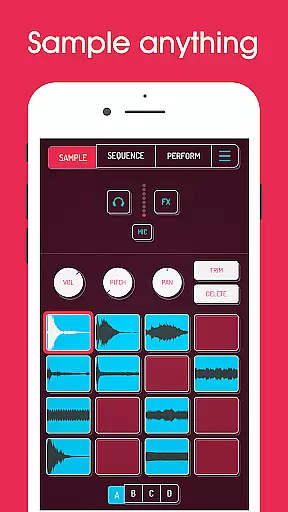
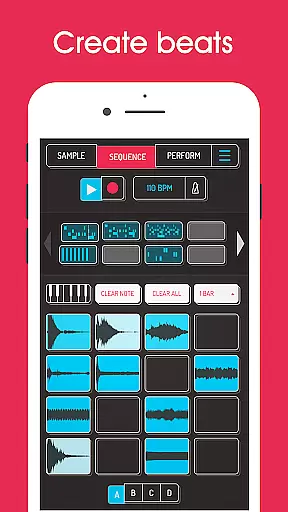
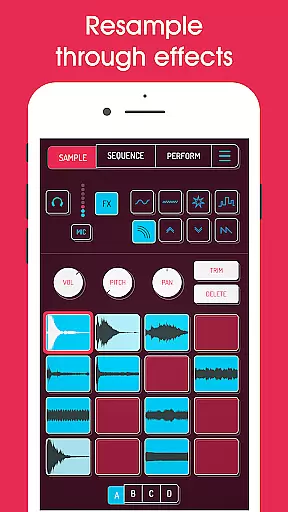
Koala Sampler is a pocket-sized music production tool designed for both amateur beatmakers and professional musicians. This app allows users to record sounds through their phone's microphone or import custom samples, transforming them into high-quality beats with built-in effects. With an intuitive interface, Koala ensures that the music-making process remains seamless and enjoyable.
One of the standout features of Koala Sampler is its ability to resample audio output back into the input, creating endless sonic possibilities. The app also includes AI-powered sample separation, enabling users to isolate individual instruments like drums, bass, and vocals from any track. Whether you're crafting loops, exporting WAV files, or experimenting with 16 unique DJ mix effects, Koala keeps the creative flow alive without overwhelming users with unnecessary parameters.
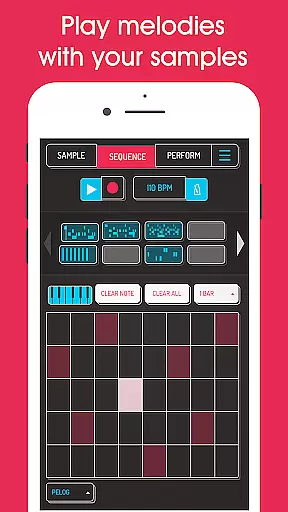
Ideal for on-the-go music production, Koala Sampler strikes a balance between functionality and ease of use. Its comprehensive feature set, including MIDI compatibility and keyboard modes, makes it a versatile tool for live performances and studio sessions alike.
Koala Sampler offers a robust suite of features tailored for music creators. At its core, the app supports up to 64 different samples, which can be recorded directly via the phone's mic or imported from external sources. Each sample can be customized using adjustable attack, release, and tone settings, while playback options include normal, one-shot, loop, and reverse modes.
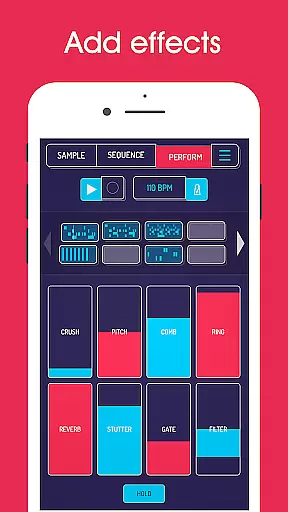
The app shines with its 16 built-in effects, ranging from reverb and fuzz to advanced options like tempo delay and talkbox. These effects can be applied to individual samples or the entire mix, giving users extensive control over their sound design. Additionally, the AI-driven sample separation tool allows musicians to break down complex tracks into distinct elements such as drums and vocals, enhancing remixing capabilities.
For those seeking more advanced functionality, the SAMURAI in-app purchase unlocks pro-quality timestretching, a piano roll editor, and auto-chop features. Combined with MIDI support and quantization tools, Koala Sampler provides everything needed to create polished tracks efficiently.
Koala Sampler offers an extensive music library that allows users to record up to 64 different samples using their phone's mic. This vast capability ensures a rich diversity of sounds, which is crucial for music creation and experimentation.
In addition to recording new samples, the app supports importing your own sounds. This feature not only expands the music library but also guarantees the copyright authenticity of the imported content, as users have full control over what they add.
The app includes AI technology to separate samples into individual instruments such as drums, bass, vocals, and others. This innovative approach enhances the creative process by providing clear, distinct elements to work with, ensuring originality and respect for intellectual property.
With professional-quality WAV file export options, Koala Sampler enables musicians to create tracks that meet industry standards, reinforcing the importance of both library size and copyright compliance in modern music production.
Audio quality is paramount in Koala Sampler, offering users 16 superb built-in effects to transform any sound or voice. These effects range from basic enhancements like More Bass and More Treble to complex modifications such as Ring Modulator and Talkbox, ensuring pristine audio output.
The app provides advanced audio manipulation features including attack, release, and tone adjustments on each sample. Such detailed controls allow for precise customization of sound properties, catering to the nuanced needs of audio professionals and enthusiasts alike.
For those seeking further refinement, Koala Sampler includes a high-resolution sequencer and MIDI controllability. These tools facilitate intricate beat creation and seamless integration with external devices, elevating the overall audio experience.
Additionally, the inclusion of professional-grade timestretch options through the SAMURAI In-App Purchase underscores Koala Sampler's commitment to delivering top-tier audio quality across various modes like Modern, Retro, Beats, and Re-pitch.
Intuitive user interface
Powerful AI sample separation
Extensive effect library
High-quality export options
MIDI compatibility
In-app purchases required
Microphone input issues
Steep learning curve
Limited free features
No cloud sync

Over 100 million tracks available for high quality streaming and download
 4.60
4.60
Tune in to the greatest hits on UK Radio | The home of Capital, Smooth & Heart.
4.90
Full-featured, High-Quality Groovebox Workstation, perfect for Live Performance!
4.80
DJ Music Mixer Pro is a real DJ controllers and DJ Music Studio to remix DJ.
4.40
Remove ads permanently from Music Visualizer
4.0
Powerful beat maker & DJ mixer to remix tracks, make music, & perform DJ mix
3.70
Unleash your creativity! Turn simple prompts into full fledged songs.
4.70
Help you quickly get started with Shokz headphones
4.40
Offline Tunes, Unlimited Vibes
3.90
24,000 free audio books and no ads!
4.90
Offline Music Player & MP3 Player.Powerful equalizer, Lyrics, Themes, Tag Editor
4.80
Simple & Intuitive Metronome
4.70
A synth that really lets you shape your sounds!
4.50
A sleek, no-frills player designed for true music lovers.
4.20
Smart piano keyboard, Classical to Pop, Real-time multiplayer connection!
4.20
Offline and always ad-free - stream in the highest quality available.
4.10
Turn your phone into a musical instrument from the future!
3.90
Background pads for your band
3.80
The Cubase remote control app
3.60


User Reviews