
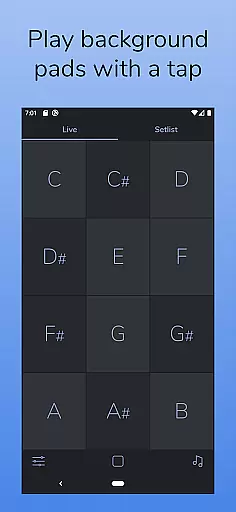
AutoPad is a versatile ambient pad loop application designed to enhance live performances and recordings with seamlessly looped sample-based drones. The app provides users with an effortless way to incorporate tasteful soundscapes into their mixes, simply by tapping a key. It supports natural crossfades between keys, ensuring smooth transitions during performances.
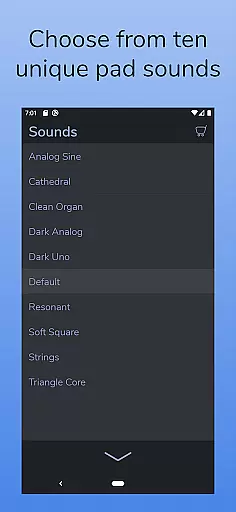
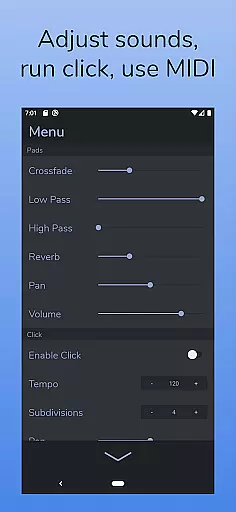
The app comes equipped with 10 expertly crafted pad sounds that create unique atmospheres in all 12 musical keys. Additionally, AutoPad offers advanced features such as a built-in metronome for band synchronization, MIDI compatibility for external controllers, and adjustable settings including crossfade time, filters, reverb, pan, and volume. Its dark color scheme ensures optimal visibility on stage.
AutoPad is particularly well-suited for musicians seeking to add subtle structure to their live performances or worship music sessions without needing frequent chord changes. By providing continuous background pads that can be played softly behind live instruments, it creates an immersive sonic environment that enhances the overall musical experience.
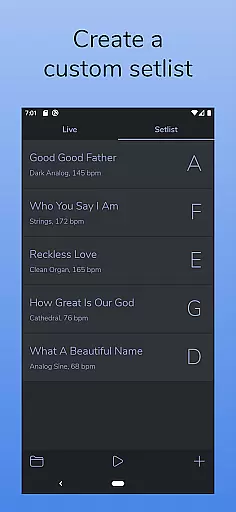
AutoPad stands out with its dual operational modes: LIVE mode for instant access to all twelve musical keys and SETLIST mode for creating customized song lists. This flexibility allows musicians to adapt the app to different performance scenarios effortlessly.
The app includes 10 meticulously designed pad sounds that offer unique atmospheres across all 12 keys. Users can further expand their sound library through in-app purchases or by importing custom WAV files. Additional notable features include a built-in metronome for precise tempo control, automatic crossfades between keys, and comprehensive menu options for adjusting crossfade time, filters, reverb amount, pan, and volume.
For enhanced usability, AutoPad supports MIDI functionality, enabling users to trigger pads using external MIDI controllers. Its visually appealing dark theme not only reduces eye strain but also performs exceptionally well under stage lighting conditions. These features collectively make AutoPad an indispensable tool for musicians looking to elevate their performances with professional-grade ambient soundscapes.
AutoPad offers a diverse music library that caters to various ambient sound needs. With 10 carefully designed pad sounds included, each provides a unique atmosphere across all 12 musical keys.
The app also supports expansion of the sound library through in-app purchases or by importing personal WAV files, ensuring users have access to a wide range of sonic possibilities while respecting copyright laws.
Users can trust the authenticity of these sounds as they are crafted to complement live performances and recordings without overshadowing them, making AutoPad an invaluable tool for musicians seeking high-quality backing tracks.
Ensuring pristine audio quality is at the heart of AutoPad's functionality. The application features two filters, reverb amount control, pan settings, and volume adjustments within its menu, allowing for precise sound shaping.
With natural crossfades between keys handled automatically and support for MIDI controllers to trigger pads with a keyboard, AutoPad delivers seamless transitions and responsive playback that maintains audio clarity.
This attention to detail in sound processing guarantees that whether used softly in worship music or as part of dynamic live performances, AutoPad provides musicians with professional-grade audio options tailored to their specific needs.
User-friendly interface
Seamless looping capability
Versatile sound library
Customizable settings
MIDI compatibility
Limited file format support
No virtual MIDI on Android
In-app purchases required
Complex for beginners
High system requirements

The ultimate media player for Android devices
 3.90
3.90
USB audio recording and playback finally possible on Android 3.1 or higher!
3.90
Bass Booster & Volume Equalizer Pro improves your music and video sound quality
4.60
The Minimalistic Premium Music Player. Handmade with passion for music
2.20
Slow music down without changing pitch.
3.70
Learn the notes on the guitar fretboard fast with this easy and fun app
4.60
Manage your Sonos system directly from your home-screen!
4.40
Listen to offline music and sounds from all categories
4.70
Play your music offline without limits
4.80
JBL PartyBox APP works with 110/310/710/120/320/520/Encore/Encore 2/Encore Ess 2
4.80
Play your hearts out on TouchTunes jukeboxes & connect with fellow music lovers.
4.80
Listen to live FM radio stations, sports, music and news on global radios online
4.70
Enhance the sound quality of your devices, listen to what you want
4.50
DJ Music Mixer Pro is a real DJ controllers and DJ Music Studio to remix DJ.
4.40
Full featured mp3 and audio player with Chromecast and Android Auto support.
4.40
No wifi music app. Mp3 offline. Tuner radio, young radio music. Music downloader
4.20
VB-AUDIO Software / VBAN-Receptor allows listening to any VBAN Streams
4.10
The Cubase remote control app
3.60
Control your MIDI USB or Bluetooth devices in app and avoid some trampling
3.30


User Reviews