
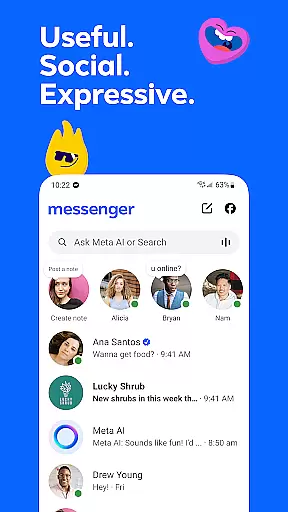






Messenger is a versatile communication app that allows users to connect with friends and family effortlessly. The core functionality revolves around instant messaging and voice/video calling, enabling seamless interactions across distances.
Beyond basic communication, Messenger offers innovative features like Meta AI assistant for instant support, high-definition photo sharing, and disappearing messages for private conversations. These capabilities make it especially valuable for users seeking both personal and professional connectivity.
Whether you're coordinating with teammates, staying in touch with loved ones, or engaging with communities of shared interests, Messenger provides a comprehensive platform that extends beyond traditional messaging apps.
Messenger stands out with its diverse feature set tailored for modern communication needs. The app's AI assistant provides users with instant answers and practical help, while HD photo sharing ensures media quality remains uncompromised.
Unique functionalities like shared albums allow collaborative content organization, and QR code connections facilitate real-world networking. The ability to send large files up to 100MB directly within chats demonstrates the app's focus on productivity.
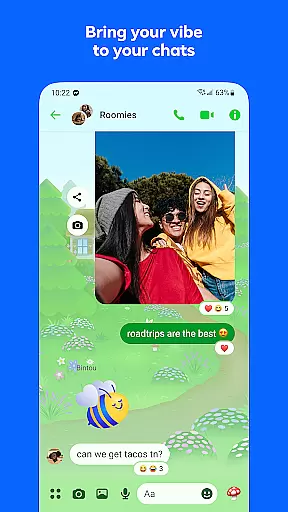
Advanced privacy features such as message editing, unsending capability, and disappearing messages give users control over their digital footprint. Meanwhile, customizable themes and creative tools enable personalized expression in conversations.
Real-time messaging speed and reliability are crucial for maintaining seamless communication in today's fast-paced digital world. Messenger excels in this area by providing instant message delivery across devices, ensuring you never miss an important conversation.
The application employs advanced synchronization technologies that keep your chat history up-to-date regardless of which device you use. This means whether you're chatting on your phone, tablet, or computer, the transition is smooth and messages appear instantly.
Moreover, Messenger has implemented robust server infrastructure to handle high volumes of messages without delay. This ensures that even during peak usage times, users experience minimal latency, making conversations feel as natural as face-to-face interactions.
For professionals and personal users alike, this level of reliability means you can trust Messenger to deliver your messages promptly and accurately, enhancing both business communications and personal relationships.
Media sharing support is a vital feature for any modern messaging app, allowing users to share their experiences and memories in rich formats beyond plain text. Messenger offers comprehensive media sharing capabilities that make it easy to send photos, videos, and large files with just a few taps.
With Messenger, you can send high-definition images and videos, ensuring that your shared moments look as vivid as when they were captured. The app also supports creating shared albums where multiple users can contribute photos and videos, perfect for group events like vacations or family gatherings.
In addition to multimedia content, Messenger enables the sharing of large files up to 100MB directly within chats. Whether it's a detailed report in PDF format or a complex Excel spreadsheet, you can easily collaborate with colleagues or share important documents with friends and family.
This extensive media sharing support not only enhances personal communication but also facilitates professional collaboration, making Messenger a versatile tool for all your messaging needs.
User-friendly interface
High-quality media sharing
Robust privacy controls
Versatile communication options
Integrated AI assistance
Occasional connectivity issues
Heavy battery consumption
Limited AI language support
Large file storage limitations
Complex privacy settings

Call Forwarding is easy and simple application to use.
 3.80
3.80
Use this Dialer app alone or as a TREK: Total Interface companion.
4.70
Messages: Fast, simple SMS app with scheduling and smart features.
4.00
Manage BoostMobile Account
4.60
Welcome to the future of phone service.
4.60
Fast Dialer & Contact Manager with Caller ID and Spam Protection
4.00
Comprehensive and powerful scan tool app with enhanced functions
3.00
Call & Text Anywhere With A Canadian Number.
3.60
A softphone app with seamless SIP calling and an intuitive VoIP dialer
3.50
فیلتر شکن قوی پرسرعت کلید جدید برای اندرویدسریع ترین وی پی ان برای همه اپراتورها
4.70
Messenger, an MMS & SMS messages app with Blockers, Driving mode & Private box
4.60
Build your web browser around you with private search, and more.
4.60
Connect and browse the internet with a fast VPN proxy server and IP blocker.
4.50
Call Blocker app: Identify unknown callers, block spam calls, fraud & robocalls
4.30
SMS Messenger is a lightning-fast messaging app.
4.20
A customizable phone number in the cloud
4.20
Messages is Private SMS Messenger 2023 with text message, instant messaging.
4.00
Auto Reply SMS, Text Messaging, Away SMS Response, Busy SMS messages, Block Text
3.10
A Browser with powerful ad blocker to help focus on what really matters.
3.00


User Reviews