
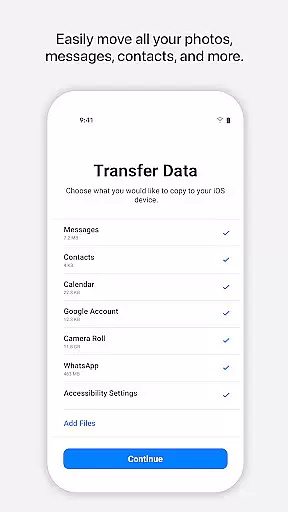
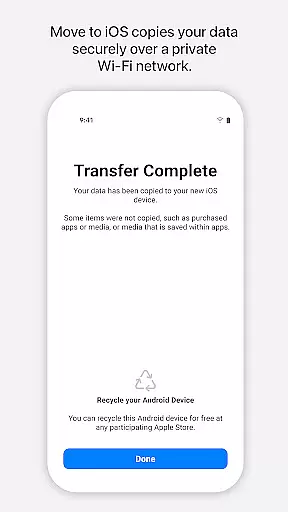
Move to iOS is a powerful migration tool designed to simplify the process of switching from Android to iPhone or iPad. This application enables users to transfer all essential content securely and automatically, including contacts, photos, videos, message history, mail accounts, calendars, and even WhatsApp data. The app creates a private Wi-Fi network between devices, ensuring a seamless and secure transition without the need for third-party storage solutions.
One standout feature is its ease of use. With just a few steps, users can migrate their entire digital life in minutes. By entering a security code, the app connects the Android device to the new iOS device, transferring data directly and organizing it into the appropriate locations on the iPhone or iPad. Whether you're upgrading your phone or switching platforms, Move to iOS ensures a smooth transition while maintaining data integrity and privacy.
Move to iOS offers several notable features that enhance the migration experience. First, it provides comprehensive data transfer capabilities, supporting everything from basic content like contacts and photos to more complex data such as call logs, voice memos, and WhatsApp conversations. This ensures users don't lose any critical information during the switch.
Another key feature is its secure connection protocol. The app establishes a private Wi-Fi network between the Android and iOS devices, eliminating the need for external servers or cloud storage. Additionally, optional permissions allow users to customize what data they want to transfer, such as SMS messages, music files, and calendar events. These granular controls give users flexibility while maintaining high security standards.
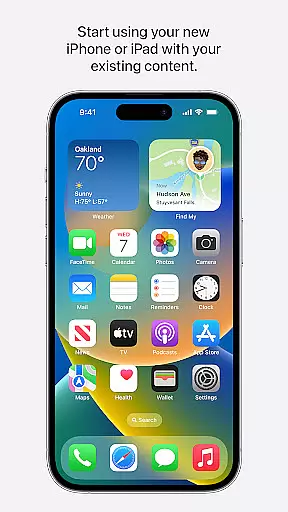
The app also emphasizes user convenience. It requires minimal setup, with clear instructions guiding users through each step. Once the transfer is complete, users can immediately start using their new iOS device without additional configuration. This combination of security, flexibility, and ease of use makes Move to iOS an indispensable tool for anyone transitioning to Apple's ecosystem.
Move to iOS is designed with precision to ensure the seamless transfer of data from Android devices to iOS. The app's core functionality lies in its ability to automatically and securely migrate a wide array of content, including contacts, message history, photos, and even app data.
The effectiveness of Move to iOS is evident through its straightforward process. By creating a private Wi-Fi network between devices, it facilitates a direct and secure connection, ensuring that all personal information is transferred without the need for third-party services or cloud storage.
Users benefit greatly from this accurate migration tool as it eliminates the hassle of manually backing up and restoring each element of their digital lives. This saves time and reduces the risk of data loss or exposure during the switch.
Ultimately, the value of Move to iOS rests in its capacity to make switching to an iPhone or iPad an easy and worry-free experience. Its reliable performance assures users that their transition will be smooth, allowing them to quickly start enjoying the features of their new device.
The interface of Move to iOS reflects Apple's commitment to simplicity and user-friendliness. With clear instructions and an intuitive design, the app guides users through every step of the migration process without overwhelming them with technical details.
Upon launching Move to iOS, users are greeted with a clean layout that requires minimal interaction. The app intelligently handles the complexity of data transfer behind the scenes, presenting users with simple prompts and progress indicators that keep them informed without causing confusion.
This focus on an uncluttered interface ensures that even those who may not be tech-savvy can navigate the app with ease. Users simply follow the on-screen guidance, enter a security code when prompted, and let the app do the rest.
In essence, Move to iOS stands out for its ability to demystify what could otherwise be a daunting task. Its intuitive nature means users can switch to their new iOS device confidently, knowing that their valuable data is being handled with care and efficiency.
Seamless data transfer
User-friendly interface
Secure Wi-Fi connection
Comprehensive content support
Optional permission settings
Limited to Android-iOS
Requires stable Wi-Fi
No reverse compatibility
Dependent on device proximity
Optional features may reduce functionality

Family Locator, Share location, StayConnect with your family in real time
 3.90
3.90
eXtended Permission Manager - a small app to manage permissions and AppOps
4.50
Forza Tuning Calculator App for Forza Horizon 5, Motorsport and Earlier Titles
4.40
Effortlessly run ADB commands directly on your device without a PC.
4.20
WiFi Signal Strength Meter help you detect WiFi Signal Strength in real time.
4.80
Quickly check the frequency of the Earth
4.30
Fast Video Downloader, Movie Downloader, Torrent Downloader & Adblock Browser
4.70
NFC Tools can read and write NFC tags.
4.70
Creation, Learning, Entertainment & More — The All-in-One AI Search Engine
4.70
Easily install aab(Android App Bundle) files on your Android device with our app
4.80
Planner and Tracker for Stardew Valley
4.60 4.50
4.50
With videos, electrical calculators, and built-in ebook, Ugly’s has your answer.
4.50 4.10
4.10
Automate everything from settings to photos, SMS to speech. ADC2 prize winner.
4.10
Create your own live wallpaper or check out thousands already made presets
3.90
Safely recover deleted photos, videos, and files with a single easy tap.
3.70
A recovery soft,it features photo recovery, video recovery, file recovery.
3.40
Unlock your Essential Key. Create custom shortcuts to your favorite apps!
4.0


User Reviews