
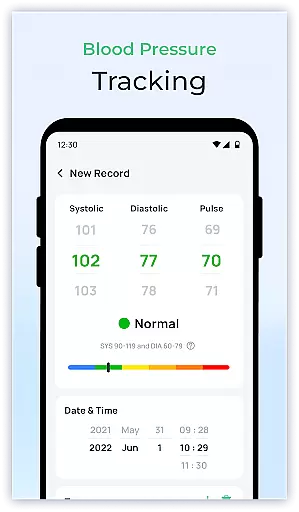
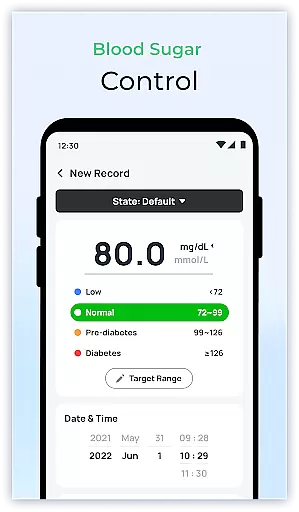
Blood Sugar & Diabetes Tracker is a comprehensive health management app designed specifically for individuals with diabetes. The app's core functionality revolves around accurate blood sugar tracking, allowing users to log their readings effortlessly and monitor trends over time. With its intuitive interface, the app provides personalized insights based on user data, helping diabetics understand how different factors affect their blood sugar levels.
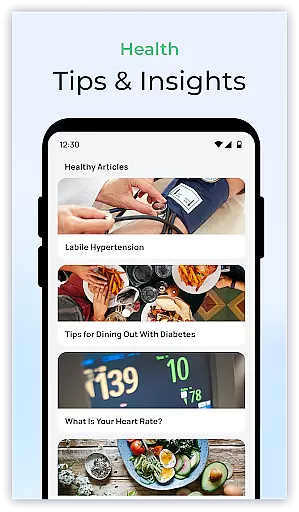
One of the standout features is its detailed reporting system, which enables users to generate professional-grade reports for sharing with healthcare providers. This facilitates more informed medical consultations and better treatment decisions. Additionally, the app offers educational resources and lifestyle tips, empowering users to take proactive steps in managing their condition. Whether you're newly diagnosed or have been living with diabetes for years, this app serves as an essential tool for maintaining optimal blood sugar control.
The Blood Sugar & Diabetes Tracker stands out with its robust feature set tailored for diabetes management. At its core, the app provides seamless blood sugar logging capabilities, allowing users to input readings quickly and view historical data through interactive charts. These visualizations help identify patterns and fluctuations in glucose levels, providing valuable insights for both patients and healthcare professionals.
Another key aspect is the app's reminder system, which can be customized to alert users about medication schedules, meal times, and upcoming doctor appointments. The app also includes a comprehensive library of diabetes-related content, featuring articles on nutrition, exercise, and the latest medical research. Furthermore, it incorporates personalized recommendations based on individual health data, suggesting lifestyle adjustments that could improve overall well-being. These features work together to create a holistic diabetes management solution that goes beyond simple tracking.
Personalized planning in health and fitness apps refers to the ability to create tailored strategies based on individual health data. For Blood Sugar & Diabetes Tracker, this means analyzing your blood sugar levels to offer customized insights and recommendations.
The app achieves personalized planning by allowing you to log your blood sugar readings effortlessly. It then processes this data to identify trends and patterns unique to your lifestyle and condition. This functionality empowers users with actionable insights that are specifically relevant to their health journey.
Users benefit from personalized planning as it helps them understand how different factors affect their blood sugar levels. The app provides suggestions to maintain stable levels, thus supporting better diabetes management. This tailored approach ensures that each user's plan is as unique as their health needs.
Ultimately, personalized planning enhances user engagement and motivation. By receiving targeted advice, users can make informed decisions about their daily activities and dietary choices. This leads to improved overall well-being and a more proactive approach to managing diabetes effectively.
Progress visualization is a crucial feature in health apps, offering users a clear picture of their health journey over time. In Blood Sugar & Diabetes Tracker, this feature translates complex health data into easy-to-understand visual formats such as charts and graphs.
The app employs advanced algorithms to convert logged blood sugar levels into visual representations. These visuals highlight fluctuations and trends, making it easier for users to grasp their progress at a glance. Such an approach not only simplifies data interpretation but also makes monitoring more engaging.
For users, progress visualization offers tangible evidence of their efforts and achievements. Seeing improvements or consistent maintenance of healthy blood sugar levels can be highly motivating. Additionally, these visual tools facilitate better communication with healthcare providers by presenting clear data during consultations.
By integrating progress visualization, Blood Sugar & Diabetes Tracker fosters a deeper understanding of oneu2019s health status. Users gain confidence in managing their condition, knowing they have comprehensive insights readily available. This boosts adherence to health plans and encourages sustained positive behavior changes.
User-friendly interface
Comprehensive tracking system
Detailed health reports
Customizable reminders
Educational resources
Premium features locked
Limited offline functionality
No automatic device syncing
Occasional bugs reported
Subscription fees apply

“Overcoming pain based on EMDR” helps you to alleviate chronic pain and stress.
 4.10
4.10
Control your sleep in real-time wearing Garmin device
3.60
Optimization for TRT & Enhanced Athletes
4.5
Histamine intolerance, low FODMAP diet and irritable bowel syndrome (IBS)
4.00
Measure real-time wrist & ambient temperature with your Galaxy Watch (Wear OS)
3.20
Measure your Pupil Distance for Eyeglasses and VR headsets in 3 quick steps.
4.70
Monitor, analyze, track, and convert blood sugar & help you control diabetes.
4.10
Walk, track, and burn calories with step counter & GPS walking tracker
4.20
Easy to use step counter, calorie counter helps lose weight, count steps offline
4.80
Weight loss app: home workout for women to lose weight & burn calories.
4.80
App to stop smoking slowly or now with a motivational badges and helpful tips
4.80
Step Counter, track steps when you walk or run
4.70
The simplest way to track your 21 Day Program containers, exercises, and water.
4.50
Chair Workout: Women's Edition for safe, flexible, and personalized fitness.
4.40
50 HD sounds to help you relax during the day and sleep great at night!
4.40
Blood Pressure Log, HRV & Heartbeat Tracker. Pulse Checker.
4.40
Create powerful subliminal audio with custom affirmations and background music.
4.00
Focus on BP & Health
3.80
GloryFit is a companion app for the smart bracelet.
3.60


User Reviews