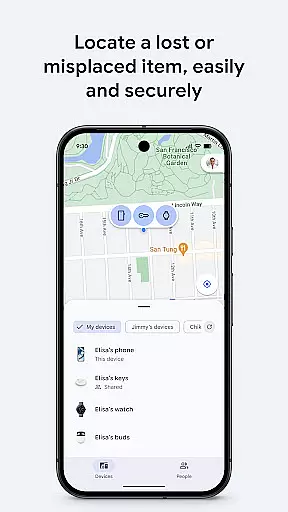
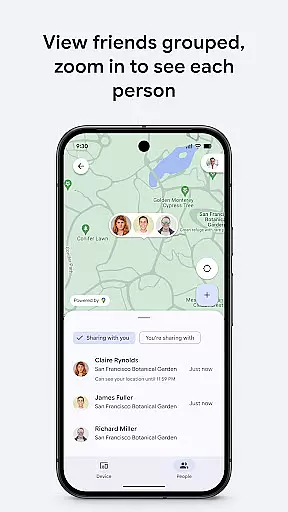
Google's Find Hub is a powerful tool designed to help users locate and manage their devices and personal items. The app allows you to view the real-time location of your phone, tablet, headphones, and other accessories on a map, even when they are offline. With features like remote device locking, erasing, and message display, it ensures your data remains secure in case of loss. Additionally, the app supports location sharing, enabling users to share their live location with friends or family for better coordination and safety checks.
The application stands out through its robust security measures. All location data within the Find Hub network is encrypted, ensuring that this sensitive information remains private and inaccessible, even to Google itself. This makes it an essential tool for anyone looking to keep track of their belongings while maintaining privacy and security.
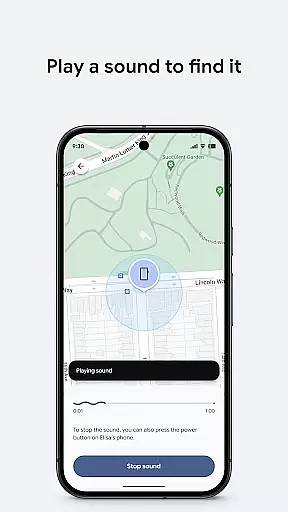
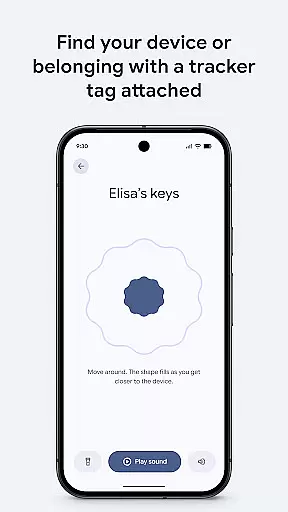
One of the standout features of Google's Find Hub is its ability to locate devices and items even when they are offline. By leveraging a network of connected devices, the app can pinpoint the last known locations of your belongings, providing peace of mind when things go missing. Users can also play a sound remotely to find a lost device if it's nearby, which is particularly useful for locating items within the house or office.
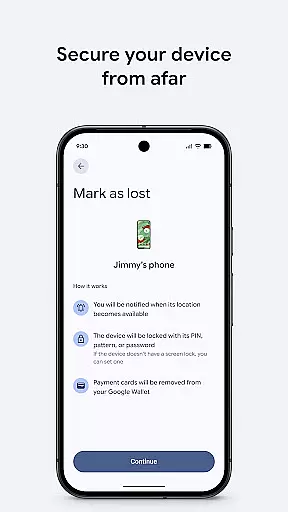
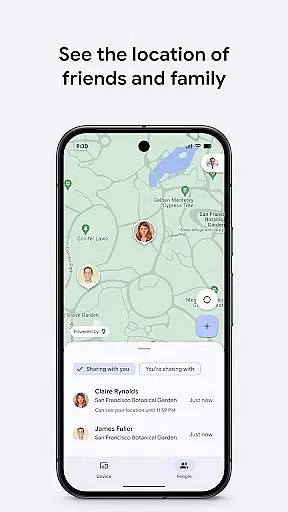
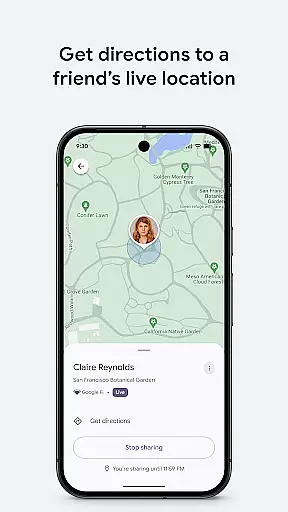
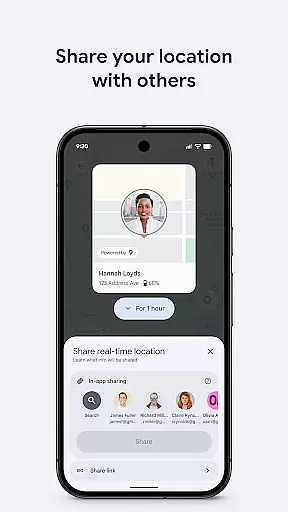
In addition to device tracking, Google's Find Hub offers advanced security options. If a device is lost or stolen, users can remotely lock or erase it to protect their personal information. A custom message can be displayed on the lock screen, allowing someone who finds the device to return it. Furthermore, the app includes a location-sharing feature that lets users share their live location with trusted contacts, making it easier to coordinate meetups or ensure loved ones reach their destinations safely.
Google's Find Hub delivers exceptional core functionality by providing accurate and effective device tracking solutions. The app allows users to view their phones, tablets, headphones, and other accessories on a map, even when offline. This precision in locating devices is achieved through advanced geolocation technologies and robust data encryption protocols.
The application goes beyond simple location tracking by offering practical tools for device recovery. Users can play a sound remotely to locate a nearby lost device or take preventive measures such as remotely securing or erasing their device if it's truly lost. These features ensure that the app not only finds devices but also protects sensitive information, enhancing its overall effectiveness.
Another key aspect of the app's functionality is its encrypted location data system. All location data within the Find Hub network is encrypted, ensuring privacy and security. This means that even Google cannot access this data, providing users with peace of mind regarding their personal information and location history.
Google's Find Hub excels in delivering an intuitive and straightforward user interface that simplifies device management. The main dashboard presents all essential functions clearly, allowing users to quickly access maps, sound alerts, and security options without navigating through complex menus. This thoughtful design ensures that even non-technical users can effectively utilize the app's features.
The app's interface maintains consistency across different functions, making it easy to switch between various tasks. Whether users are tracking multiple devices, sharing live locations, or managing security settings, they'll find the same logical structure and familiar controls. This uniformity significantly reduces the learning curve and enhances overall usability.
Additionally, the app offers clear visual indicators and status updates for each device, helping users understand their devices' current state at a glance. Simple icons and color-coded statuses make it easy to identify which devices are online, offline, or require attention. These intuitive design elements contribute to a seamless user experience while maintaining functional depth.
User-friendly interface
Advanced security features
Offline device tracking
Remote device management
Encrypted location data
Limited to Android devices
Dependent on network coverage
No desktop version available
Occasional sync issues
Requires Google account
Transfer Files, APK from Phone to Watch & Install.
 4.0
4.0
FV File Manager Pro, Fast and powerful file manager for Android
4.60
Fluid navigation gestures for all of us!
4.30
Optimize your WiFi network, turn your phone into Wifi Analyzer
4.70
Excellent scientific calculator with symbolic algebra, integrals, derivatives
4.80
Bedrock Together: Join any bedrock server on Xbox/PS
4.80
Planner and Tracker for Stardew Valley
4.60
Protect your device with antivirus, storage cleanup, and system monitoring
4.70
Enjoy a smooth mobile reading experience!
3.60
Support Fossify apps with a warm thank you!
5.00
Powerful collection of electronics tools and reference.A must for any enthusiast
4.90 4.50
4.50
Quickly switch to an encrypted DNS server on Android TV
4.50
eXtended Permission Manager - a small app to manage permissions and AppOps
4.50
Clean up large files and similar photos, fast and easy to use
4.40
An easy-to-use calculator designed to save time calculating and bending conduit
4.30
Just one-tap to easy translate in any language after calls within seconds.
4.20
A powerful, easy-to-use flight computer on your phone or tablet!
3.80
PDF Reader - Document Viewer: Read, Manage & Organize Your Documents
3.10


User Reviews