
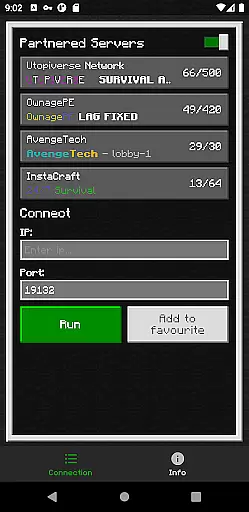
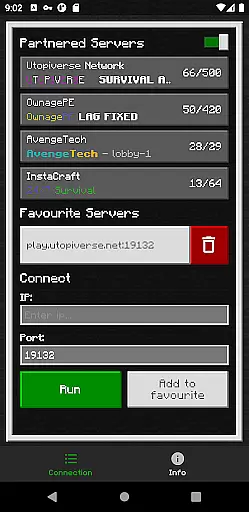
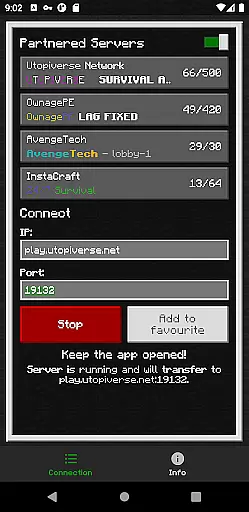
BedrockTogether (Pro) is a specialized networking tool designed for Minecraft Bedrock Edition players. This ad-free version allows any Bedrock server to appear as a LAN server on Xbox or PlayStation clients, enabling seamless connections without DNS rerouting. The app serves as a bridge between different devices on the same local network, making multiplayer gaming more accessible.
The application's core function is to simplify the server connection process for console gamers. By entering the server IP and port, then activating the 'Run' button, users can connect through the game's Friends tab. It's an essential tool for Minecraft enthusiasts who want to enjoy cross-platform play with minimal technical hassle.
This tool is particularly valuable for gaming groups that frequently play together on local networks. While it currently doesn't support Realms or Nintendo Switch, its ability to connect multiple devices through a standardized process makes it indispensable for Minecraft communities using Xbox and PlayStation consoles.
BedrockTogether (Pro) offers several distinctive features that enhance the Minecraft multiplayer experience. The primary capability is its unique server bridging technology, which creates a virtual LAN connection between different devices on the same network. This feature eliminates the need for complex network configurations or external DNS services.
The application implements a straightforward four-step connection process that maintains security while simplifying access. Its protocol translation technology ensures compatibility between different platforms, though currently limited to Xbox and PlayStation clients. The pro version removes advertisements, providing an uninterrupted user experience during server connections.
Additional features include automatic network detection and error handling mechanisms. These technical implementations help users troubleshoot common connection issues, ensuring more successful server joins. The application also maintains a lightweight footprint, allowing it to run efficiently in the background while users focus on their gaming sessions.
BedrockTogether (Pro) delivers exceptional core functionality by enabling seamless LAN server connections for Minecraft Bedrock Edition users. The app ensures that any Bedrock Edition server can be easily detected as a LAN server on Xbox or PlayStation clients without the need for complex DNS rerouting.
The application's effectiveness is demonstrated through its straightforward connection process. Users simply input their desired server IP and port, click the 'Run' button, and navigate to the 'Friends' tab in the game to connect via the LAN option. This streamlined approach eliminates unnecessary technical barriers, making server connections quick and reliable.
By maintaining ad-free operation and focusing on functional precision, BedrockTogether (Pro) provides users with a dependable tool for their gaming needs. The app's ability to maintain stable connections while ensuring compatibility across different devices on the same LAN network showcases its technical accuracy.
While Realms and Nintendo Switch compatibility are currently not supported, the app's core functions remain robust and effective for the platforms it does support. This focused approach to functionality ensures that users can rely on BedrockTogether (Pro) for consistent performance when connecting to their favorite servers.
The interface of BedrockTogether (Pro) exemplifies simplicity and intuitive design, allowing users to operate the app with minimal learning curve. Its straightforward layout requires only essential inputs - server IP and port - before initiating the connection process with a single button press.
This simplistic approach extends to its troubleshooting guidelines, which provide clear, easy-to-follow instructions for common connection issues. By focusing on basic network requirements and presenting them in a clear format, the app ensures users can quickly identify and resolve potential problems.
The app's design philosophy emphasizes function over form, resulting in an uncluttered interface that prioritizes usability. Important information and operational buttons are strategically placed for immediate access, while supplementary details like bug reporting channels are discreetly positioned.
Although the interface maintains professional simplicity, it doesn't compromise on necessary information. Users can easily access support through provided Discord and Telegram links while enjoying an uninterrupted, ad-free experience that keeps the interface clean and focused on its primary purpose.
Seamless LAN connection
Ad-free experience
Simple setup process
Cross-platform support
Efficient performance
No Nintendo Switch support
Limited to local networks
Requires manual entry
No Realms compatibility
Third-party application

 4.50
4.50 4.50
4.50
Use your phone as a webcam on your computer over WiFi or USB.
4.40
Canon PRINT is a companion app for your Canon printer.
4.60
Keep track of your Palia friendships, tasks, and inventory with Palia Notebook
4.60
An open-source APK explorer for Android!
4.10
Mirror your screen to Chromecast and Android TV - Super fast and simple
4.60
Mirror your screen to Fire TV - Super fast and simple
4.40
A clean app.
4.50
Extremely fast, secure, and protects your privacy
4.80
Learn the vast amount of system information about device and monitor it's state
4.70
ADB support Android 4.X-Android 13(Support wireless pair mode).No root required!
4.70
Small and simple app to Verify Root Access and BusyBox Install!
4.70
Screen Mirroring for Roku Sticks, Roku TCL TV and Roku Hisense TV
4.50
An easy-to-use calculator designed to save time calculating and bending conduit
4.30
A simple app to back up and restore SMS & MMS messages and call logs.
4.10
Detect hidden spy camera with advanced scanning {{ Premium version }}
4.00
Introducing Smart Printer, your ultimate destination for printing solutions!
4.00
1-Click close all background apps on Android TV
3.90


User Reviews