
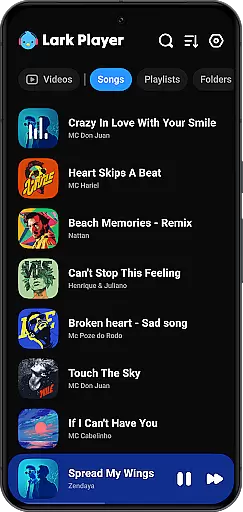
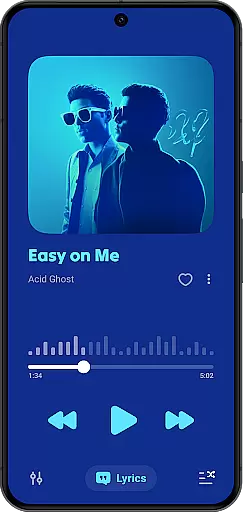
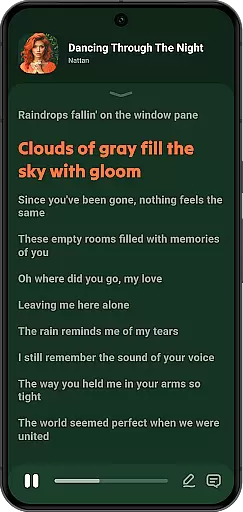
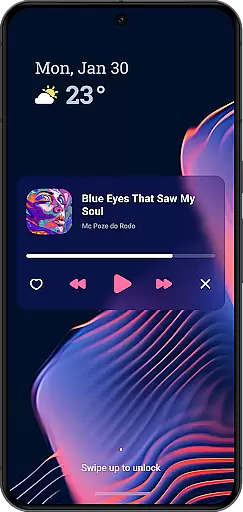
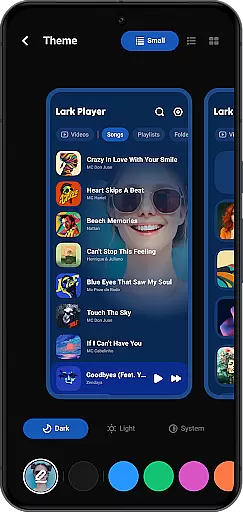
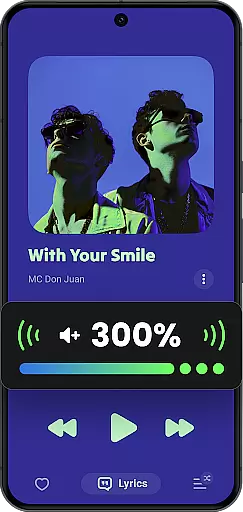
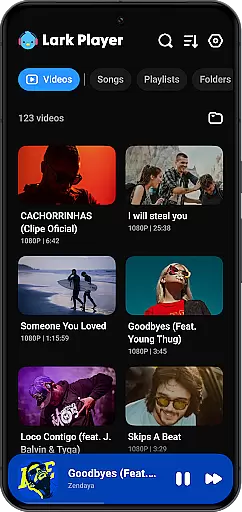
Lark Player is a versatile offline music and video player for Android, supporting all major audio and video formats. This free app features a powerful equalizer, customizable sound effects, and an intuitive user interface that makes managing your media effortless.
With dedicated modes for various music genres and support for lyrics display, Lark Player offers a personalized listening experience. The floating window feature allows multi-tasking by adjusting the player's size and position on-screen, enabling users to enjoy media while performing other tasks.
Designed for convenience, this app lets you browse music by song, artist, album, or genre. You can create playlists, set sleep timers, and even use it as a background music player. Lark Player combines functionality with a sleek design, making it a top choice for offline media enjoyment.
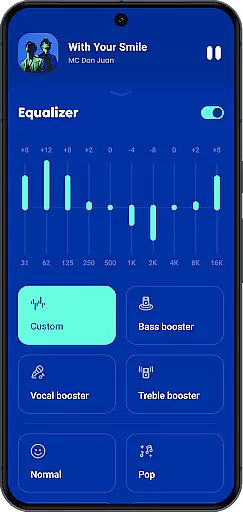
Lark Player stands out with its comprehensive format support, playing both audio files like MP3, WAV, FLAC, and video formats such as MP4 and MKV. The built-in equalizer offers various presets including Classical, Pop, and Rock, allowing users to tailor their audio experience precisely.
Beyond basic playback, the app provides advanced features like file management capabilities, enabling users to delete files and organize playlists directly within the app. Its floating player functionality supports uninterrupted media consumption while using other apps, enhancing multitasking efficiency.
The app also includes practical utilities such as setting custom ringtones, displaying synchronized lyrics, and converting videos to MP3. With day/night themes, notification controls, and sharing options through social platforms or Bluetooth, Lark Player delivers a complete package for offline media enthusiasts.
Lark Player offers an extensive music library that supports all major audio formats including MP3, MIDI, WAV, FLAC, AC3, AAC, M4A, and ACC. This ensures users can enjoy a wide variety of music genres without worrying about format compatibility.
While Lark Player is not a music downloader, it allows users to play their offline music collection seamlessly. The app's dedication to copyright authenticity is evident through its support for personal offline music files, ensuring users legally manage and enjoy their purchased or personally owned tracks.
The inclusion of a powerful equalizer with bass enhancement, reverb settings, and sound field adjustments provides the best sound quality experience. Users can customize their listening sessions with preset modes tailored for different music styles such as Classical, Jazz, Pop, and Rock.
With over 100 million users worldwide, Lark Player has proven itself as a reliable platform for enjoying high-quality music experiences. Its commitment to copyright authenticity and a vast array of supported formats makes it a go-to choice for discerning listeners.
Audio quality in Lark Player is significantly enhanced by its powerful equalizers and bass enhancements, allowing users to tailor their sound experience according to their preferences. Whether you're a fan of clear classical compositions or deep bass drops in electronic music, this app caters to all tastes.
In addition to supporting various audio formats like MP3, MIDI, WAV, FLAC, AC3, AAC, M4A, and ACC, Lark Player also matches lyrics with offline songs from your phone. This feature enriches the listening experience by enabling users to follow along with their favorite tracks' lyrics.
The app includes multiple audio playback options such as shuffle, order, or loop modes, giving users control over how they listen to their playlists. Furthermore, setting a sleep timer ensures the music will automatically stop after you fall asleep, providing convenience and conserving battery life.
For those who appreciate aesthetics, Lark Player offers beautiful day/night themes that can be switched at will within the app. These themes not only enhance visual appeal but also contribute to a more comfortable and enjoyable user interface during extended listening sessions.
User-friendly interface
Extensive format support
Powerful equalizer
Customizable experience
Floating player feature
No music downloading
Ads may appear
Occasional bugs
Limited editing tools
Notification issues

Time Trainer: accurate metronome w tools to help you develop your internal time!
 4.20
4.20
Gorgeous UI, Powerful music Search and Equalizer, the great choice for you!
4.70
A High-Precision Audio Spectrum Analysis App
4.20
Visualize the guitar fretboard, master scales & play through changes like a pro!
4.50
The original SP-1200 experience on your iPad
4.20
Full featured mp3 and audio player with Chromecast and Android Auto support.
4.40
Uninterrupted Tunes, Unmatched Vibes
3.90
Get alarms that fit your lifestyle and wake up to the sounds you love.
4.80
Be a true music maker: create beats, mix and make music like a real DJ!
4.30
Tune in to the greatest hits on UK Radio | The home of Capital, Smooth & Heart.
4.90
More downloads than any other metronome. Includes drum machine & tempo trainer.
4.80
Super Sound Editor, Song Maker & Mixer, Vocal Remover, Voice Recorder & Changer!
4.60
A complete sound package for the sound engineer or enthusiast
4.60
Reverse your voice & songs instantly! Fun singing challenge with cool effects.
4.60
Fun & Easy Voice Changer – Record, Edit & Add Hilarious Effects!
4.50
Enhance the sound quality of your devices, listen to what you want
4.50
Guzheng Master supports many playing techniques as an acoustic Guzheng
4.50
10-Band Audio Equalizer, Sound / Bass Booster for Spotify Users & Music Players
4.40
Background pads for your band
3.80


User Reviews