
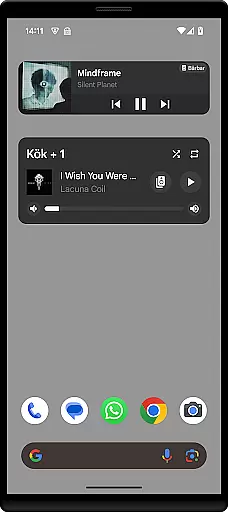
Sonos Widget is a powerful tool designed for music enthusiasts who want seamless control over their Sonos system directly from their home screen. This app offers two distinct widget options, Compact and Enhanced, allowing users to customize their experience based on their needs.
With features like volume control, grouping, playback controls (Play, Pause, Next, Previous), and modes support (Shuffle, Repeat), Sonos Widget ensures that you have complete control over your audio environment without needing to open the main Sonos app. Whether you're at home or managing your system remotely, this widget provides quick access to essential functions, enhancing your overall listening experience.
The Sonos Widget stands out with its dual-widget offering: Compact and Enhanced. The Compact widget provides essential controls in a small form factor, while the Enhanced widget displays relevant metadata alongside playback controls, giving users more information at a glance.
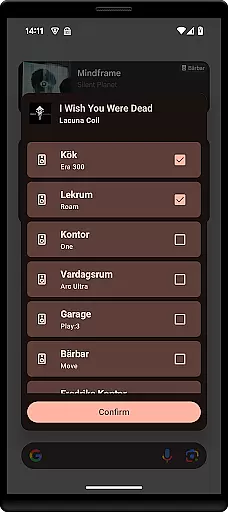
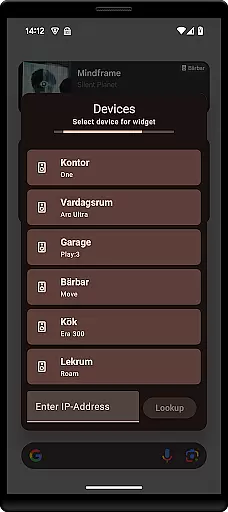
Users can easily adjust the volume, group speakers, and manage playback modes such as Shuffle and Repeat. These features are accessible right from the home screen, eliminating the need to navigate through multiple menus within the main app. Additionally, the setup process is straightforward—simply select a Sonos Widget from your 'Widget'-drawer and follow the on-screen instructions to connect to your Sonos system.
This streamlined approach not only saves time but also enhances user convenience by providing immediate access to frequently used functions. For any issues or inquiries, users can reach out via email for prompt assistance.
When it comes to managing your music library, Sonos Widget offers a seamless experience. The application allows you to control your Sonos system directly from your home screen, providing access to an extensive range of music options.
The app supports various playback controls such as Play, Pause, Next, and Previous, ensuring that users can enjoy their entire music collection without any hassle. Additionally, the Enhanced widget displays relevant metadata, giving users insights into their tracks and albums.
While Sonos Widget itself does not host a music library, it provides the tools necessary to manage and play your existing collection efficiently. This ensures that all content accessed through the app is authentic and complies with copyright regulations.
Sonos Widget places a strong emphasis on delivering high-quality audio experiences. By offering volume control and mode support for Shuffle and Repeat, the app ensures that users can customize their listening sessions according to their preferences.
The two different widgets, Compact and Enhanced, provide options for how much detail you want at your fingertips. The Enhanced widget, in particular, offers more detailed information about what's currently playing, enhancing the overall user experience.
Moreover, the ability to group speakers adds another layer of audio customization. Users can create perfect soundscapes in every room by controlling multiple devices simultaneously, ensuring consistent and superior audio quality throughout their homes.
User-friendly interface
Customizable widgets
Quick access to controls
Volume and playback management
Efficient grouping options
Limited official support
No advanced equalizer
Requires Sonos system
Basic visual design
Third-party application

Over 100 million tracks available for high quality streaming and download
 4.60
4.60
Your song collections with lyrics and chords on Android smartphones and tablets.
4.80
Bass Booster Pro takes auto-equalizing to the next level!
4.30
Bass Booster & Volume Equalizer Pro improves your music and video sound quality
4.60
Record, Mix & Master with all n-Track effects, 64-bit audio and Stem Separation.
4.70
Unleash your creativity! Turn simple prompts into full fledged songs.
4.70
Listen radio AM / FM Stations. Live AM / FM Radio App Station. Radio Com.
4.70
A complete sound package for the sound engineer or enthusiast
4.60
Be a true music maker: create beats, mix and make music like a real DJ!
4.30
Full-featured, High-Quality Groovebox Workstation, perfect for Live Performance!
4.80
Ultimate Sonos Controller
4.70
AI Music Maker: Generate And Compose AI Tunes & AI Songs & AI Music & AI Melody!
4.60
Learn the notes on the guitar fretboard fast with this easy and fun app
4.60
DJ Music Mixer - DJ Remix: remix songs, make beat music & record mix of DJ.
4.40
Master Salsa Rhythm quickly and with a lot of fun!
4.30
The alternative folder based music player.
4.20
The original SP-1200 experience on your iPad
4.20
USB audio recording and playback finally possible on Android 3.1 or higher!
3.90
Make music anywhere. Turn your device into an instrument.
4.5


User Reviews