
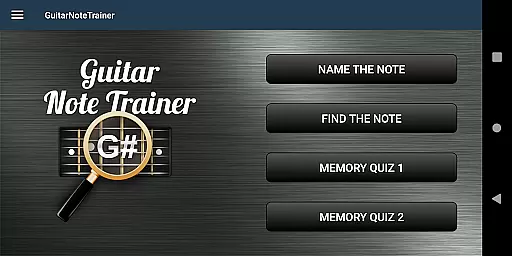
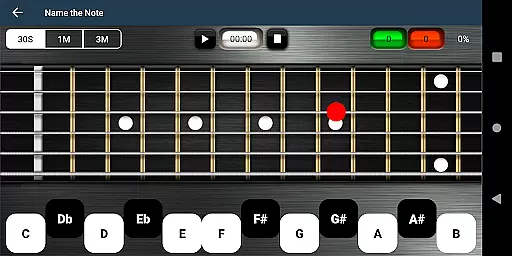

Guitar Fretboard Note Trainer is a specialized app designed to help guitarists master the notes on their instrument's fretboard. This essential skill is crucial for progressing musicians, and the app makes learning both fun and effective through progressive games.
The app features four distinct training modes that cater to different learning styles and levels of expertise. Users can practice naming notes, finding specific notes across all six strings, and challenging their memory with progressively difficult quizzes. With customizable options for beginners and an audio feature to hear notes as you select them, this app provides a comprehensive learning experience.
Whether you're practicing at home or on the go, Guitar Fretboard Note Trainer offers a flexible and engaging way to improve your musical knowledge and skills. By incorporating regular practice sessions with this app, users can significantly enhance their ability to navigate the guitar neck with confidence.
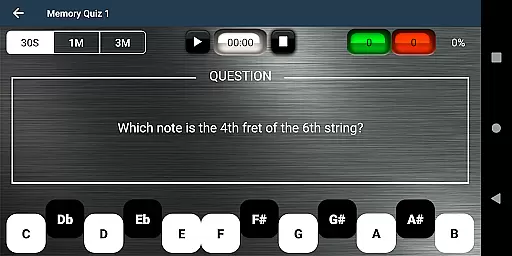
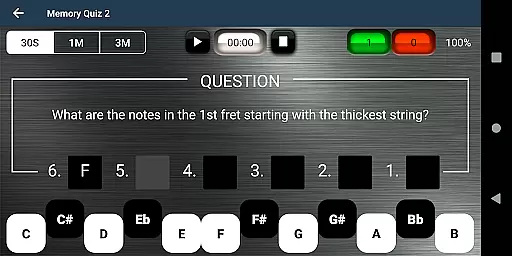
The app boasts four unique training modes: Name The Note, Find A Note, Memory Quiz 1, and Memory Quiz 2. Each mode targets different aspects of fretboard knowledge, from basic note recognition to advanced memory challenges across entire frets.
For beginners, the app includes 'Easy' options that limit the range of answers, making it less overwhelming to start learning. Additionally, an audio option allows users to hear the notes they select, reinforcing auditory learning alongside visual recognition.
A standout feature is the ability to 'cheat' by swiping diagonally across the fretboard to reveal all notes temporarily. This encourages exploration and helps users check their progress. With these diverse and interactive features, Guitar Fretboard Note Trainer ensures a dynamic and personalized learning journey for every guitarist.
When it comes to music learning applications, the depth and breadth of the music library are crucial for a comprehensive learning experience. The Justin Guitar Fretboard Note Trainer offers an extensive range of notes and positions across the guitar neck, ensuring that learners have access to a wide array of musical notes and scales.
This app meticulously covers various training modes including 'Name The Note', 'Find A Note', and challenging memory quizzes. Such diversity not only enhances note recognition but also aids in understanding the fretboard layout thoroughly.
Moreover, every note and scale in the application is crafted with precision, guaranteeing the authenticity of the content provided. Users can trust the accuracy of the notes they are practicing, which is essential for building a solid foundation in guitar playing.
The availability of audio options further enriches this vast library by allowing users to hear the notes as they interact with them, reinforcing auditory learning alongside visual recognition.
Audio quality plays a significant role in music education apps, influencing how accurately users can learn and replicate sounds. In the Justin Guitar Fretboard Note Trainer, great emphasis is placed on delivering high-quality audio experiences through its innovative features.
One standout feature is the ability to hear notes upon selection, providing immediate auditory feedback. This functionality ensures that learners can associate the sound with the correct position on the fretboard, enhancing their overall comprehension and retention.
Additionally, the inclusion of diverse training modes such as 'Memory Quiz 1' and 'Memory Quiz 2' challenges users while maintaining superior audio clarity throughout each exercise. These modes help develop both mental recall and physical dexterity without compromising sound integrity.
For those just starting, easy options limit the range of answers, making it less overwhelming while still delivering clear and precise audio cues. This thoughtful design guarantees an optimal learning environment regardless of skill level.
Engaging learning games
Customizable difficulty levels
Audio feedback for notes
Progressive challenge modes
User-friendly interface
Limited advanced theory
No chord recognition
Basic visual design
Few external resources
Premium version costs

Turn your phone into a musical instrument from the future!
 3.90
3.90
Pay Once, no monthly payment
4.60
Control your MIDI USB or Bluetooth devices in app and avoid some trampling
3.30
Background pads for your band
3.80
VB-AUDIO Software / VBAN-Receptor allows listening to any VBAN Streams
4.10
USB audio recording and playback finally possible on Android 3.1 or higher!
3.90
Music, News & Sports Radio Tuner App. Tune in Live FM & AM Radio Stations.
4.80
Sheet music reader, piano & music note player. Play music score & learn to read.
3.90
Sing, record, and create music together — enhanced by smart voice tools.
4.00
Record, Mix & Master with all n-Track effects, 64-bit audio and Stem Separation.
4.70
Enhance the sound quality of your devices, listen to what you want
4.50
Powerful 10-Band equalizer pro with sound booster improves Android audio quality
4.30
Master Salsa Rhythm quickly and with a lot of fun!
4.30
Smart piano keyboard, Classical to Pop, Real-time multiplayer connection!
4.20
PowerAudio is a powerful offline music player.
4.20
Offline Tunes, Unlimited Vibes
3.90
The iconic iOS metronome app is now on Android.
3.70
MilkDrop for Android TV
3.00
Remove ads permanently from Music Visualizer
4.3


User Reviews