
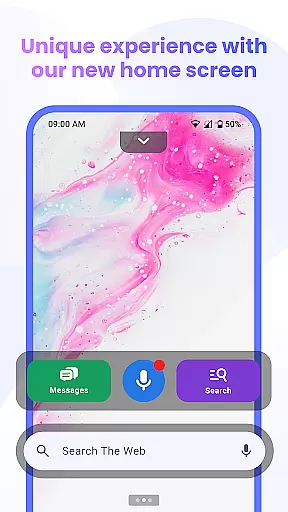


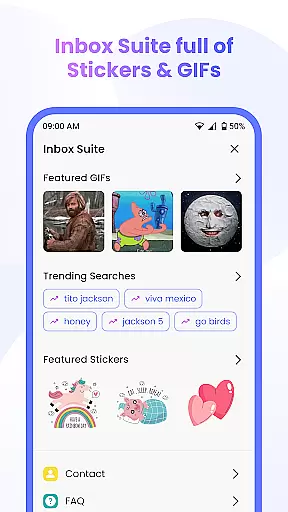

Messenger Chat Home is a unique personalization app that transforms your Android home screen into an efficient messaging hub. This innovative application allows users to send and receive SMS & MMS messages, initiate group chats, and express themselves with free stickers, GIFs, and emojis without leaving the home screen.
Designed for simplicity and functionality, Messenger Chat Home combines classic texting with modern launcher capabilities. The app's smart widget enables quick previews of unread texts and instant replies, while features like voice-to-text support hands-free communication. With its ad-light experience and privacy-focused design, this app ensures smooth performance and secure messaging.
Ideal for users seeking an organized and fast communication tool, Messenger Chat Home is particularly useful in busy environments where quick access to messaging features is essential. Its ability to streamline conversations while offering creative expression options makes it a valuable addition to any Android device.
Messenger Chat Home stands out with its comprehensive feature set tailored for efficient communication. The app integrates directly into the Android home screen, providing instant access to SMS & MMS messaging capabilities. Users can conveniently manage their inbox and recent chats through the home screen launcher, eliminating the need to switch between multiple applications.
The application offers extensive customization options for self-expression, including thousands of free stickers, GIFs, and emojis. These creative tools allow users to personalize their conversations while maintaining the simplicity of traditional texting. Additionally, the smart widget functionality enables users to preview and respond to messages quickly, enhancing productivity and convenience.
Advanced features such as voice-to-text functionality and minimal advertising create an uninterrupted user experience. The app's lightweight design ensures optimal performance while preserving device resources. These characteristics make Messenger Chat Home a practical solution for users who value both functionality and aesthetics in their messaging applications.
Messenger Chat Home offers a wide array of customization options that allow users to personalize their messaging experience. With features such as free stickers, GIFs, and emojis, the app ensures that every conversation can be as unique and expressive as the user desires.
The ability to customize is not just limited to text enhancements. Users can modify their home screen with launcher access that puts their inbox and recent chats just a swipe away. This level of personalization extends to group chats and media sharing, allowing for a tailored experience that caters to individual preferences.
Moreover, Messenger Chat Home provides smart widgets that give a preview of unread texts, enabling quick replies without the need to open the app fully. The inclusion of voice-to-text functionality adds another layer of customization, catering to those who prefer hands-free operation.
This extensive customization empowers users to communicate in a way that truly reflects their personality, making each interaction more engaging and enjoyable.
Theme compatibility in Messenger Chat Home ensures that users can enjoy a consistent and personalized visual experience across their device. By integrating seamlessly with the user's chosen device theme, the app maintains aesthetic harmony, enhancing the overall look and feel of the home screen.
The application supports various themes, which means that whether you prefer a light, dark, or colorful interface, Messenger Chat Home adapts to your style. This flexibility in theme selection allows for an intuitive and visually pleasing environment that aligns with personal tastes or functional needs, like reducing eye strain during nighttime use.
In addition to visual theming, the app also respects user preferences for notification styles and sounds, ensuring that alerts are not only seen but also heard in a way that matches the selected theme. This attention to detail in compatibility enriches the user experience by providing a cohesive and considerate design approach.
By focusing on theme compatibility, Messenger Chat Home delivers a smooth and integrated experience that resonates with users who value both form and function in their digital communications platform.
User-friendly interface
Extensive customization options
Fast message access
Privacy-focused design
Lightweight performance
Limited cross-platform support
Requires Android OS
No built-in video calls
Occasional ads display
Learning curve for new users

A light in the dark, a unique style and an andless cutomization!
 4.30
4.30
Transform your phone with Launcher iOS 26 - Smooth & elegant iOS experience
4.50
Over 28,000 high quality icons to bring color & homogeneity to your phone.
4.60
Ultimate Gallery Lock App - Hide Pictures, Videos and Lock Apps Instantly!
4.60 4.10
4.10
Color phone with cool effects for call screen, flash alert & ringtones music
4.50
300+ Stunning and well-designed widgets inspired by NOTHING.
4.70
350+ widgets with a premium glass-style finish, perfect for home & lock screens.
4.70
Emoji Maker app - Design custom emojis and effortlessly blend them with Mixer
3.80
Ultra realistic high quality analog watch face for Wear OS.
4.60
Make your phone look simple & luxury, like iDevice
4.60
Unique Android Launcher
4.60
Embrace the Night. Unleash the power of darkness with Raven Dark Icon Pack
4.60
Icons made of colorful linear lines
4.60
AI-powered Copilot. Personalized keyboard with gifs, stickers & themes
4.40
Organize and manage your photos and videos effortlessly with Photo Gallery
4.20
Unleash Your Creativity and Connect with Loved Ones with Lockscreen Drawing!
4.20
Customizable flower power digital watch face for Wear OS watches.
4.00
Adaptive Dot Style IconPack with Light & Dark Theme.
3.70


User Reviews