
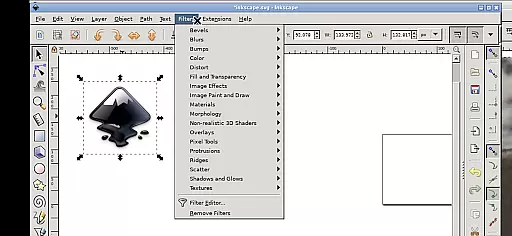
Inky is a powerful vector graphics editor tailored for Android devices, bringing the full functionality of Inkscape to mobile platforms. This app allows users to create and edit vector images in Scalable Vector Graphics (SVG) format while supporting other file types through import and export features.
With Inky, users can render primitive vector shapes such as rectangles, ellipses, polygons, arcs, spirals, stars, and 3D boxes, along with text manipulation. The app supports advanced design options like solid colors, patterns, gradients, and adjustable transparency. Additionally, it offers raster graphic embedding and tracing capabilities, making it versatile for professional designers and hobbyists alike.
Whether you're designing on a tablet or a smartphone, Inky provides an intuitive touch-based interface that mimics desktop functionality. Its adaptability makes it ideal for creating scalable designs on the go, ensuring high-quality outputs for both personal and professional projects.
Inky stands out with its comprehensive set of design tools optimized for Android. It includes essential vector shape creation and manipulation features such as moving, rotating, scaling, and skewing objects. Users can apply various fill options like solid colors, patterns, and gradients, all with adjustable transparency settings.
The app also supports advanced functionalities like raster graphic embedding and tracing, enabling users to convert photos into vector graphics seamlessly. Its touch-friendly interface incorporates gestures such as pinch-to-zoom, panning, and two-finger scrolling, enhancing usability on mobile devices.
One unique feature is its integration with Android's file system, allowing direct access to Documents, Pictures, and other folders without needing to import or export files. This seamless workflow, combined with its open-source nature under GPLv3 licensing, ensures flexibility and continuous improvement driven by community contributions.
Inky offers a comprehensive suite of creative tools that cater to both professional designers and hobbyists. The app provides full-featured vector graphics editing capabilities, enabling users to create intricate designs with ease.
With support for primitive vector shapes such as rectangles, ellipses, polygons, arcs, spirals, stars, and 3D boxes, Inky allows for versatile design options. Users can fill these objects with solid colors, patterns, or gradients while adjusting transparency levels to achieve the desired effect.
The ability to embed and trace raster graphics means that users can transform photos and other raster images into scalable vector artwork. This feature expands the creative possibilities and ensures that Inky remains a powerful tool in any designer's arsenal.
Inky stands out with its canvas and format flexibility, allowing creators to work without constraints. The app supports various file formats for import and export, making it easy to integrate with different workflows and projects.
Designers can manipulate their creations with transformations like moving, rotating, scaling, and skewing. These functions provide the freedom to experiment with different visual compositions and arrangements.
Additionally, Inky facilitates access to files across Android devices through useful links in the home directory. This seamless integration means there is no need for cumbersome importing or exporting of files, thus streamlining the design process.
User-friendly interface
Advanced design tools
Open-source flexibility
Direct file system access
Versatile file support
Steep learning curve
Performance on phones
Limited stylus support
No native cloud sync
Complex navigation

Vidu is an AI video generator made for creators and aspiring makers.
 3.30
3.30
Create sweet, cool and unique couple avatars easily, in just a few steps!
3.40
Create trending AI photos & videos with powerful effects and 3D styles.
3.20
Draw beautiful mandala's very easily
4.60
800+ Drawing, Painting Lessons App to Practice, Sketch & Paint Art.
4.30
Novices can also easily complete diamond painting masters
4.70
Get creative and make art with your Sesame Friends!
4.00
Video AI: Revolutionize Your Content Creation with Advanced Video Generation
4.50
An intuitive, high-performance painting app that lets you focus on creating
4.40
See Color, Paint Color
4.90
Passport size photo maker, create ID photo and visa photo in seconds
4.80
Learn how to draw with step-by-step tutorials, fun lessons & multiplayer drawing
4.70
Photo stitcher for automatically screenshot stitching into a long screenshot
4.70
Create neon drawing with magic doodle and fun doodle art effects!
4.50
The perfect place to start sketching! Use Sketchbook to draw and paint sketches.
4.50
Just trace a projected picture on paper and color! Draw & Paint with AR drawing
4.40
Your homescreen as an elegant glass with customized blur, lighting, and visuals.
3.70
Create cute cat emojis & PFPs! Fun, custom avatars for cat lovers.
3.70
Art of Combination Wear OS Watch faces
4.2


User Reviews