
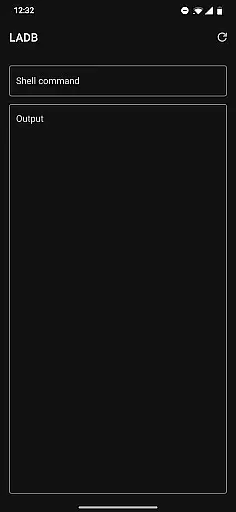
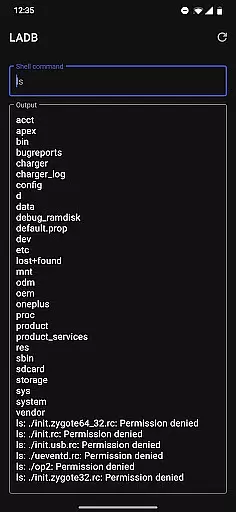
LADB is a powerful tool that bundles an ADB server within the app libraries, enabling users to connect to their local device without an active USB connection. By leveraging Android's Wireless ADB Debugging feature, it facilitates seamless communication between the server and client locally.
With LADB, users can efficiently manage wireless debugging connections, copy pairing codes, and configure ports directly from their mobile devices. This makes it an essential tool for developers and power users who require flexible access to their Android devices.
The app also provides comprehensive troubleshooting guidance and supports manual pairing for more reliable connections. Whether you're debugging applications or managing device settings, LADB offers a practical solution for remote device management.
LADB stands out with its unique ability to bundle an ADB server within the app itself, eliminating the need for cumbersome USB connections. This feature alone significantly enhances the convenience of managing Android devices remotely.
In addition to its core functionality, LADB offers an intuitive interface for setting up wireless debugging connections. Users can easily copy pairing codes and configure necessary ports while keeping both the LADB and Settings windows open, ensuring a smooth initial setup process.
For advanced users, LADB provides detailed troubleshooting steps and supports manual pairing, which proves invaluable when dealing with compatibility issues or finicky devices. These features collectively make LADB a versatile and indispensable tool for Android developers and enthusiasts alike.
For a tool like LADB, core function accuracy and effectiveness are paramount. This app bundles an ADB server within its libraries to facilitate local device connections that traditionally require active USB connections. By leveraging Android's Wireless ADB Debugging feature, it enables communication between the server and client locally.
The app provides a seamless setup process by allowing users to use split-screen mode or pop-out windows with LADB and Settings simultaneously. This ensures that pairing information remains valid during the initial setup phase, which is crucial for establishing a reliable connection. Users can add a Wireless Debugging connection and input the necessary pairing code and port into LADB without dismissing the dialog prematurely.
Despite some compatibility issues with other apps like Shizuku, LADB offers troubleshooting steps such as clearing app data, removing all Wireless Debugging connections, and rebooting the device to resolve most errors. These measures ensure that the core functionalities of managing wireless debugging connections remain robust and effective.
A user-friendly interface is essential for tools like LADB, where technical processes need to be simplified for ease of use. The app achieves this by integrating assisted pairing modes that streamline the connection process between the local device and the bundled ADB server.
However, when the assisted pairing mode encounters issues, especially with newer Android versions, LADB provides a manual pairing tutorial. This tutorial, accessible via a linked video, guides users through reliably pairing their devices themselves, ensuring that even if automatic processes fail, users can still establish connections effectively.
Moreover, LADB maintains simplicity and intuitiveness by offering straightforward troubleshooting steps. Users facing problems can easily follow instructions to clear app data, remove Wireless Debugging connections, and reboot their devices. Such intuitive design choices make complex tasks more approachable for users at all technical levels.
User-friendly interface
Wireless ADB Debugging
Comprehensive troubleshooting
Manual pairing support
Essential for developers
Incompatible with Shizuku
Requires reboot after uninstall
Occasional connectivity issues
No offline user data processing
Manual pairing can be complex

Safely recover deleted photos, videos, and files with a single easy tap.
 3.70
3.70
Optimize your WiFi network, turn your phone into Wifi Analyzer
4.70
Forza Tuning Calculator App for Forza Horizon 5, Motorsport and Earlier Titles
4.40
PC precision for mobile gaming: dominate with keyboard and mouse!
4.30
Mirror your screen to Chromecast and Android TV - Super fast and simple
4.60
Bedrock Together: Join any bedrock server on Xbox/PS
4.80
Button mapper, mouse toggle, sleep timer and a lot of another features
4.50
Protect your device with antivirus, storage cleanup, and system monitoring
4.70
Screen recorder with audio to record high-quality videos and take screenshots.
4.40
HD Video player and downloader for all formats, fast & smooth 4K video playback.
4.60
Quickly switch to an encrypted DNS server on Android TV
4.50
Head tracking for PC sim games such as MSFS 2024 or Elite:Dangerous. No headset!
4.50
Just one-tap to easy translate in any language after calls within seconds.
4.20
Carry a FTP server in your pocket and avoid USB cables for file transfer
4.20
Signal Strength, Mobile, Wifi, Speed Test, Bad Signals, Cellular, 5G, LTE, 4G
4.20
Family Locator, Share location, StayConnect with your family in real time
3.90
Unleash gamepad precision for ultimate mobile gaming dominance.
3.90
Fun lie-detection pranks for friends and parties.
3.80
Download any file easily and quickly with Downloader
4.2


User Reviews