
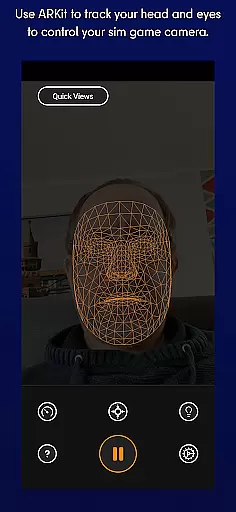
SmoothTrack is an innovative tool that transforms your mobile device into a 3D head tracking controller for sim games. By leveraging the AR capabilities of your device, it allows you to intuitively control the game camera without any additional equipment. Simply position your device to see your face, and with slight head movements, you can shift your in-game perspective seamlessly.
The app supports all games compatible with TrackIR, FreeTrack, or similar protocols, including popular titles like Microsoft Flight Simulator, Elite: Dangerous, and Euro Truck Simulator 2. Whether you're flying a plane, driving a truck, or exploring space, SmoothTrack enhances immersion by translating your natural head motions into precise camera controls.
Ideal for gamers seeking a more immersive experience, SmoothTrack eliminates the need for expensive hardware while delivering professional-grade head tracking functionality. Its intuitive design and customizable features make it a must-have tool for simulation enthusiasts.
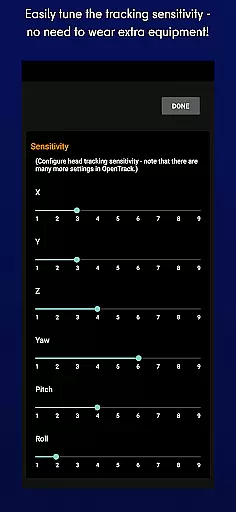
SmoothTrack offers a comprehensive set of features designed to elevate your gaming experience. The app utilizes advanced AR technology to track your head movements accurately, providing real-time camera control in supported games. With adjustable sensitivity settings, users can customize how their physical movements translate into in-game actions, ensuring a personalized and comfortable experience.
In addition to its core functionality, SmoothTrack includes practical display modes tailored to different environments. A dark mode helps conserve battery life and protects OLED screens, while a bright mode ensures visibility when playing in dimly lit rooms. These thoughtful features demonstrate the app's commitment to user convenience and device longevity.
SmoothTrack also provides reliable customer support through Discord and email channels. This ensures that users can quickly resolve any technical issues or suggest new features to enhance the app further. With its robust compatibility and user-focused design, SmoothTrack stands out as a premier solution for virtual head tracking in simulation games.
SmoothTrack delivers precise 3D head tracking for an immersive sim gaming experience. The app utilizes advanced AR capabilities to accurately detect even the slightest head movements.
This precision allows gamers to control their in-game camera with natural motions. Whether you need to lean forward to inspect your Flight Simulator cockpit or glance left before a turn in Euro Truck Simulator 2, the response is immediate and exact.
The app's sophisticated algorithms ensure that every head movement translates into appropriate in-game perspective changes. This creates an intuitive and responsive control system that enhances gameplay without any special equipment.
With support for industry-standard protocols like FreeTrack and TrackIR, SmoothTrack maintains compatibility across various simulation games while delivering consistently accurate tracking performance.
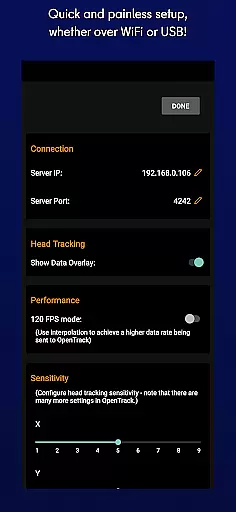
SmoothTrack features an elegant interface that requires no complicated setup procedures. Users can start controlling their games immediately after launching the app.
The application automatically detects your device's position and adjusts settings accordingly. There's no need for calibration or manual adjustments - just place your device where it can see your face and begin playing.
Two viewing modes cater to different environments. Dark mode protects OLED screens and saves battery, while bright mode ensures visibility in low-light conditions.
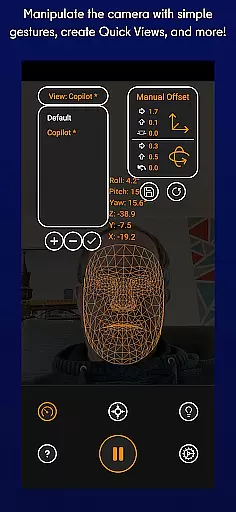
Intuitive gesture controls eliminate the learning curve. Natural head movements translate directly into game actions, making the interface feel like second nature to users.
Intuitive controls
No extra hardware
Wide game support
Customizable settings
Efficient power usage
Requires AR setup
Limited to compatible games
Dependent on device camera
Potential battery drain
Learning curve for beginners

 4.10
4.10
A powerful, easy-to-use flight computer on your phone or tablet!
3.80
Connect instantly to a fast, encrypted VPN with one tap
4.60
Save any video in HD - paste the link, download fast and watch offline.
4.2
eXtended Permission Manager - a small app to manage permissions and AppOps
4.50
A non-root local ADB shell client. READ BELOW!
3.40
Excellent scientific calculator with symbolic algebra, integrals, derivatives
4.80
Powerful collection of electronics tools and reference.A must for any enthusiast
4.90
Create your own custom widget with endless possibilities
3.90
Connect wirelessly to your computer to watch movies, browse the web, play games
5.00
WiFi Signal Strength Meter help you detect WiFi Signal Strength in real time.
4.80
Optimize your WiFi network, turn your phone into Wifi Analyzer
4.70
Small and simple app to Verify Root Access and BusyBox Install!
4.70
Creation, Learning, Entertainment & More — The All-in-One AI Search Engine
4.70
Keep track of your Palia friendships, tasks, and inventory with Palia Notebook
4.60 4.50
4.50
Just swipe the edge to do something!
4.40
Quickly & easily calculate the spacing of handrail balusters
4.20
Fun lie-detection pranks for friends and parties.
3.80


User Reviews