







Shazam is a powerful music recognition app that instantly identifies songs playing around you or in other apps, even with headphones on. With over 2 billion installs and 300 million users worldwide, it offers an impressive suite of features beyond just song identification.
The app allows users to discover artists, view song lyrics, watch music videos, and explore upcoming concerts. It supports integration with major music platforms like Apple Music, Spotify, YouTube Music, and Deezer. Shazam works offline, provides time-synced lyrics, and includes unique functionalities such as Auto Shazam and the Shazam Widget for instant access.
Whether you're looking to identify a catchy tune, find concert information, or explore new music recommendations, Shazam delivers a seamless experience across Android devices, making it an essential tool for music enthusiasts.
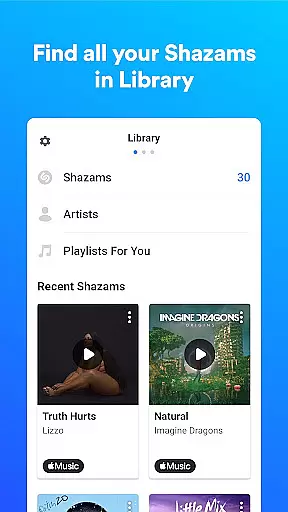
Shazam stands out with its advanced music recognition technology that works instantly and accurately, even in noisy environments or with headphones on. The app goes beyond basic identification by offering time-synced lyrics, direct links to music videos on Apple Music or YouTube, and the ability to save your song history in one place.
One of the key highlights is its versatility - Shazam can identify music from any app including Instagram, YouTube, and TikTok through the Notification Bar. The Auto Shazam feature allows continuous song detection even when the app is running in the background. Users can also explore music charts, discover similar songs, and receive personalized recommendations based on their listening habits.
Additional features include offline functionality, Wear OS support, and integration with popular social media platforms for easy sharing. The app also provides valuable insights through its Shazam count feature, showing a song's popularity among users worldwide.
Companion app integration is essential for wearable devices as it ensures seamless functionality between the smartphone and wearable versions of an application. Shazam offers a robust companion app experience by allowing users to identify songs directly from their Wear OS devices.
The integration works by syncing data between the phone and wearable, enabling features such as Auto Shazam even when the user is not actively using the phone app. This means you can continue discovering music effortlessly throughout your day without needing to have your phone in hand.
For Shazam users, this translates into uninterrupted music recognition whether they're commuting, exercising, or simply away from their phones. The ability to access song identification, view lyrics, and explore music charts from their wrists enhances convenience and connectivity.
Ultimately, Shazam's companion app integration exemplifies how wearable technology can complement smartphone capabilities, providing users with a fluid and cohesive experience across devices.
Device compatibility is crucial for apps like Shazam that extend their services to wearable platforms such as Wear OS. Shazam ensures broad compatibility with various Wear OS devices, allowing users to enjoy its music recognition features regardless of their specific smartwatch model.
This compatibility is achieved through meticulous optimization of the app's performance on different hardware specifications. Whether you own a high-end smartwatch or a more budget-friendly option, Shazam delivers consistent accuracy and speed in identifying songs.
Users benefit from this compatibility by experiencing minimal latency and maximum reliability when using Shazam on their wearables. The appu2019s design takes into account the limited screen real estate and processing power of smartwatches, ensuring a smooth and responsive interface.
By prioritizing Wear OS and device compatibility, Shazam reinforces its commitment to accessibility and user satisfaction, making it a versatile tool for music discovery on any supported device.
Instant song recognition
Offline functionality
Multi-platform integration
Time-synced lyrics
Auto Shazam feature
Limited without permissions
Feature availability varies
Requires internet for full access
Some features region-locked
Privacy concerns with microphone

Gym Log & Workout Tracker | Fitness Journal, Training & Weight Lifting Planner
 4.90
4.90
Christmas - Festive - Christmas Village - Winter - Christmas lights
5.00
Embrace the festive spirit with our Christmas Countdown watchface for Wear OS
4.10
Sleek, highly customizable watch face inspired by Galaxy Watch Circle Dashboard.
4.5
Locate your family members by GPS phone location tracker everywhere and anytime
4.30
Viewer for Wyze/Yi/Eufy/Arlo/ONVIF/RTSP/P2P IP cams w/ adv. features & DIY DVR
4.00
Premium hybrid watch face with many customizations for Wear OS devices.
4.40
Daily Weather forecast with 15 weather images for Day & Night plus Big Bold time
4.10
Start and succeed with PAP
4.10
Christmas Theme Watch Face for Wear Os
5.00
Highly customizable hybrid watch face for Wear OS, perfect for everyday use.
4.60
Kia Access makes getting your vehicle information easier than ever
4.60
Bold, Modern Hybrid Watch Face for Wear OS. 10 Colors, Rich Info Display.
4.30
A customizable Christmas watch face for Wear OS with a countdown.
4.20
Watch the sharpness of the sky on your wrist..
3.70
Wear Os Watch Face - Animated Snow Effect & Christmas Lights
4.5
Christmas and New Year - Themed Watchface
4.5
an Analog Watch Face for winter season with freeze winter background for Wear OS
4.0
Analog watch face with 8 complications and expedition styling
4.1


User Reviews