

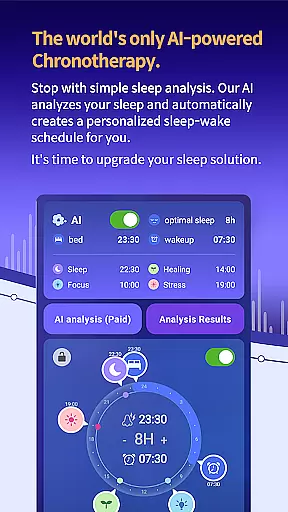
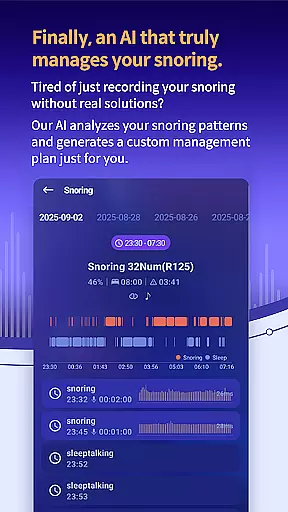
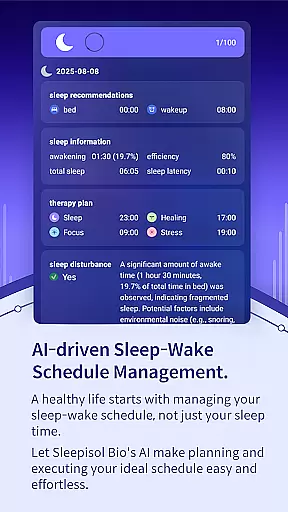
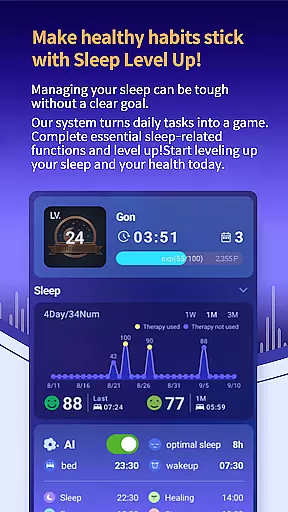
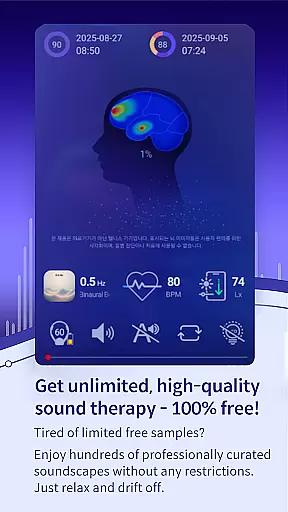
SleepisolBio represents a breakthrough in personalized sleep management, utilizing advanced AI technology to analyze and optimize individual sleep patterns. This Android Wear application goes beyond basic sleep tracking by incorporating circadian rhythm analysis and snoring detection to generate comprehensive sleep reports.
The app's standout feature is its chronotherapy recommendation system, which suggests optimal times for sleep and various therapeutic activities throughout the day. Users can access a diverse range of sound-based therapies including 48 unique sound treatments and specialized mindfulness content, all delivered in high-quality 320kbps stereo audio.
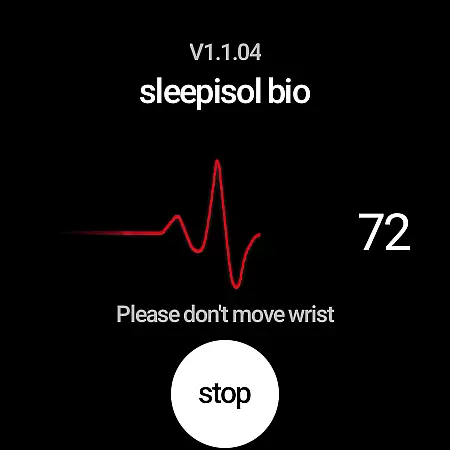
What sets SleepisolBio apart is its real-time biofeedback system that adapts therapy recommendations based on users' heart rate data. The application also offers an array of customizable alarms and wake-up missions, making it an essential tool for those seeking to improve their sleep quality and overall well-being through wearable technology.
SleepisolBio distinguishes itself through innovative features designed specifically for Android Wear devices. The app's core functionality revolves around its sophisticated AI engine that processes multiple sleep parameters including circadian rhythms, snoring patterns, and sleep cycles to deliver personalized recommendations.
A key differentiator is its integration with wearable technology, particularly Samsung Galaxy Watch and Leesol's Sleepisol device, enabling real-time heart rate monitoring during therapy sessions. The app provides an extensive library of therapeutic content including 16 brain wave therapy options across Theta, Alpha, Beta, and Gamma frequencies, alongside 6 bedtime stories and dynamically generated sound therapies using monaural beats, binaural beats, and isochronic tones.
The application's strength lies in its comprehensive approach to sleep management, offering not just nighttime solutions but also daytime therapy recommendations. Its Google Health Connect integration enables sophisticated biological rhythm charting, while maintaining strict data privacy protocols by processing all information locally on the device.
Companion app integration is crucial for wearable devices as it ensures seamless data synchronization and feature coordination between the main application and its wearable counterpart. SleepisolBio excels in this area by offering real-time heart rate monitoring during therapy sessions through its Wear OS app.
The integration allows users to access their sleep data, circadian rhythm charts, and therapy recommendations directly on their Samsung Galaxy Watch or other compatible devices. This means that whether you're tracking your sleep patterns or engaging in one of the sound-based therapies, the information is always at your wrist.
By leveraging companion app integration, SleepisolBio enhances user convenience. Users can receive notifications, control therapy sessions, and even adjust settings without needing to reach for their phone. This interconnected system provides a fluid experience that supports continuous personalization and management of sleep health.
Ultimately, the robust companion app integration in SleepisolBio ensures that users have a comprehensive and uninterrupted approach to managing their sleep and overall well-being, making it easier to follow personalized therapy plans throughout the day.
Device compatibility is a key factor when choosing a wearable application. SleepisolBio offers broad compatibility with Wear OS devices, ensuring that users can take full advantage of its features regardless of their specific device model.
This compatibility extends beyond basic functionality; SleepisolBio integrates advanced features such as real-time heart rate monitoring during therapy sessions. The app works seamlessly with Samsung Galaxy Watches and other Wear OS devices, providing accurate biofeedback that enhances personalized therapy options.
Moreover, SleepisolBio's design prioritizes ease of use across different devices. Whether you're viewing sleep reports, adjusting therapy settings, or setting alarms, the interface remains intuitive and responsive. This consistency ensures that all users, regardless of their device, enjoy a high-quality experience.
In summary, SleepisolBio's commitment to Wear OS and device compatibility guarantees that users can rely on consistent performance and access to advanced sleep management tools, enhancing both convenience and effectiveness in achieving better sleep health.
Advanced AI sleep analysis
Real-time biofeedback system
Extensive sound therapy library
Comprehensive circadian tracking
Customizable wake-up features
Premium features locked
Device compatibility limited
Complex setup process
Requires wearables
Subscription costs high

Watch the sharpness of the sky on your wrist..
 3.70
3.70
Christmas watch face. For Wear OS devices.
4.30
an Analog Watch Face for winter season with freeze winter background for Wear OS
4.4
Snowflake Rose Gold Watch Face - Digital, modern, & sleek with GYRO effect.
4.10
MyNISSAN® lets you remotely control your car from your phone.*
4.50
A watch face that fuses motorsport precision with contemporary smartwatch design
4.0
Elegant animated Christmas tree with multiple customization options
4.20
Hyperlocal rain alerts by MyRadar using patent-pending technology, radar & more
4.80
Your music, your playlists, and more—offline and unlimited.
4.20
The Chevron App allows you to pay for fuel from the comfort of your car!
4.80
The most customizable hybrid watch face. For Wear OS 5.0, API 34+ and later
4.70
Premium hybrid watch face with many customizations for Wear OS devices.
4.40
Embrace the festive spirit with our Christmas Countdown watchface for Wear OS
4.10
Daily Weather forecast with 15 weather images for Day & Night plus Big Bold time
4.10
Animated Watch Face and Customizable with 24 Backgrounds. Perfect for Christmas!
3.90
Authentic military-tactical design with ZULU time! Realistic and functional!
3.80
Wear Os Watch Face - Animated Snow - Sesonal for Christmas & Winter
4.0
A heartwarming Christmas scene featuring a cute image of Santa and Rudolf
4.4
Minimalistic design modern digital watch face.
4.2


User Reviews