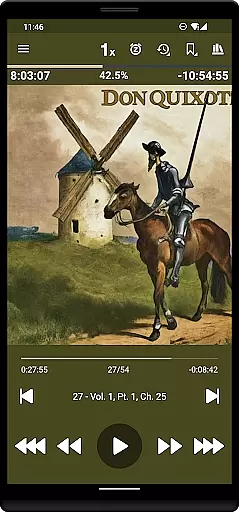
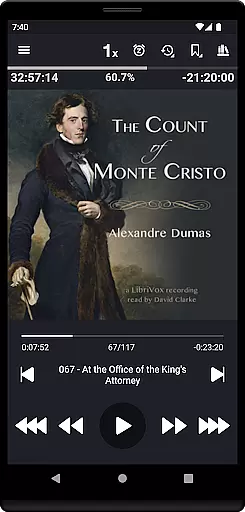
Listen Audiobook Player is a feature-rich audio player specifically designed for audiobook enthusiasts. This application allows users to play DRM-free audiobooks from various sources, including popular platforms like Librivox, Downpour, and Loyalbooks. The app supports multiple audio formats such as mp3, m4b, m4a, opus, ogg, aac, flac, and more, ensuring compatibility with a wide range of audiobooks.
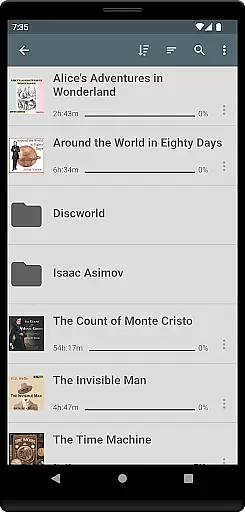
One of the standout features of Listen Audiobook Player is its folder-based library system that automatically syncs with your audiobook folder, allowing for easy organization and quick access to your entire collection. With support for embedded chapters, variable playback speed (0.5 to 4x), pitch control, volume boost, and an equalizer, users can customize their listening experience to suit their preferences. Additionally, the app offers seamless integrations with Android Auto, Plex, and Audiobookshelf, enhancing its usability across different devices and platforms.
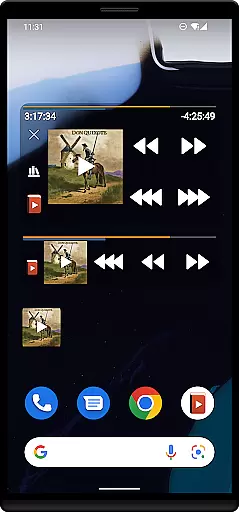
The app also includes advanced functionalities such as bookmarking, position history, Bluetooth controls, sleep timer, and widget support, making it a versatile tool for audiobook listeners. Whether you're commuting, traveling, or simply relaxing at home, Listen Audiobook Player provides a comprehensive solution for managing and enjoying your audiobook library.
Listen Audiobook Player boasts an array of features tailored to enhance the audiobook listening experience. One of its core functionalities is the folder-based library system, which automatically syncs with your audiobook folders, ensuring that each book is organized within its own folder and subfolders. This intuitive organization allows users to browse their library efficiently and search for specific books with ease.
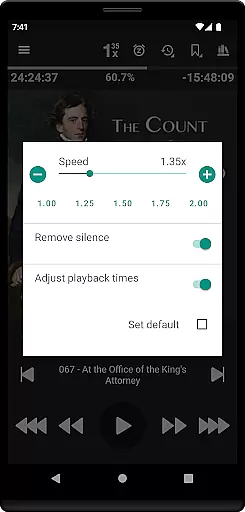
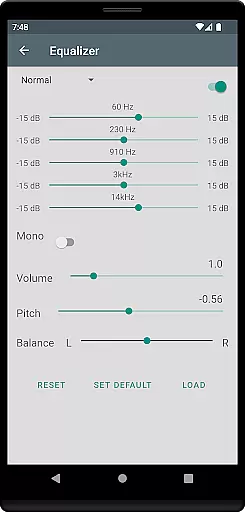
The app supports a variety of audio formats, including mp3, m4b, m4a, opus, ogg, aac, flac, and more, accommodating a broad spectrum of audiobook sources. It also supports embedded chapters in most audio codecs, providing a seamless navigation experience through audiobook content. Users can enjoy variable playback speeds ranging from 0.5x to 4x, trim silence, adjust pitch, boost volume, and utilize an equalizer to fine-tune their listening experience.
Additional features include cover art integration from embedded files or images within the book folder, Android Auto support, Plex and Audiobookshelf integrations, and the ability to convert books to Opus format for reduced file size without compromising sound quality. With built-in sync support, bookmarks, position history, Bluetooth controls, widgets, and lock-screen controls, Listen Audiobook Player ensures a highly customizable and user-friendly experience.
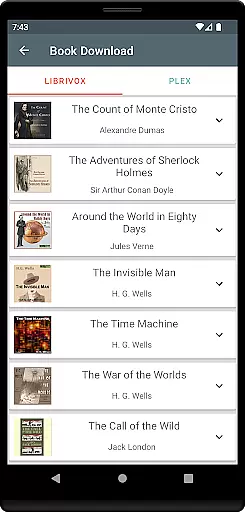
When evaluating an audiobook player, the size and variety of its music library are crucial factors. Listen Audiobook Player offers access to a vast collection of DRM-free audiobooks from various sources like Librivox, Downpour, and Loyalbooks. This ensures users have a wide selection of content to choose from, spanning multiple genres and authors.
The app also emphasizes copyright authenticity by allowing users to download curated books directly within the app. With classics such as 'The Count of Monte Cristo' and 'Pride and Prejudice,' users can be confident they are accessing legitimate content. The inclusion of religious texts like the Bible and the Koran further enriches the library's diversity.
By supporting multiple audio formats including mp3, m4b, and flac, the app caters to different user preferences and ensures compatibility with a broad range of devices. This flexibility enhances the overall user experience, making it easier for audiophiles to enjoy their favorite books without format restrictions.
Audio quality is paramount for an immersive listening experience. Listen Audiobook Player excels in this area by offering variable playback speed ranging from 0.5x to 4x, allowing users to adjust the tempo according to their preference. This feature is particularly beneficial for those who wish to consume content more quickly or need a slower pace for better comprehension.
In addition to speed control, the app provides advanced audio settings such as trim silence, pitch control, and volume boost. These options enable users to fine-tune their listening experience, ensuring optimal sound quality regardless of the original recording. The equalizer and balance features further enhance this customization, catering to individual audio preferences.
For users seeking convenience, the app includes Android Auto support and Bluetooth play/pause/skip functionality. These integrations ensure seamless operation across different devices and environments, maintaining high-quality audio output. Moreover, the ability to convert books to Opus format allows for smaller file sizes without compromising sound quality, making it an excellent choice for audiobook enthusiasts.
User-friendly interface
Wide format compatibility
Advanced playback options
Seamless integrations
Comprehensive bookmarking
No cloud storage option
Limited language support
No automatic updates
Manual library management
Premium price tag

Simply convert wav to mp3. Clear. Reliable. Safe.
 4.4
4.4
Offline and always ad-free - stream in the highest quality available.
4.10
The Music Journey in Your Hands
4.30
10-Band Audio Equalizer, Sound / Bass Booster for Spotify Users & Music Players
4.40
A synth that really lets you shape your sounds!
4.50
Voice recorder - Audio recorder. Best recorder for recording
4.90
Offline Music Player&MP3 Player with themes, equalizer, lyrics, music play mode
4.60
Full featured mp3 and audio player with Chromecast and Android Auto support.
4.40
Offline Tunes, Unlimited Vibes
3.90
24,000 free audio books and no ads!
4.90
Make songs with AI! Any genre, custom lyric, song generator for music creation!
4.80
Simple & Intuitive Metronome
4.70
Walkout Song DJ is the most intuitive app to manage your sports music.
4.70
Fun & Easy Voice Changer – Record, Edit & Add Hilarious Effects!
4.50
Versatile MP3 recorder with auto-backup to Dropbox and Google Drive
4.10
Background pads for your band
3.80
Powerful beat maker & DJ mixer to remix tracks, make music, & perform DJ mix
3.70
The Skullcandy App Experience
3.20
Make music anywhere. Turn your device into an instrument.
4.0


User Reviews