
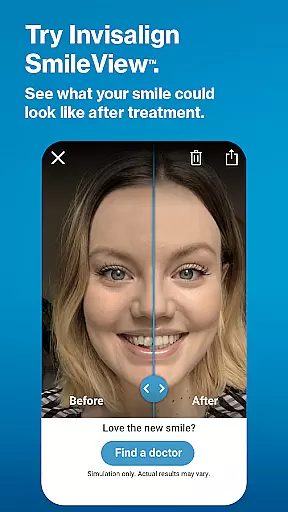
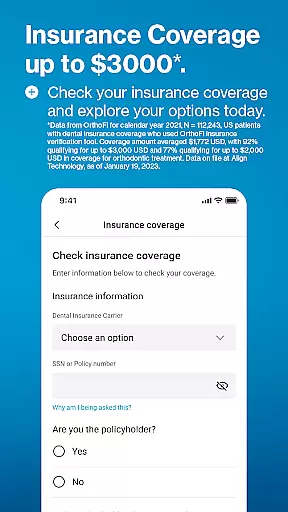
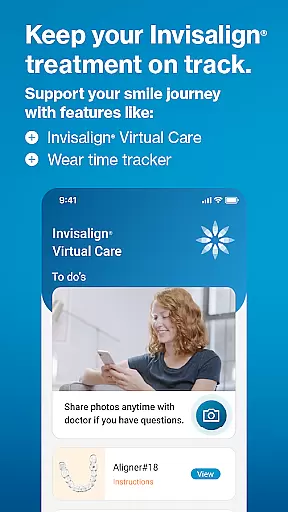
My Invisalign is a comprehensive application designed specifically for users of the renowned Invisalign clear aligners. This app serves as an essential tool for both prospective and current Invisalign patients, providing a range of functionalities to support their journey towards achieving a perfect smile. Users can explore detailed information about Invisalign treatment options, simulate potential smile outcomes with SmileView™, and locate nearby certified doctors for consultations.
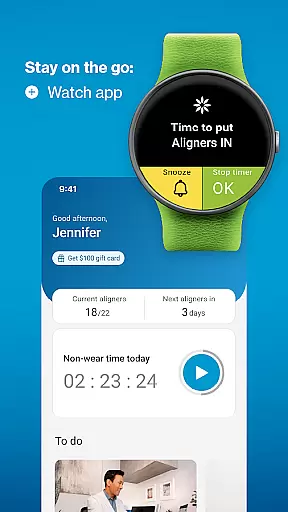
For those already undergoing treatment, My Invisalign offers advanced features such as ClinCheck® treatment plan viewing, virtual care through photo sharing with doctors, wear-time tracking, personalized treatment calendars, and progress monitoring via videos and photos. The app also integrates with Wear OS devices, allowing users to conveniently track aligner wear time directly from their smartwatches. These robust features ensure that patients remain engaged and informed throughout their treatment process.
The true value of My Invisalign lies in its ability to enhance patient experience by providing tools that promote treatment adherence, facilitate communication with dental professionals, and enable users to visualize their progress. Whether you're just beginning to consider Invisalign treatment or are midway through your aligner journey, this app proves to be an invaluable companion in achieving optimal orthodontic results.
My Invisalign stands out with its diverse array of specialized features tailored to meet the needs of clear aligner users. One of its most notable capabilities is the SmileView™ simulation tool, which allows users to preview their potential new smile and share these simulations with friends and family. This innovative feature helps prospective patients make informed decisions about pursuing Invisalign treatment while generating excitement about their future smile transformation.
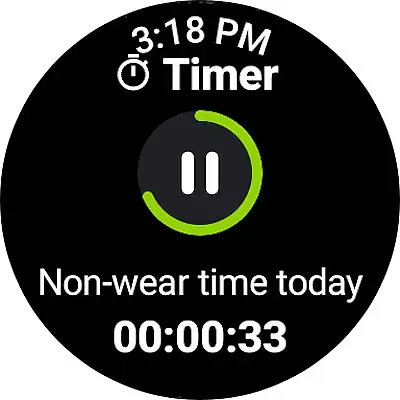
The app's integration with professional treatment processes is equally impressive. Through doctor invitations, patients can access their ClinCheck® treatment plans, enabling them to visualize each step of their orthodontic journey. The Invisalign® Virtual Care feature facilitates remote communication with dental professionals by allowing users to share progress photos and receive timely feedback. Additionally, the comprehensive wear-time tracking system provides multiple views (weekly, monthly, yearly) and includes a custom timer for precise monitoring of aligner usage.
Other valuable features include a fully customizable treatment calendar for managing appointments and events, automated reminders for aligner changes, and tools for documenting treatment progress through videos and before/after photos. The app's Wear OS integration extends its functionality to smartwatches, offering convenient access to aligner tracking features. These carefully designed elements work together to create a seamless and supportive treatment experience, empowering users to maintain consistent progress toward their smile goals.
Companion app integration is essential for users who want a seamless experience between their mobile devices and wearables. The My Invisalign app excels in this area by ensuring that all your treatment data is synchronized across platforms.
By connecting your Wear OS device to the My Invisalign app, you can access the custom aligner tracker directly from your watch. This feature allows you to conveniently monitor your wear-time progress without needing to reach for your phone.
The synchronization between the phone app and the wearable ensures that whether you're at home or on the go, your treatment calendar, notifications, and progress tracking are always up-to-date and accessible.
This level of integration not only enhances user convenience but also helps maintain treatment consistency, which is crucial for achieving the desired results with Invisalign clear aligners.
Ensuring compatibility with Wear OS and other devices is vital for providing a versatile user experience. The My Invisalign app supports a range of devices, allowing users to manage their orthodontic treatment efficiently.
With its dedicated watch app, My Invisalign extends its functionality to Wear OS devices. Users can benefit from features like the custom aligner tracker, which provides quick access to essential treatment information right from their wrist.
The app's compatibility with various devices means that regardless of your choice of smartphone or wearable, you can expect a smooth and reliable performance. This adaptability makes it easier for patients to incorporate treatment management into their daily routines.
By prioritizing Wear OS and device compatibility, My Invisalign ensures that users have a flexible and integrated toolset to support their journey towards a healthier, more beautiful smile.
User-friendly interface
Comprehensive treatment tracking
Virtual care capabilities
Smile simulation tool
Wear OS integration
Doctor invitation required
Limited to Invisalign users
Premium feature restrictions
Device compatibility issues
Occasional syncing problems

Gym Log & Workout Tracker | Fitness Journal, Training & Weight Lifting Planner
 4.90
4.90
Highly customizable hybrid watch face for Wear OS, perfect for everyday use.
4.60
Analog watch face with 8 complications and expedition styling
4.0
Elegant animated Christmas tree with multiple customization options
4.20
Ideal for surviving in the wasteland left after nuclear fallout
4.50
Locate your family members by GPS phone location tracker everywhere and anytime
4.30
Stay in touch with your friends and family using LINE!
3.40
Funny animated watch face for Thanksgiving
4.1
Control your Samsung Smart TVs, appliances, and SmartThings-compatible devices
4.60
Beautiful, colorful and practical watch face. For Wear OS devices.
5.00
Hyperlocal rain alerts by MyRadar using patent-pending technology, radar & more
4.80
A modern premium sporty hybrid watch face for Wear OS by Ballozi
4.70
Simple, helpful messaging by Google
4.60
Reliable phone calls with spam protection, caller ID and more helpful features
4.40
Let's celebrate Thanksgiving - Wear Os watch face
4.20
Animated video-game inspired “secret agent” simulation, right on your wrist!
4.20
Your local weather forecast, storm tracker, radar maps & live weather news
3.40
Christmas is near, let's count together the days left until Santa comes
4.0
Hybrid Vibrant Health Watch Face for Wear OS
4.2


User Reviews