


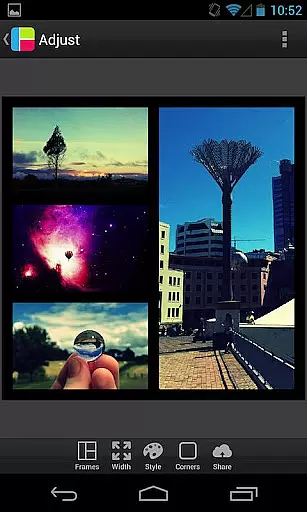
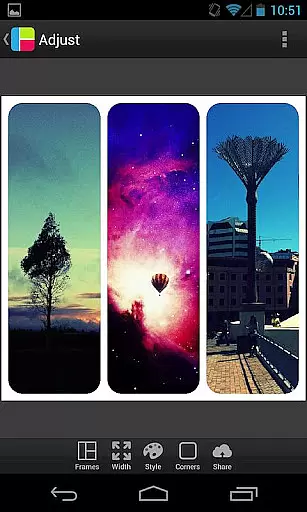

PicFrame is a versatile photography app that allows users to create stunning photo collages by combining multiple images into customizable frames. With 36 adjustable frame layouts, users can include up to five photos in a single frame, offering endless creative possibilities. The app provides advanced editing tools such as rounded corners, shape customization, and precise control over borders, colors, and patterns. Whether you're looking to enhance your social media posts or create personalized gifts, PicFrame delivers professional-quality results with ease.
One of the standout features of PicFrame is its intuitive design interface, which makes it accessible for both casual users and photography enthusiasts. You can fine-tune photo effects like brightness, contrast, and saturation, ensuring each collage reflects your unique style. Additionally, the app supports various aspect ratios and high-resolution outputs, making it suitable for both digital sharing and print projects. Its seamless integration with popular platforms like Instagram, Facebook, and Twitter ensures that your creations can be shared instantly with friends and family.
PicFrame stands out with its extensive range of customization options, catering to users who value creativity and precision. The app offers 36 fully adjustable frames, allowing you to modify inner borders to achieve the perfect layout for your photos. Unique features like shape customization enable you to transform photos into hearts, circles, hexagons, and more, adding an artistic touch to your collages. The adjustable border width and easy-to-use color picker provide complete control over the visual aesthetics of your frames.
Beyond basic framing, PicFrame includes powerful photo editing tools. Users can adjust individual photo settings such as brightness, contrast, and saturation, ensuring each image looks its best. The app also supports rotation and zoom functionality, giving you the flexibility to position and scale photos precisely. With 52 background patterns and multiple output resolutions, PicFrame ensures that every collage is optimized for both screen viewing and printing. These robust features make PicFrame an indispensable tool for anyone passionate about photography and design.
Real-time capture and preview functionality is essential for photography apps as it allows users to see exactly what the final image will look like before taking a photo. PicFrame offers this feature by enabling users to adjust various settings such as brightness, contrast, and saturation in real time.
The app provides an interactive interface where users can pinch to zoom and drag to move photos within their frames. This ensures that each composition is perfectly aligned and visually appealing even before saving or sharing the framed collage.
With multiple output resolutions available, users have control over the quality and size of their final images. This flexibility makes PicFrame suitable for both casual sharing on social media platforms like Instagram and professional use cases requiring high-resolution outputs.
AI beauty and enhancement features are increasingly popular in photography apps, aiming to improve image quality while maintaining natural aesthetics. PicFrame includes several tools that leverage advanced algorithms to enhance photos without making them appear overly processed.
Users can apply adjustable photo effects, choose from 52 background patterns, and modify the shape of their photos into creative forms such as hearts or hexagons. These options ensure that every frame has a unique yet authentic look, preserving the original essence of the captured moments.
Additionally, the ability to change border colors with an easy-to-use color picker adds another layer of personalization. By offering these sophisticated but user-friendly enhancements, PicFrame empowers users to create stunning collages that reflect their individual style and creativity.
User-friendly interface
Extensive customization
High-quality output
Variety of frame styles
Advanced editing tools
Limited free features
In-app purchases required
Occasional ads
Steep learning curve
Heavy on storage

Create collages easily! Nice pic collage maker & background eraser for Instagram
 4.50
4.50
Photo editor: AI filters, photo enhancer, pic collage maker, AI art generator.
4.80
Over 800 film simulation recipes for Fujifilm. Black Friday Offer!
4.5
Collage your moments in one tap: 1000+ layouts, filters, stickers, and texts.
4.90
Transform Photos: Edit, Beautify and Craft Memories & Make Collages!
4.10
Your personal guide to the sun and moon. Plan ahead, visualize and predict!
4.70
Catch sunlight, sunrise sunset times and sun phases with the AR sun tracker.
4.10
A unique animation app. Powerful, easy to use, and lots of fun.
4.30
Solocator stamps photos you take with GPS location, Compass Direction, Date/Time
3.80
AI Photo Editor with 100+ Filters, Effects! Remove BG, Retouch & Photo Enhancer.
4.80
The original Rarevision VHS look seen everywhere!
4.70
Easily create custom gifts, cards, photo books & more on the Shutterfly app!
4.60
Movie camera, supports pro recording settings for filming. Try it and be amazed!
4.50
Trendy TikTok time warp scan funny filter app brings you unique photos & videos.
4.40
Edit like a pro with Hypic. Apply filters, AI effects, & magic touch.
4.40
RAW video capture with advanced controls
4.40
Turn your phone into a professional camera - full DSLR manual photography
4.30
Professional photography on your mobile phone
4.20
Turn photos into cartoons & avatars! - Photo Editor, Cartoon Face!
3.90


User Reviews