
Solocator is an advanced GPS camera app designed specifically for professional photo documentation needs. The app allows users to overlay critical metadata directly onto images, including GPS coordinates, compass direction, altitude, and timestamp information. This makes it particularly valuable for fieldwork where accurate photo documentation is essential.
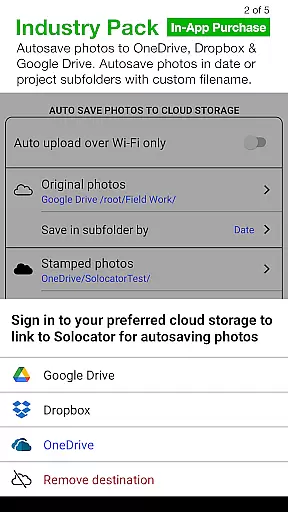
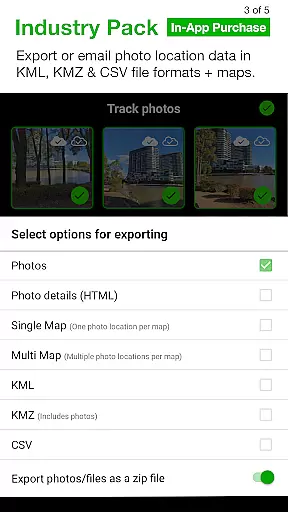
With its optional Industry Pack, Solocator offers additional functionality such as customizable note overlays, street address tagging, and UTM/MGRS coordinate formats. Users can autosave photos with metadata stamps, organize them by various criteria, and export data in professional formats like KML, KMZ, and CSV. These features make it a versatile tool for industries ranging from construction to environmental monitoring.
The app's ability to save both original and stamped images ensures that users maintain a complete record of their work. Whether documenting building conditions, tracking field assets, or creating detailed site reports, Solocator provides professionals with a reliable solution for capturing verifiable photographic evidence.
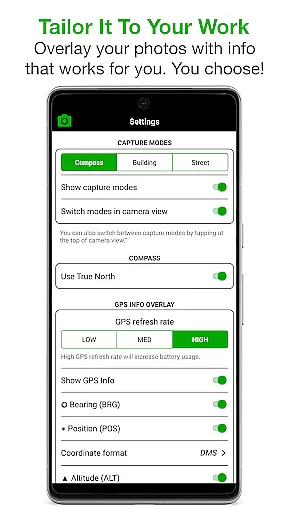
Solocator stands out with its comprehensive set of features tailored for professional use. The app's core functionality revolves around its ability to overlay precise technical information on photographs. Users can select from multiple data points to include in their image stamps, such as various GPS formats, compass bearings, altitude measurements in both metric and imperial units, and detailed timestamp information.
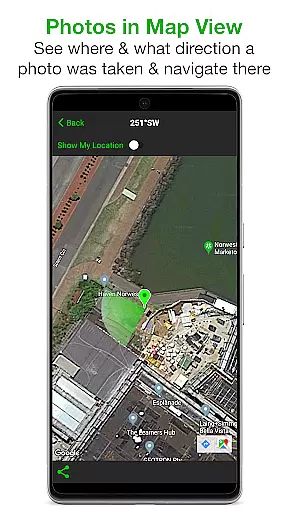
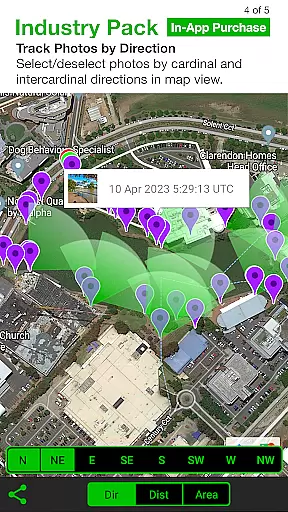
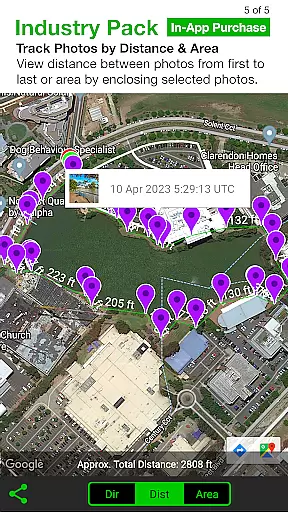
One of the app's key innovations is its Industry Pack, which expands its capabilities significantly. This includes editable note fields for project names and descriptions, customizable export filenames, and batch editing options for multiple photos. The app also supports automatic saving to major cloud storage services and offers advanced mapping features that allow users to track photo locations and distances between shots.
Additional notable features include support for both front and rear cameras, pinch-to-zoom functionality, and a compact view mode. The app's ability to refine and lock GPS locations proves especially useful in challenging environments. Furthermore, its compatibility with devices lacking a compass ensures broader accessibility while maintaining full functionality on equipped devices.
Solocator excels in real-time capture and preview, ensuring that every photo taken is immediately overlaid with essential information. This feature is crucial for professionals who require accurate documentation on the field.
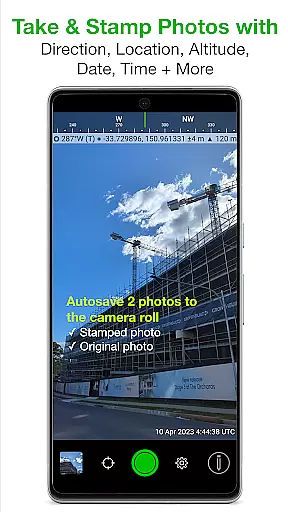
The app overlays critical data such as GPS position, compass direction, altitude, and local time directly onto images as they are captured. This instant integration of information saves time and ensures that all necessary details are recorded without the need for manual entry.
Users benefit from Solocator's ability to autosave two versions of each photo: one with the selected overlays and another original photo without any modifications. This dual-saving feature provides flexibility in how the images can be used later, whether for official records or personal reference.
By offering both back and front camera support, pinch zoom, self-timer, flash, and exposure controls, Solocator ensures a seamless photography experience while maintaining the integrity and accuracy of the overlaid information.
While Solocator does not focus on AI beauty enhancements typical in social media apps, it offers natural enhancement through precise and customizable data overlays. This approach catifies to professionals needing authentic and unaltered photographic evidence.
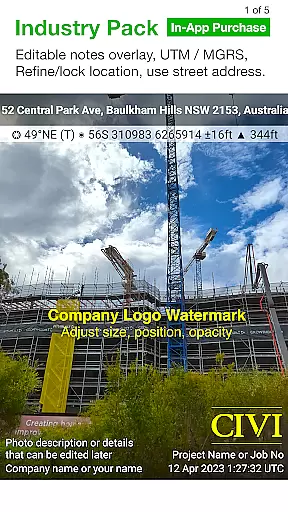
The Industry Pack available as an in-app purchase extends these capabilities by allowing tailored overlays including project names, descriptions, and watermarks. These additions maintain the natural quality of the photos while adding layers of professional detail required for specific job functions.
With features like UTM/MGRS coordinate formats, street address inclusion, and refined GPS location locking, Solocator enhances the authenticity and usability of each photo without resorting to artificial beautification. This ensures that the visual data remains reliable and credible for official purposes.
Overall, Solocatoru2019s emphasis on factual accuracy and customization makes it an indispensable tool for industries relying on genuine photographic documentation rather than aesthetically enhanced images.
Comprehensive metadata overlay
Batch editing capabilities
Cloud storage integration
Professional export formats
Customizable photo information
Paid Industry Pack required
Complex for casual users
Occasional GPS inaccuracies
Interface may feel cluttered
Learning curve for new users

Search, tag and rate your way to an organized image gallery
 4.40
4.40
[3DSteroid Pro] is a stereoscopic application for Android.
4.30
Photobooth mini FULL app will allow you to add more fun to your parties
4.00
Create AI Photos, Improve and restore quality of blurry, old or damaged pics.
4.20
Over 800 film simulation recipes for Fujifilm. Black Friday Offer!
4.3
Cartoon and artistic effects for your photos and videos
4.70
AI Photo Editor with 100+ Filters, Effects! Remove BG, Retouch & Photo Enhancer.
4.80
Smart, light, and fast photo and video gallery
4.30
A unique animation app. Powerful, easy to use, and lots of fun.
4.30
Easily view, share, delete photos with Gallery.
4.70
Light-weight Media Gallery app for Android made with Jetpack Compose
4.60
Easily create custom gifts, cards, photo books & more on the Shutterfly app!
4.60
Cut and paste photo editor & eraser to customize photos easy and swap faces fun
4.50
Use AI Video Generator to turn your words to ai generated videos.
4.50
Effortlessly organize, view and share your photos & videos with Gallery app!
4.40
Edit like a pro with Hypic. Apply filters, AI effects, & magic touch.
4.40
Create & Edit with AI: AI Remove, Enhance, Retouch, Filter
4.10
Transform Photos: Edit, Beautify and Craft Memories & Make Collages!
4.10
live datamoshing
4.00


User Reviews