
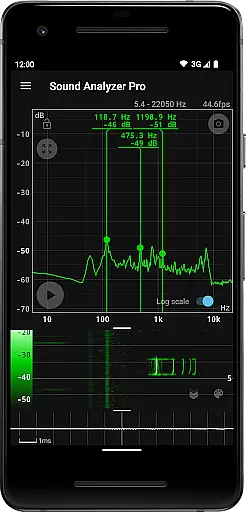
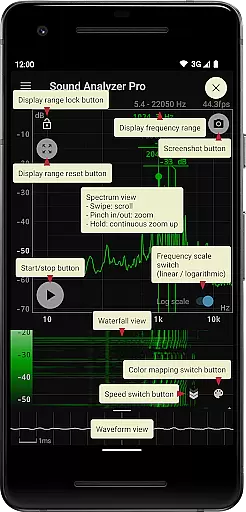
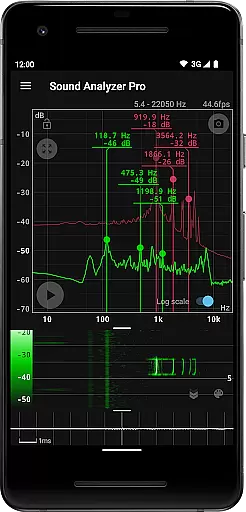
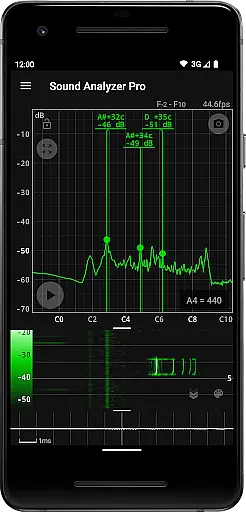
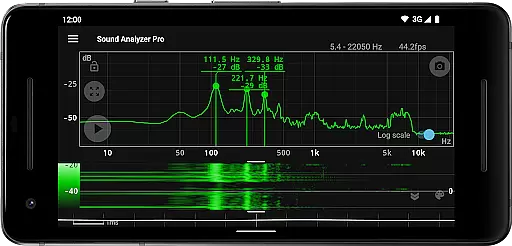
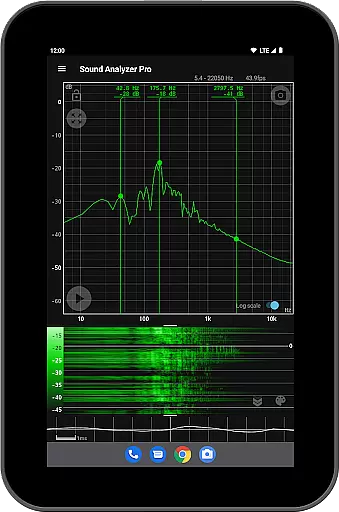
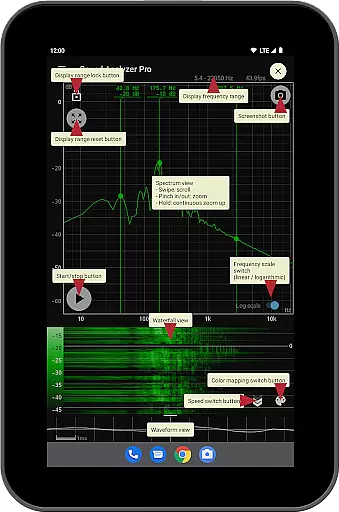
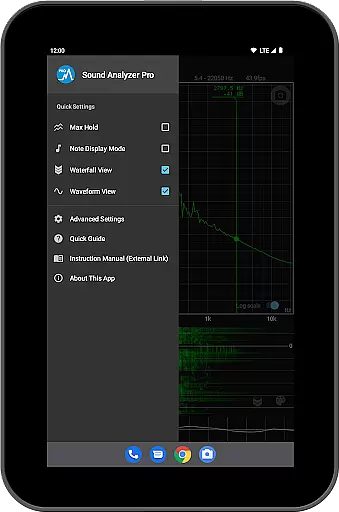
Sound Analyzer is a sophisticated audio analysis tool designed for both professionals and enthusiasts in the music and audio field. The app's core functionality lies in its ability to display real-time frequency (Hz) and amplitude (dB) spectra directly on your mobile device, eliminating the need for bulky external equipment. With specialized features such as waterfall view for tracking spectral changes over time and waveform view for visualizing sound waveforms, it offers an all-in-one solution for detailed audio signal examination.
One of the standout capabilities of Sound Analyzer is its high measurement accuracy, with errors typically within 0.1 Hz in low-noise environments. This precision makes it ideal for tasks like tuning musical instruments or conducting acoustic experiments. Whether you're an audio engineer, musician, or simply someone interested in sound technology, this app provides valuable insights into audio signals through its intuitive interface and advanced functionalities.
Sound Analyzer boasts a comprehensive set of features that cater to various audio analysis needs. The app includes a peak frequency display function, which identifies and showcases prominent spectral components in real time, complete with their corresponding frequencies and amplitudes. Users can easily adjust the display range through touch operations and toggle between logarithmic and linear scales on the frequency axis, offering flexibility in how data is presented.
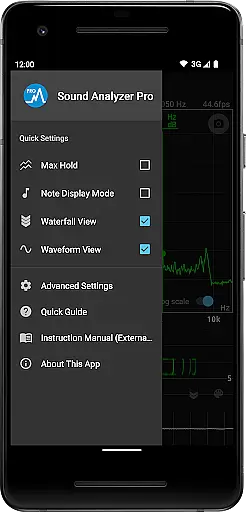
In addition to its primary spectrum analysis tools, the app supports advanced functionalities such as the max hold function for capturing transient peaks, a note display mode that translates pitches into musical notes, and a screenshot feature with timer support for saving analysis results. These features collectively ensure that users have access to detailed, actionable information about their audio signals, whether they are analyzing live performances, studio recordings, or environmental sounds.
Sound Analyzer does not focus on providing a vast music library but rather emphasizes real-time audio signal analysis. The app allows users to analyze any audio input, making it versatile for various sound sources.
While the app doesn't directly deal with copyrighted music tracks, its ability to display frequency and amplitude spectra in real time ensures that users can examine audio details accurately. This feature is crucial for professionals who need precise data without worrying about copyright infringement.
The application's strength lies in its adaptability to different audio inputs, whether they are live recordings or pre-existing tracks. Users can trust the accuracy of the displayed information, which is essential when working with potentially copyrighted material.
By focusing on high-frequency spectrum analysis up to 96 kHz, Sound Analyzer offers advanced capabilities beyond typical music apps. This makes it an invaluable tool for audiophiles and professionals requiring detailed spectral data, regardless of the source's copyright status.
Sound Analyzer excels in providing multiple audio quality options, allowing users to adjust settings according to their specific needs. The app supports frequency measurements with exceptional accuracy, typically within a 0.1 Hz error range in low-noise environments.
Users can choose between logarithmic and linear scales for the frequency axis, catering to different analytical preferences. This flexibility ensures that both casual users and audio professionals can optimize their experience based on the task at hand.
The inclusion of advanced features like Max hold function, waterfall view, and waveform view enhances the overall audio quality assessment. These tools enable users to visualize changes over time and examine detailed sound waveforms, contributing to a comprehensive understanding of audio characteristics.
Furthermore, the app's ability to extend frequency settings up to 96 kHz demonstrates its commitment to high-quality audio analysis. Although this feature is primarily beneficial for high-performance devices, it showcases Sound Analyzer's dedication to offering top-tier audio quality options across various device types.
User-friendly interface
High measurement accuracy
No advertisements
Real-time analysis
Comprehensive feature set
Limited high-frequency support
Advanced features may overwhelm beginners
Requires compatible devices for full functionality
Interface could be more visually appealing
Steep learning curve for novices

SqueezePlayer turns your Android phone or tablet into a SqueezeBox on its own!
 4.60
4.60
Formerly known as Spotistats! View your top tracks, artists, albums and more!
4.40
Full-featured, High-Quality Groovebox Workstation, perfect for Live Performance!
4.80
Walkout Song DJ is the most intuitive app to manage your sports music.
4.70
The only true audiophile music player with Hi-Fi audio rendering and DSP engine
3.90
Smart piano keyboard, Classical to Pop, Real-time multiplayer connection!
4.20
Offline Music Player & MP3 Player.Powerful equalizer, Lyrics, Themes, Tag Editor
4.80
The Minimalistic Premium Music Player. Handmade with passion for music
2.20
Reverse your voice & songs instantly! Fun singing challenge with cool effects.
4.60
More downloads than any other metronome. Includes drum machine & tempo trainer.
4.80
The best music and audio player, with beautiful UI, music search and equalizer.
4.60
DJ Music Mixer - DJ Remix: remix songs, make beat music & record mix of DJ.
4.40
Master Salsa Rhythm quickly and with a lot of fun!
4.30
The official Sonos app
4.10
Permanently backup Now Playing. Maps, filters & listening stats.
4.00
The ultimate media player for Android devices
3.90
The Cubase remote control app
3.60
The Skullcandy App Experience
3.20
Remove ads permanently from Music Visualizer
4.5


User Reviews