
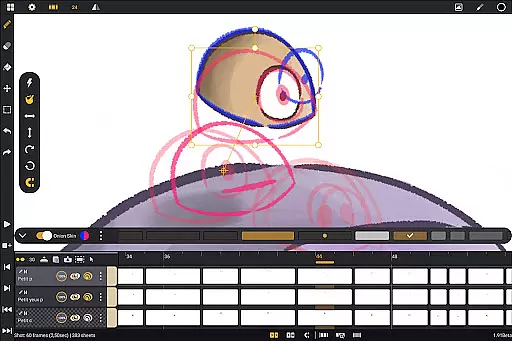
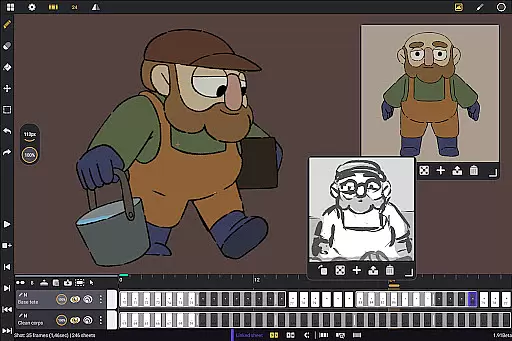
Callipeg is a professional-grade 2D hand-drawn animation application tailored for both seasoned animators and beginners. The app provides an extensive suite of tools akin to a full-fledged animation studio, all accessible on Android devices. With support for frame-by-frame and keyframe animation, storyboard development, and complete shot production, Callipeg empowers creators to produce high-quality animations.
The platform offers advanced features such as studio-like organization, adjustable frame rates up to 60 frames per second, and canvas sizes reaching 4K resolution. It also includes unlimited layer support, comprehensive drawing tools with customizable brushes, and onion skinning for efficient workflow management. Additionally, its flexible import and export options allow seamless integration with industry-standard software, making it an indispensable tool for professional animators.
Designed specifically for Android tablets with stylus support, Callipeg ensures a natural drawing experience without subscription fees. Its intuitive interface and supportive learning resources make it suitable for various creative tasks, from feature-quality shots to simple rough sketches.
Callipeg distinguishes itself through a robust set of features designed to streamline the animation process. One standout aspect is its studio-like organization system, which allows users to arrange shots by dragging and dropping them into scenes and folders. This organizational structure, complemented by color tags and filters, helps manage assets effectively while the integrated search function enables quick location of specific shots.
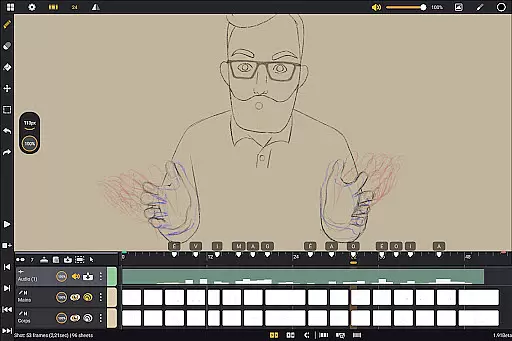
The app supports adjustable frame rates and large canvas sizes, catering to professional standards. Users can work with frame rates including 12, 24, 25, 30, or 60 frames per second and utilize canvas sizes up to 4K. Furthermore, Callipeg offers unlimited layer support, accommodating various types such as drawing, video, transformation, audio, or group layers. This flexibility facilitates techniques like rotoscopy and lip-syncing.
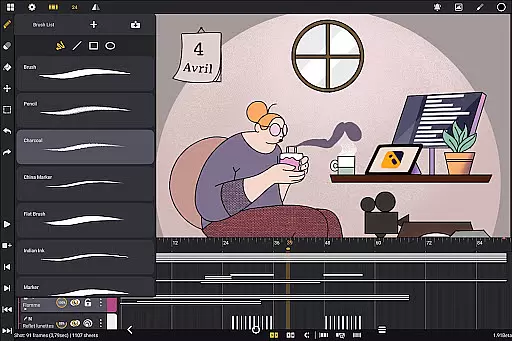
Comprehensive drawing tools enhance the creative process, providing a versatile brush set that includes pencil, charcoal, ink, and more. Each brush can be customized in terms of smoothing, tip shape, and texture, allowing artists to fine-tune their work. Additional features like onion skinning, customizable workspaces, and flexible import/export options further solidify Callipeg's position as a top-tier animation tool.
In the realm of 2D animation, having access to a comprehensive suite of creative tools is essential for producing high-quality work. Callipeg rises to the occasion by offering an extensive array of features that cater to both professional animators and beginners alike. The app provides users with unlimited layer support, accommodating various types such as drawing, video, transformation, audio, or group layers. This flexibility allows creators to import images, video clips, and audio files for advanced techniques like rotoscopy or lip-syncing.
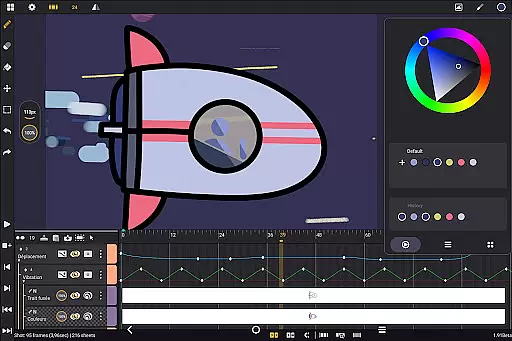
Callipeg doesn't stop there; it also equips users with a versatile brush set including options like pencil, charcoal, ink, and more. Each brush can be customized in terms of smoothing, tip shape, and texture, giving artists the freedom to fine-tune their drawing experience. Additionally, the app offers robust color management through a color wheel, sliders, and palettes, streamlining the coloring process and enhancing workflow efficiency.
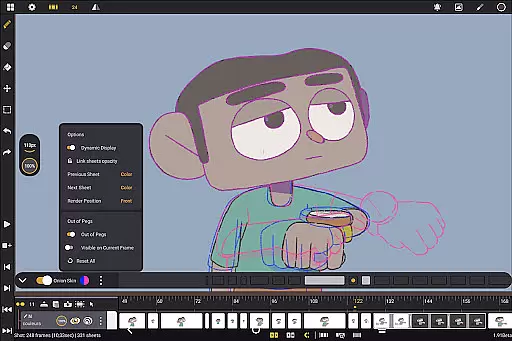
The inclusion of animation-focused tools such as onion skinning further enriches the creative process. Users can display up to eight frames before and after the current frame, with adjustable opacity and color settings. These features ensure that each movement is precisely crafted, maintaining the continuity and fluidity of animations. Moreover, gesture controls for playback, flipping frames, selection, and transformation make the overall interface highly intuitive and conducive to creativity.
Flexibility in canvas size and format compatibility is crucial for animators who need to meet diverse project requirements and professional standards. Callipeg addresses this need by providing a large canvas option that supports resolutions up to 4K. This ensures that whether you're working on detailed storyboards or feature-quality shots, the app can accommodate your vision without compromising on quality.
Beyond just canvas size, Callipeg excels in its adjustable frame rates, allowing users to set their preferred speed including 12, 24, 25, 30, or 60 frames per second. Such versatility enables animators to tailor their projects according to specific stylistic choices or industry norms. Furthermore, the app's flexible import and export options enhance its utility by supporting multiple formats such as .mp4, .gif, .png, .tga, .psd, and .peg.
For professionals who collaborate across different software ecosystems, Callipeg facilitates seamless transitions by enabling project file imports and exports in .json, .xdts, and .oca formats. This maintains timing and layer structure consistency when moving between industry-standard applications. With these capabilities, Callipeg empowers users to create animations that are not only visually stunning but also technically adaptable to various production pipelines.
User-friendly interface
Unlimited layer support
Customizable workspace
Flexible import/export options
Professional-grade tools
Limited to Android devices
No iOS version available
Stylus required for best results
Advanced features may overwhelm beginners
One-time purchase cost

Learn how to draw with step-by-step tutorials, fun lessons & multiplayer drawing
 4.70
4.70
Logo Generator powered by AI: Create stunning logos effortlessly!
4.70
See Color, Paint Color
4.90
Digital, Abstract, Classic - all types of color wheels in one app!
4.60
Android 14 style widgets and wallpapers app.
4.0
Share the joy of painting with ibis Paint! Drawing anime and manga art.
4.50
Create amazing pictures and unleash your creative genius with AR Drawing Sketch
4.40
How to draw anime step by step for beginner easily by AR drawing sketch & paint.
3.60
Multiplayer Drawing game, Coloring, Painting・Sketch, Handwriting・Paint, draw
4.30
The ultimate tool for creating animations
4.60
Create neon drawing with magic doodle and fun doodle art effects!
4.50
Draw Trace image sketch by, AR art projector app, Easy to trace any image.
4.50
Stylish letters, Stylish Keyboard, Symbols, Emojis, Cool nickname
4.40
Sketch, plan, take notes and illustrate on an infinite canvas.
4.20
Text to Image, Image to Video & AI Chat
4.20
Powerful home decoration & house design that allows you to design dream home.
3.80
Sketch, trace and master AR drawing with awesome anime art!
3.30
Art of Combination Wear OS Watch Faces
3.30
Transform photos into amazing monochrome dither art with professional algorithms
4.4


User Reviews