
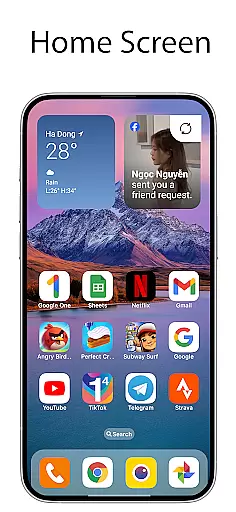
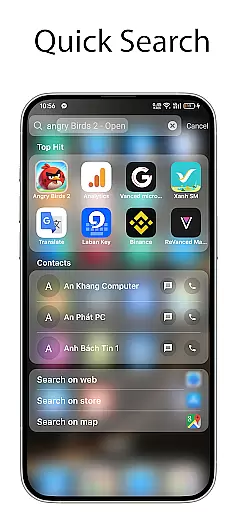
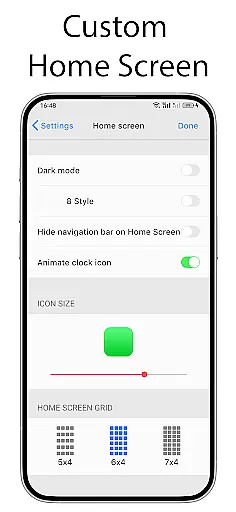
OS Launcher 18 - Phone 16 Max is a personalization app that transforms the visual appearance of Android devices into a more simple and luxurious interface. This launcher provides users with a customized experience, including redesigned app icons, wallpapers, and various other features. It allows Android users to customize their devices to resemble a Simple interface while maintaining the core functionality and versatility of the Android operating system.
The app offers an array of customization options such as app grouping, lock protection for apps, weather forecasts, widgets, and more. With its user-friendly design, OS Launcher 18 caters to those who want both aesthetic appeal and practical utility on their devices. Whether you're looking to enhance your device's look or improve its usability, this app delivers a comprehensive solution.
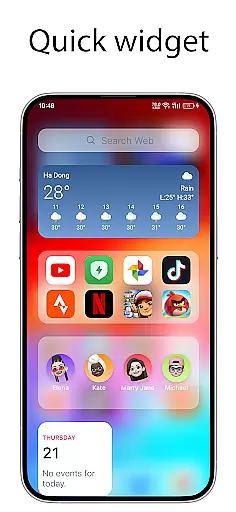
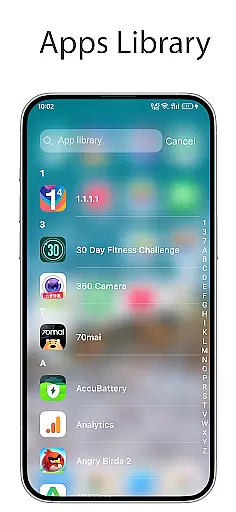
OS Launcher 18 - Phone 16 Max stands out with its rich set of features designed to enhance the Android user experience. One of its main attractions is the Apps Library, which organizes apps into categories, making navigation seamless. The Today View feature displays essential information like weather updates, favorite contacts, and calendar events right on the home screen, ensuring users have quick access to important details.
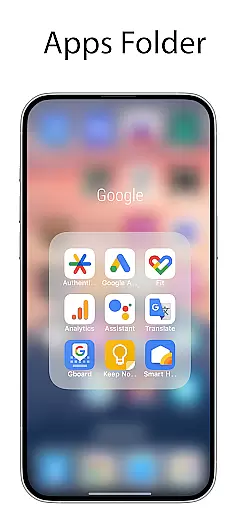
Another notable feature is the ability to create folders by dragging and dropping apps onto each other, allowing for better organization. Users can also customize app icons and names, hide apps from the home screen, and enjoy beautiful weather forecasts with detailed information such as temperature, wind speed, and humidity. Additionally, the Unread Notification Dot feature alerts users to unread messages, enhancing productivity and keeping users informed.
Customization is at the heart of OS Launcher 18 - Phone 16 Max, allowing users to tailor their Android device's interface with a wide array of options. This app offers an extensive range of features including customizable app icons, wallpapers, and widgets that collectively transform the visual appearance into something more simple yet luxurious.
The main appeal lies in its comprehensive customization capabilities such as the Apps Library which organizes apps into categories for easier access. Additionally, users can create folders by dragging and dropping apps onto each other, further personalizing their home screen layout according to individual preferences.
For those who value privacy or want to maintain a clutter-free interface, there are options like Hide Apps and Lock App functionalities. These ensure that personal content remains secure from intruders while also enabling a cleaner look on the home screen by hiding seldom-used applications.
OS Launcher 18 - Phone 16 Max excels in theme compatibility, ensuring that all visual modifications are not only aesthetically pleasing but also functionally coherent. The launcher supports various themes which allow users to enjoy a consistent look across their device without compromising on usability or performance.
One standout feature is the Customizable Icons option where users can modify both the icon and name of any application. This level of personalization ensures that every element on the screen aligns perfectly with the chosen theme, providing an immersive experience that reflects personal style.
Beyond static visuals, dynamic elements such as weather forecasts and unread notification dots integrate seamlessly within this personalized environment. By maintaining operational integrity while offering diverse aesthetic choices, OS Launcher 18 guarantees both form and function coexist harmoniously.
User-friendly interface
Highly customizable
Comprehensive weather info
Effective app organization
Enhanced security features
May consume more resources
Occasional bugs reported
Limited default themes
Ads in free version
Requires permissions

Classic analogue watch face. For wear os devices.
 4.60
4.60
A Colorful and Minimal icon pack in an Outline Style - Over 13,600 icons!
4.70
Ninja Turtles Cowabunga SE watch face for Wear OS
4.50
Themes - Widget & Wallpaper: Customize home screen, icon changer w unique themes
4.30
Sparkle your screen with Glitter Wallpapers For Girls and Cute Backgrounds!
4.80 4.50
4.50
Customize your home screen with stunning themes, blur, widgets & icons.
4.60
Embrace the Night. Unleash the power of darkness with Raven Dark Icon Pack
4.60
Create stunning widgets with Widget 2026: Aesthetic Widgets for Android!
4.60
100+ Stylish Fonts, Emojis, Symbols keyboard for Instagram & TikTok!
4.80
Glass style colourful icons with a One UI look and feel
4.60
A retro cartoon style watch face and a punch right in the face of the copyright
4.60
Stylish Pink Cute Hippo keyboard with 10000+ customized keyboard themes!
4.60
Aesthetic Widgets, HD Wallpapers, Themes in Mico Widget for Home and Lock Screen
4.50 4.50
4.50
200+ Material Inspired Widgets
4.50
Run multiple accounts of the same app on a single device
4.10
Crystal-clear, square icon provides a sleek and sophisticated visual upgrade
4.00
Custom edge gestures for volume control, brightness, apps, and shortcuts.
4.5


User Reviews