





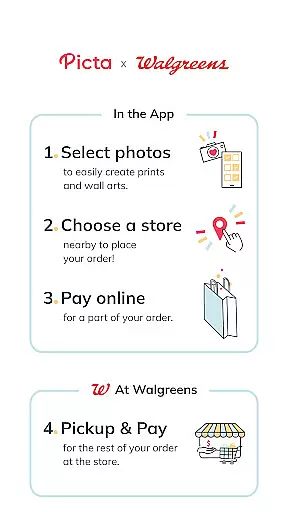
Picta is a photo printing app that allows users to print their mobile photos at Walgreens stores. With this app, you can easily select your photos, choose the print size and quantity, and pick up your prints in just one hour. Picta offers professional-quality photo printing services on Kodak paper in multiple sizes, including 4x6, 5x7, and 8x10 enlargements. You can also create personalized photo gifts such as magnets, posters, canvas, photobooks, greeting cards, and more.
One of the key features of Picta is its fast and safe photo transfer capability. The app organizes your mobile photos by date taken, making it easy to find and select the photos you want to print. Picta is available exclusively in the United States and is compatible with both Android and iOS devices. Whether you want to print individual photos or create a photo collage, Picta provides a seamless and convenient experience.
With Picta, you can enjoy special deals and discounts on photo printing. The app offers exclusive coupons for its users, allowing you to save money on your prints. Additionally, Picta is committed to providing excellent customer service. If you have any questions or concerns about the app or your photo prints, you can contact their support team via email. Overall, Picta is a reliable and user-friendly app that makes photo printing quick and hassle-free.
Picta offers a range of features that enhance the photo printing experience. One notable feature is the ability to crop and zoom each picture easily within the app. This allows you to adjust the composition of your photos before printing, ensuring that you get the desired result. Another feature is the real-time order status tracking, which enables you to monitor the progress of your photo prints and know exactly when they will be ready for pickup.
In addition to standard photo prints, Picta also offers various customization options. You can create personalized photo gifts such as magnets, posters, canvas, photobooks, greeting cards, and more. These products are perfect for special occasions like birthdays, weddings, or holidays. Picta's gallery organizes your mobile photos by date taken, making it easy to navigate through your collection and select the photos you want to print.
Picta stands out from other photo printing apps due to its fast and convenient service. With the app's store locator feature, you can easily find your nearest Walgreens store for quick photo pickup. Most orders are ready within an hour, saving you time and effort. Furthermore, Picta ensures the quality of your prints by using professional-grade Kodak paper. This guarantees vibrant colors and sharp details in every photo. Overall, Picta provides a comprehensive set of features that make photo printing a breeze.
Real-time capture and preview functionality is essential for ensuring that users can accurately capture the moments they want to preserve. The Picta app offers a seamless experience by allowing users to select photos directly from their Android devices, crop, and zoom each picture easily within the app.
This app ensures that users have control over how their final prints will look before confirming the order. By providing an intuitive interface for photo selection and editing, it enhances user satisfaction as customers can tweak their images until they are pleased with the preview.
The ability to adjust photos in real time not only saves time but also allows for greater creativity and precision. Users can be confident that what they see on their screen is what they will get in print, which is crucial when creating personalized gifts or professional-quality photo prints.
AI beauty and enhancement features are becoming increasingly popular in photography apps, offering users the ability to improve their photos with natural-looking results. Picta incorporates advanced AI algorithms to enhance photo quality while maintaining the authenticity of the original image.
With this app, users can transform their mobile photos into fabulous prints and gifts without compromising the natural essence of their pictures. The AI enhancements work subtly in the background, ensuring that every print reflects the true colors and details captured in the moment.
By focusing on naturalness, Picta stands out among photo printing services. Customers benefit from professional-quality photo printing services that use Kodak paper, ensuring that enhanced images retain their genuine appearance, whether they are standard prints or customized products like magnets, posters, or photobooks.
User-friendly interface
Fast and convenient service
Wide range of print sizes and customization options
Exclusive coupons and discounts
Professional-quality photo printing
Limited availability outside the United States
Requires access to a Walgreens store for pickup
Additional charges may apply for certain customization options
Occasional technical issues reported by users
Print quality may vary depending on the original photo resolution

Long exposure camera with computational photography
 2.60
2.60
Add Watermark - Sign your pictures with a text or logo. Effective, quick, easy!
4.50
Easily stitch panoramas from multiple photos or video.
4.40
Professional video recording application with manual controls for filmmakers!
2.80
Virtual makeup, hair filters & body tuner—edit from face to full body!
4.20
Edit like a pro with Hypic. Apply filters, AI effects, & magic touch.
4.40
AI photo editor with hair editor, retouch tools, hair color changer & filters!
4.50
Create AI Photos, Improve and restore quality of blurry, old or damaged pics.
4.20
Create amazing frames with up to five photos. Rounded corners, effects and more!
3.60
A collection of tools and reference tables for DPs, ACs, DITs and Operators.
4.70
Amazing Photo Effects - The most fun you can have with your photos!
4.70
See your baby AI baby face generator AI baby maker Face generator babymaker fun!
4.70
Enhance, upscale, and transform your images — on your device, without limits
4.70
Take videos and pictures with the popular TikTok TIME WARP SCAN filter.
4.60
All-in-One Editor & AI Photo Enhancer, Beautify & Retouch, Collage, Cartoonify
4.20
Professional photography on your mobile phone
4.20
All-in-One Editor & AI Photo Enhancer, Collage, Cartoonify, Funny Stickers & BGS
4.10
Catch sunlight, sunrise sunset times and sun phases with the AR sun tracker.
4.10
How old age camera Gender Swap App Face Shape Hairstyle App Hair Styler App fun!
4.00


User Reviews