
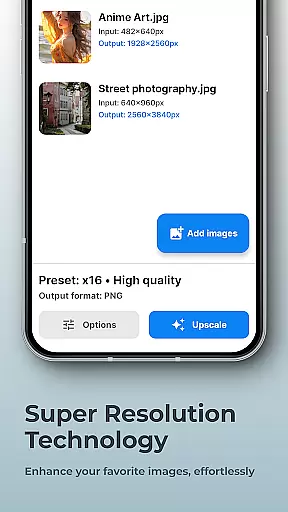
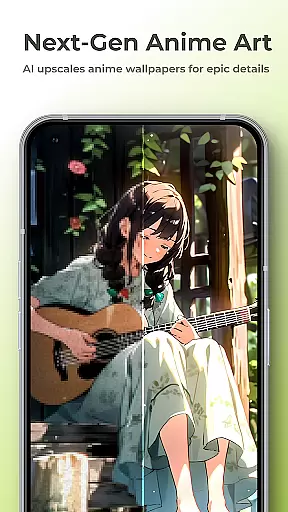
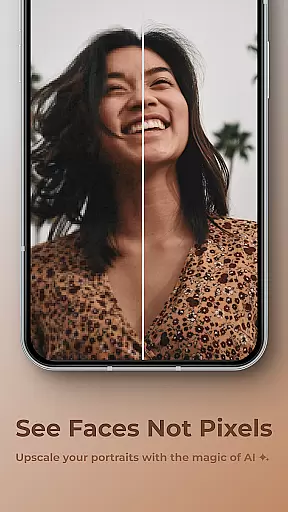
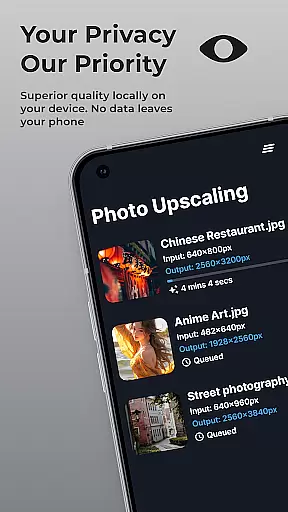
SuperImage Pro is a comprehensive AI-powered photo editing application designed for photography enthusiasts and professionals alike. This app offers advanced image enhancement features such as upscaling, background removal, and portrait refinement, all powered by on-device AI processing. With its cutting-edge technology, users can transform their images while maintaining complete privacy since no internet connection is required.
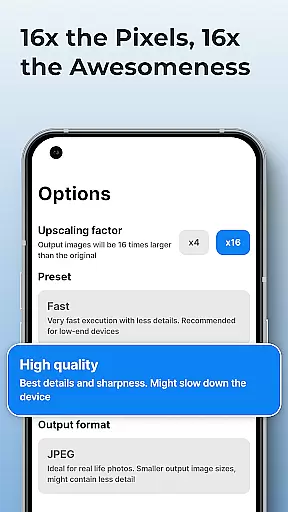
The application stands out with its ability to upscale photos up to 16x the original resolution, making blurry images a thing of the past. Additionally, SuperImage Pro allows users to load custom AI models in various formats, catering to advanced users who seek tailored experiences. Whether you're looking to enhance your portraits or create transparent cutouts, this app provides the tools you need to achieve professional-quality results directly on your mobile device.
SuperImage Pro boasts an impressive array of features that cater to diverse photo editing needs. One of its standout capabilities is the on-device AI processing, which ensures that all transformations occur locally on the user's device. This not only guarantees privacy but also enables usage without an internet connection. The app supports multiple AI model formats including PyTorch, ONNX, and MNN, allowing users to import custom models for a personalized editing experience.
Another remarkable feature is the image upscaling functionality, which can increase photo resolution up to 16x without losing quality. Users can also remove backgrounds, isolate subjects, and refine facial features in portraits. These features are particularly beneficial for creating professional-grade visuals for social media or marketing materials. The combination of powerful AI tools and user-friendly interface makes SuperImage Pro an indispensable tool for anyone serious about photography.
Real-time capture and preview functionality is essential for photography apps as it allows users to see exactly what the camera is capturing before taking a shot. SuperImage Pro excels in this area by providing an intuitive interface that displays accurate colors, lighting, and details directly on your device's screen.
The app leverages advanced AI models optimized for modern hardware to ensure that the preview is smooth and responsive. This means you can adjust settings like exposure, focus, and white balance in real time, giving you greater control over the final image quality.
Users benefit from this feature by being able to make precise adjustments before capturing an image, which reduces the need for post-processing edits. The ability to preview changes instantly also enhances creativity, allowing photographers to experiment with different styles and compositions without any lag or delay.
Overall, SuperImage Pro's real-time capture and preview capabilities empower users to take better photos with confidence, knowing they have full control over every aspect of their shot right at their fingertips.
AI beauty and enhancement features are increasingly popular in photography apps, offering tools to refine facial features, enhance background clarity, and improve overall image quality. SuperImage Pro stands out by ensuring these enhancements look natural and not overly processed.
The app uses sophisticated algorithms to analyze images and apply enhancements that preserve the authenticity of the subject while improving key aspects such as skin tone, texture, and lighting. This approach avoids the pitfalls of artificial-looking results often associated with other photo editing apps.
For users, this means achieving professional-grade edits without sacrificing the genuine qualities of their portraits. Whether enhancing low-resolution portraits or refining high-quality shots, SuperImage Pro delivers results that maintain the integrity and character of the original image.
By prioritizing naturalness in its AI-driven enhancements, SuperImage Pro ensures that users can achieve stunning yet believable edits, making it a top choice for those seeking both power and subtlety in their photo editing experience.
Advanced AI processing
Complete privacy protection
High-quality upscaling
Custom model support
User-friendly interface
Steep learning curve
Resource-intensive
Limited free features
No cloud backup
Occasional bugs

Gallery show photo, video, slideshow, is perfect 3D effect private photo albums.
 4.80
4.80
Add Watermark - Sign your pictures with a text or logo. Effective, quick, easy!
4.50
Shooting photos and records video easily and efficient with professional Camera
4.30
Easily stitch panoramas from multiple photos or video.
4.40
Photo editor & gallery. Crop pictures & edit photos offline, no wifi!
4.50
Add a dreamy vibe to your selfies and videos with soft style filters
4.1
Easily create custom gifts, cards, photo books & more on the Shutterfly app!
4.60
Unblur, enhance & restore photos with powerful AI photo enhancer tools.
4.60
Pro version: AR sun/moon tracker for any date. Tool for photographers & planners
4.90
See your baby AI baby face generator AI baby maker Face generator babymaker fun!
4.70
Easily view, share, delete photos with Gallery.
4.70
Movie camera, supports pro recording settings for filming. Try it and be amazed!
4.50
Professional photography on your mobile phone
4.20
How would you look like with a differently shaped nose, chin or lips?
3.90
USB Storage Access for Photos, Videos, Music and Documents
3.80
Professional video recording application with manual controls for filmmakers!
2.80
Long exposure camera with computational photography
2.60
HD Photo gallery and photo manager to edit, hide private photos, videos & albums
4.0
Over 800 film simulation recipes for Fujifilm. Black Friday Offer!
4.0


User Reviews