

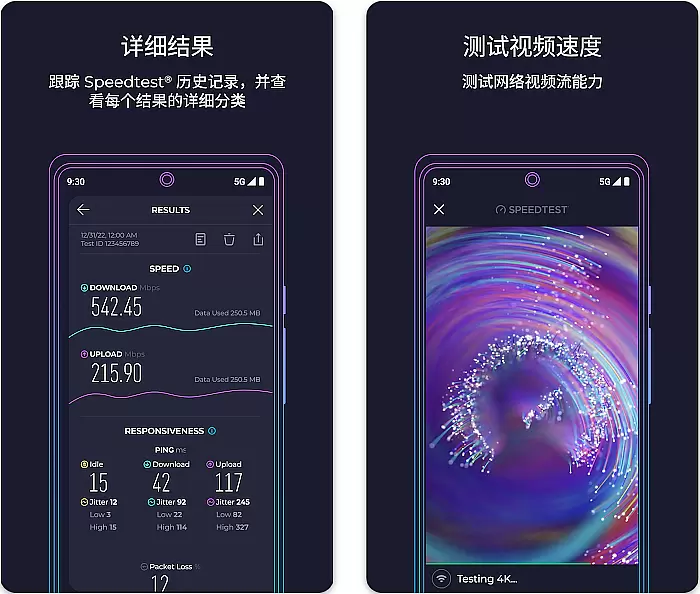
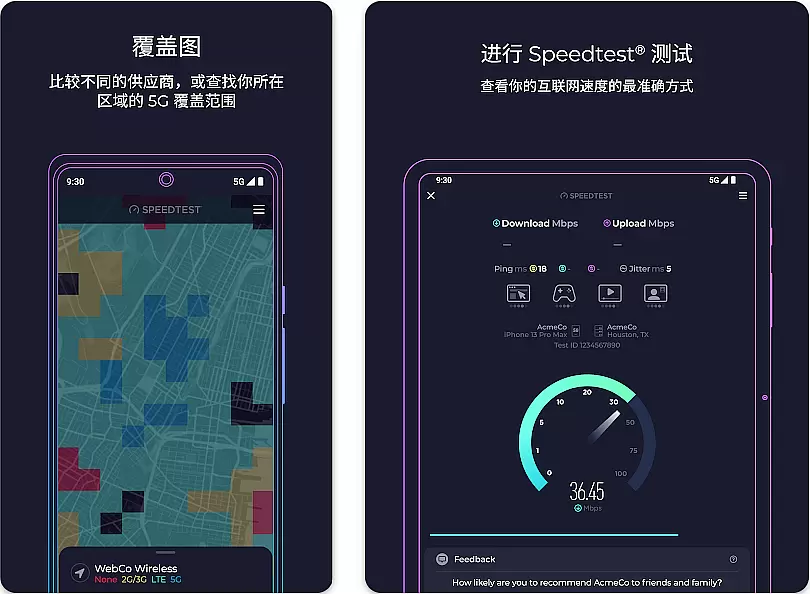
Speedtest by Ookla is a powerful network diagnostic tool designed to provide users with accurate internet speed measurements. The app offers comprehensive testing capabilities including download, upload, and latency checks
Beyond basic speed tests, the application provides detailed network analytics such as packet loss, jitter, and historical performance tracking. These features make it particularly useful for both casual users monitoring their home internet and IT professionals assessing network infrastructure
The app's value lies in its ability to deliver consistent and reliable performance metrics across different devices and network conditions, helping users make informed decisions about their internet service quality
Speedtest stands out through its advanced testing protocols and user-friendly interface. The app implements industry-standard testing methodologies while maintaining an intuitive design
Key functionalities include real-time speed graphs, server selection based on location, and result sharing options. Users can compare their current test results with previous ones through the built-in history feature
Additional notable features encompass background testing capability, widget support for quick access, and integration with various network diagnostic tools, making it a comprehensive solution for network performance evaluation
Speedtest by Ookla is a premier tool designed to deliver precise and reliable internet speed measurements. The core function of this application lies in its ability to accurately measure download speeds, upload speeds, and latency with minimal margin for error. This precision is achieved through a sophisticated testing methodology that connects users to the closest and most reliable servers available.
The app employs advanced algorithms to ensure that each test reflects real-world conditions as closely as possible. By leveraging a vast network of servers worldwide, Speedtest provides consistent and accurate results regardless of the user's location. This ensures that whether you're testing your connection on a mobile network or a home broadband setup, the data you receive is both relevant and actionable.
For users, this means gaining access to trustworthy information about their internet performance. Whether troubleshooting connectivity issues, verifying promised speeds from an ISP, or simply monitoring network health, Speedtest equips users with the insights needed to make informed decisions. The reliability of these metrics makes it an indispensable tool for anyone looking to optimize their online experience.
A standout feature of Speedtest by Ookla is its commitment to providing a user-friendly interface that simplifies complex technical processes. The design philosophy centers around making internet speed testing accessible even to those who may not be tech-savvy. With just one tap, users can initiate a test without needing any prior technical knowledge or configuration.
The layout is clean and uncluttered, presenting key metrics such as download speed, upload speed, and ping time in an easy-to-read format. Visual indicators like progress bars and color-coded results further enhance comprehension, allowing users to quickly interpret their data without feeling overwhelmed. Additionally, historical data is presented clearly, enabling users to track changes over time effortlessly.
This intuitive approach extends beyond mere aesthetics; it enhances productivity by reducing the learning curve associated with more complicated diagnostic tools. Users benefit from quick access to critical information without unnecessary distractions or complications. As a result, Speedtest strikes the perfect balance between functionality and ease-of-use, ensuring that all users can confidently assess their internet performance whenever needed.
Accurate speed measurement
User-friendly interface
Comprehensive analytics
Global server network
Reliable performance
Requires stable connection
Ads in free version
Premium subscription cost
Background data usage
Occasional server issues

 4.10
4.10
Use your phone as a webcam on your computer over WiFi or USB.
4.40
Safely recover deleted photos, videos, and files with a single easy tap.
3.70
Enjoy smooth gameplay with Game Booster
4.90
Small and simple app to Verify Root Access and BusyBox Install!
4.70
Excellent scientific calculator with symbolic algebra, integrals, derivatives
4.80
Undelete and recover your lost or deleted files with DiskDigger!
3.40
Game Booster, GFX Tool is now compatible with newer game update
4.50
Automate everything from settings to photos, SMS to speech. ADC2 prize winner.
4.10
Best leveling tool for your Android device. Hang paintings like a pro.
4.90
Easily install aab(Android App Bundle) files on your Android device with our app
4.80
Optimize your WiFi network, turn your phone into Wifi Analyzer
4.70
NFC Tools can read and write NFC tags.
4.70
Protect your device with antivirus, storage cleanup, and system monitoring
4.70
Play your X-Box games remotely in 1080p with any controller and zero latency
4.60
eXtended Permission Manager - a small app to manage permissions and AppOps
4.50
Quickly check the frequency of the Earth
4.30
Unleash gamepad precision for ultimate mobile gaming dominance.
3.90
Create your own custom widget with endless possibilities
3.90


User Reviews