
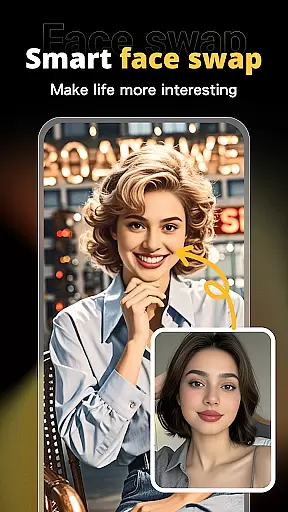
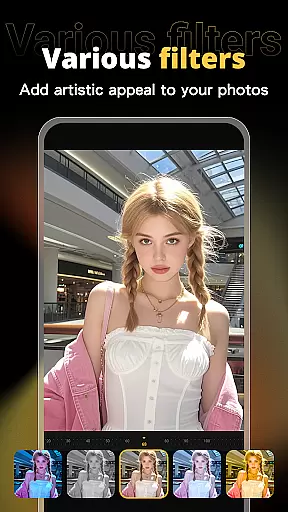



X PhotoKit is a versatile photo editing application that brings professional-grade tools to your fingertips. Featuring AI-powered face swapping, comprehensive photo editing options, collage creation, and ready-to-use templates, this app allows users to effortlessly enhance their photos and create unique visual content with ease.
The app's standout feature is its intelligent AI face swap technology, which uses advanced algorithms to seamlessly replace faces in images while maintaining a natural look. With additional tools like image stitching, filter effects, and adjustment options, X PhotoKit caters to both casual users and design enthusiasts who want to elevate their photo editing game. Whether you're creating social media content, designing promotional materials, or preserving travel memories, this app provides the tools needed to produce high-quality results on any device.
X PhotoKit offers an impressive range of features designed to meet diverse photo editing needs. The app includes a powerful suite of editing tools such as filters, effects, and precise adjustment sliders for brightness, contrast, saturation, and more. These tools allow users to quickly beautify their photos and achieve professional-level enhancements without requiring extensive technical knowledge.
One of the most innovative aspects of X PhotoKit is its AI face swap functionality. Users can upload a selfie and let the intelligent algorithm seamlessly blend their face into another image, ensuring realistic results every time. Additionally, the app provides built-in templates for posters, holiday cards, and social media graphics, along with customizable collage layouts and image stitching capabilities. This combination of creative freedom and user-friendly design makes X PhotoKit an ideal choice for unleashing creativity anytime, anywhere.
Real-time capture and preview functionality is essential for ensuring that users can see the results of their photo edits instantly. This feature allows users to visualize changes as they apply filters, effects, and adjustments, providing immediate feedback on their creative decisions.
X PhotoKit offers a seamless real-time editing experience through its advanced processing capabilities. The app ensures that even complex edits like AI face swapping and image stitching are previewed without delay, maintaining a smooth workflow for users.
The benefit of real-time capture and preview in X PhotoKit is the ability for users to fine-tune their work efficiently. Whether enhancing personal portraits or creating professional-quality posters, users can make precise adjustments and see the outcomes instantly, thus saving time and improving productivity.
This instant feedback loop empowers users to experiment with different styles and settings confidently. By seeing the impact of each edit in real time, users can unleash their creativity and produce visually stunning images that meet their exact vision.
AI beauty and enhancement features focus on improving the aesthetic quality of photos while maintaining a natural look. These tools use sophisticated algorithms to enhance facial features, skin texture, and overall image quality without making the results appear artificial or overly processed.
In X PhotoKit, the AI beauty and enhancement functionalities leverage intelligent algorithms to deliver realistic improvements. Users can beautify their photos using various filters and effects that intelligently adjust elements such as skin tone, eye brightness, and smile enhancement, ensuring the final image looks polished yet authentic.
The advantage of these AI-driven enhancements is the balance between aesthetic improvement and natural appearance. Users can elevate the visual impact of their photos while preserving the original essence, which is crucial for creating believable and appealing images.
With X PhotoKit's AI beauty features, both amateur and professional photographers can achieve high-quality results effortlessly. The natural enhancement options allow users to create stunning visuals that retain their genuine character, making the app suitable for a wide range of applications from social sharing to commercial design.
User-friendly interface
Advanced AI face swap
Variety of templates
Comprehensive editing tools
Creative collage options
Limited free features
Occasional ads
Premium subscription cost
High system requirements
Learning curve for beginners

Remote control of the phone camera from your Wear OS smartwatch
 3.70
3.70
Find time and duration of different sunlight phases at any location
4.90
Viewfinder, Light meter, Reciprocity failure time, DOF & Bellows Extension
4.60
Virtual makeup, hair filters & body tuner—edit from face to full body!
4.20
Photo prints, cards, & gifts at Walgreens. Easy ordering & fast local pickup !
4.80
Take videos and pictures with the popular TikTok TIME WARP SCAN filter.
4.60
Raw Image Viewer. Gallery with support of raw images (.cr3, .cr2, .nef, .raf).
2.00
Professional camera app that brings DSLR manual photography controls to Android.
4.20
Effortlessly make high-quality GIFs from images & videos without any watermarks.
4.70
Automatically backup your photos and videos to computer, NAS and Cloud services
4.60
Movie camera, supports pro recording settings for filming. Try it and be amazed!
4.50
AI portrait generator and polaroid AI selfie, fun AI generated AI photo creator!
4.30
Smart, light, and fast photo and video gallery
4.30
All-in-One Editor & AI Photo Enhancer, Beautify & Retouch, Collage, Cartoonify
4.20
Professional photography on your mobile phone
4.20
Catch sunlight, sunrise sunset times and sun phases with the AR sun tracker.
4.10
How would you look like with a differently shaped nose, chin or lips?
3.90
Professional video recording application with manual controls for filmmakers!
2.80
Snap photos remotely using your Garmin watch as the camera trigger
4.1


User Reviews