
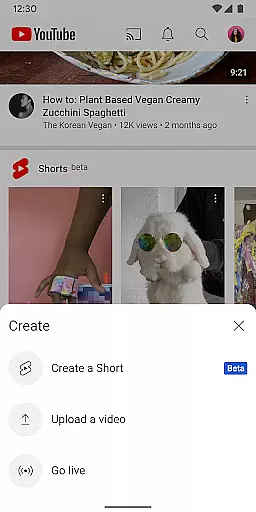




YouTube is the world's leading video-sharing platform, offering an extensive range of content across various categories. Users can explore trending videos in music, gaming, beauty, news, and more. The app provides personalized recommendations on the Home screen and allows users to subscribe to their favorite channels for regular updates.
Beyond just watching, YouTube enables content creation directly from mobile devices. Users can upload videos, engage with audiences through live streaming, and interact with the community via comments, posts, and stories. With features like channel memberships and YouTube Premium, users can support creators and enjoy an ad-free experience.
YouTube is ideal for anyone looking to consume or create video content. Whether you're a casual viewer or aspiring creator, the platform offers tools and features that cater to diverse needs, making it a versatile choice for video enthusiasts worldwide.
YouTube stands out with its robust set of features designed for both viewers and creators. The Home screen provides personalized video recommendations based on user preferences and viewing history. The Subscriptions tab ensures users never miss updates from their favorite channels, while the Library section keeps track of watched, liked, and saved videos.
For creators, YouTube offers powerful tools such as live streaming, story sharing, and community posts. These features help creators engage with their audience in real-time and build a loyal following. Additionally, YouTube's monetization options, including channel memberships and Super Chats, allow creators to earn revenue while providing exclusive perks to subscribers.
YouTube Premium enhances the viewing experience by offering ad-free playback, offline downloads, and access to YouTube Music Premium. This subscription service caters to users seeking uninterrupted entertainment and additional benefits, setting YouTube apart from other video platforms.
Video format compatibility is a crucial feature for any video player, ensuring that users can enjoy content in various formats without technical barriers. YouTube excels in this area by supporting a wide range of video formats, from common ones like MP4 and AVI to more specialized codecs.
The app's robust compatibility allows creators to upload videos without worrying about format restrictions, while viewers can stream content seamlessly across different devices. This versatility ensures that whether you're watching on a smartphone, tablet, or smart TV, the video quality remains consistent and reliable.
Moreover, YouTube's adaptive streaming technology automatically adjusts video quality based on your internet connection, optimizing the viewing experience regardless of the original file format. This intelligent system guarantees smooth playback even during network fluctuations.
For content creators, this extensive format support means more creative freedom in video production. They can experiment with different formats and resolutions knowing that YouTube will deliver their content accurately to audiences worldwide.
AI-powered editing features are revolutionizing how users create and edit video content on mobile platforms. YouTube incorporates several advanced AI tools that make video creation more accessible and professional-looking for all users.
The platform's automatic captioning system uses sophisticated speech recognition algorithms to generate accurate subtitles, enhancing accessibility for viewers while saving creators time in manual transcription. Additionally, YouTube's AI-driven enhancement tools can automatically adjust lighting, color balance, and audio levels, elevating the quality of amateur productions.
For content organization, YouTube's AI analyzes video content to suggest optimal chapter markers and thumbnails, helping creators improve viewer engagement. The system also provides intelligent cropping suggestions for different aspect ratios, ensuring content looks great on all devices.
These AI-powered features not only streamline the editing process but also enable creators to focus more on content ideation rather than technical execution. As these technologies continue to evolve, they promise to further democratize professional-quality video production.
User-friendly interface
Extensive content library
Personalized recommendations
Live streaming capabilities
Monetization opportunities
Ads in free version
Limited offline access
High data usage
Restricted features
Subscription costs

?100% FREE! Download & save videos? safely in this app. All formats supported.
 4.60
4.60
This app was created to edit the metadata of music files.
4.20
Turn your phone into a wireless camera!
4.20
Fast & easy HD video downloader for all formats, support 4K playback & download.
4.60
Movie maker & video editing app with AI effects and green screen
4.30
AI Video Editor:AI Music, Text to Video,Text to Speech,Auto Caption,Video Effect
4.00
Video Downloader, Multiple Resolution Options, Video Player
4.50
Video&Drama Player All Format is a HD video player, music player
3.00
Photo editor & video maker with music and slideshows.
4.10
Tik & Story Saver-Download ALL social media videos, photos & reels no watermark.
4.80
Screen recorder with audio to take live videos & Screenshot in high quality!
4.70
Create photo video with music & template. AI video maker for stunning slideshow.
4.60
Video player, file manager for all formats, 4K/HD media player supports subtitle
4.30
Powerful Video Editor & Photo Editing App —— Quick Edits & Stunning Effects!
4.30
Video Downloader is an utility that can save videos and music from web sites
4.20
HD video & music player - All format support with floating & PIP mode!
3.80
Live TV, anywhere in your home
3.80
Connect EasyCap or UVC devices for recording and broadcast video/audio stream
3.60
The smartest M3U IPTV Player your playlists have ever seen.
4.5


User Reviews