

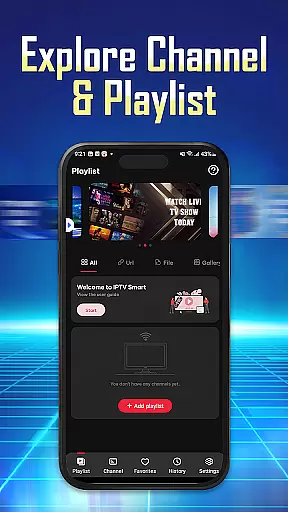

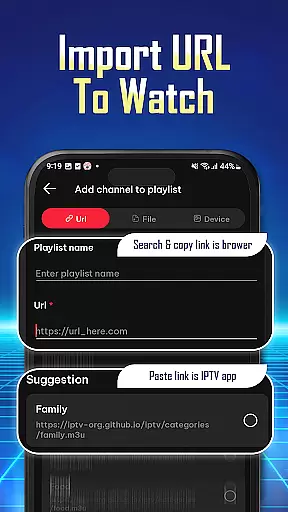
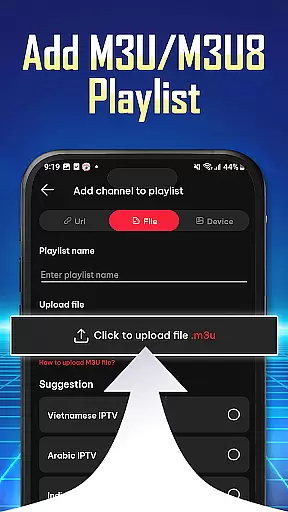
IPTV Player - Smarters Watch TV is a versatile media player designed for seamless streaming of live TV channels, sports events, and movie series. This application allows users to import playlists via URL or M3U/M3U8 files, making it easy to organize preferred content for quick access.
With support for high-definition streaming and multi-device compatibility, IPTV Player ensures an uninterrupted entertainment experience. Whether you're watching on a phone, tablet, or Android TV, the app provides a personalized and user-friendly interface that caters to all your streaming needs.
IPTV Player offers a range of features including flexible playlist support for both M3U and M3U8 formats, allowing users to effortlessly manage their content. The app supports high-definition streaming, ensuring top-quality video playback for live TV and sports events.
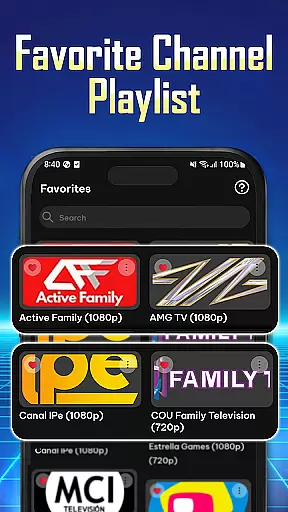
Users can personalize their viewing experience by organizing favorite channels and accessing playback history. With wide compatibility across phones, tablets, and Android TV, IPTV Player delivers a seamless navigation experience, enabling quick channel searches and easy saving of preferred content.
Video format compatibility is a crucial feature for any video player application, ensuring that users can enjoy content in various formats without technical hindrances. IPTV Player - Smarters Watch TV excels in this area by supporting both M3U and M3U8 playlist formats, which are widely used for streaming media over the internet.
The app's ability to handle these formats means users can import playlists from different sources, expanding their content options significantly. This flexibility allows for an uninterrupted entertainment experience, as users are not limited by file type or source.
For users, this translates into a seamless experience where they can stream live TV channels, sports events, and movies in high-definition quality without worrying about format issues. The IPTV Player's wide compatibility ensures that whether you're using a phone, tablet, or Android TV, your playlists will work smoothly across all devices.
While IPTV Player - Smarters Watch TV focuses primarily on streaming capabilities, it also integrates AI-powered features to enhance user experience. Although not a traditional video editor, the app uses intelligent algorithms to organize preferred channels, shows, and movies, providing quick access and a personalized viewing journey.
This smart organization is akin to AI-driven editing tools that adapt to user preferences, making navigation effortless. Users can easily find channels, save favorites, and review history, which collectively serve as a form of content curation powered by AI.
The benefit to users is a streamlined interface where their most-watched content is readily accessible, reducing search times and enhancing overall satisfaction. By leveraging AI in this manner, IPTV Player ensures that viewers can focus more on enjoying their content rather than managing it.
User-friendly interface
High-definition streaming
Multi-device support
Flexible playlist options
Wide compatibility
No pre-installed channels
Requires manual playlist setup
Limited offline functionality
Dependent on internet speed
Ads in free version

Online Videos Player
 3.90
3.90
Client application for NextPVR software
3.00
You can play SWF format file!
2.50
IPTV-Smarters Player Pro M3U - Watch Live Stream TV Channels with Chromecast
4.00
Play and download HD videos from all sources — fast, simple, and all-in-one.
4.1
Fast & Private Video Downloader App. Save all videos easily from the Internet.
4.40
Add date and time watermark to photos and videos
4.50
Create, Publish & Maximize
4.70
Photo editor & video maker with music and slideshows.
4.10
#1 Torrent App on Android ** No Ads Ever + Battery Saver **
4.80
GENRAL PRO - General Pro is the best video player that fully supports all formats.
4.70
Cast Videos from Web Browser, IPTV to Roku, Chromecast, DLNA, Smart TV +more
4.60
VLC Remote lets you control your VLC Media Player on Mac, PC or Linux.
4.60
HD video maker with no watermark, no ads & vlog maker with music, PIP, text
4.50
Fast & Private HD Video Downloader with Built-in Proxy Browser and Video Player.
4.50
KMPlayer Plus (Divx Codec) officially support Divx codec.
4.30
Video player with powerful streaming playback and various convenient features.
2.10
The smartest M3U IPTV Player your playlists have ever seen.
4.3
Powerful HD video player with support for all formats & subtitles.
4.4


User Reviews