
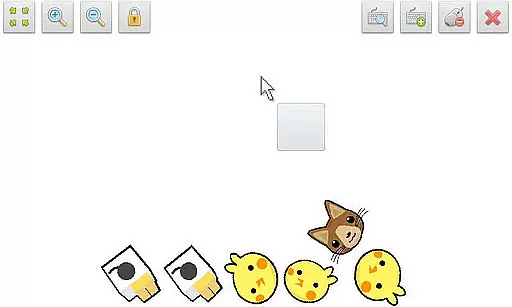
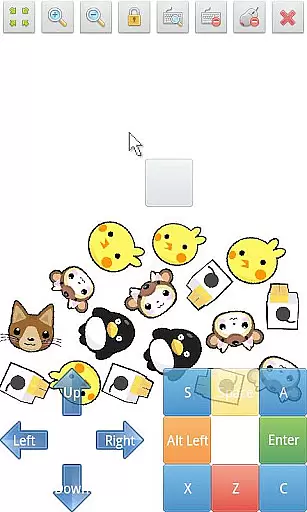
SWF Player Pro is a specialized video player designed for SWF format files, providing users with an efficient way to enjoy Flash content on Android devices. The app supports playback through both Android AIR and Ruffle engines, ensuring compatibility across different SWF files.
In addition to basic playback, the app offers advanced features such as zoom in/out functionality, play/stop controls, and fullscreen mode. Users can also benefit from multi-touch virtual keypads, virtual mouse support, and a built-in file browser for easy navigation. With customizable settings like wmode, background color, and rotation, SWF Player Pro delivers a tailored viewing experience.
This application is particularly useful for professionals and enthusiasts who need to view legacy Flash animations or interactive content on modern mobile devices. By supporting essential playback features and offering advanced customization options, it ensures that users can access their SWF files conveniently and efficiently.
SWF Player Pro stands out with its comprehensive feature set tailored specifically for SWF file playback. The app leverages two powerful rendering engines - Android AIR and Ruffle - to ensure smooth and reliable performance across various SWF content types.
One of the key strengths of this application is its robust control system. Users can easily manipulate their viewing experience with intuitive play/stop controls, zoom functionality, and fullscreen options. The implementation of multi-touch virtual keypads and virtual mouse support makes interaction with SWF content seamless and natural.
The app's advanced settings menu allows users to fine-tune their experience with options for wmode configuration, background color adjustment, wake-lock management, rotation settings, quality control, and scaling preferences. These features demonstrate the developer's commitment to providing a highly customizable and professional-grade SWF playback solution.
SWF Player Pro offers comprehensive support for SWF format files, ensuring users can enjoy a wide range of multimedia content. The application leverages two powerful SWF engines - Android AIR and Ruffle - to provide optimal playback performance.
The player's versatility is further enhanced by its advanced settings options, which include wmode, background color adjustments, rotation controls, and scaling features. These functionalities allow users to customize their viewing experience according to their specific preferences and device capabilities.
Additional features such as zoom in/out functionality, play/stop controls, and fullscreen support make this application suitable for various use cases, from casual viewing to professional presentations. The multi-touch virtual keypad and virtual mouse support add another layer of convenience for users working with interactive SWF content.
While primarily a video player, SWF Player Pro incorporates intelligent features that enhance the user's interaction with SWF content. The application's advanced settings menu provides sophisticated options for optimizing video playback, including quality adjustments and wake-lock control to prevent screen dimming during extended viewing sessions.
The implementation of multi-touch gestures and virtual keypad functionality demonstrates the application's adaptation to modern user interface expectations. These features, combined with traditional playback controls, create an intuitive and responsive user experience that caters to both casual viewers and power users.
Furthermore, the player's support for file browsing and its comprehensive feature set make it a versatile tool for managing and viewing SWF content. Although not a traditional video editor, these intelligent features effectively streamline the process of working with SWF files on mobile devices.
User-friendly interface
Advanced customization options
Multi-engine support
Intuitive controls
Comprehensive feature set
Limited to SWF format
No iOS version available
Premium price point
Occasional compatibility issues
Requires technical knowledge for advanced settings

Save photos and videos from social apps in one tap.
 3.60
3.60
Cast Videos from Web Browser, IPTV to Roku, Chromecast, DLNA, Smart TV +more
4.60
Watch a large amount of high-definition short drama content
4.60
KineMaster, Your Ultimate Video Editor!
4.40
Fast video downloader & private browser. Save HD clips to watch offline.
4.40
HD video maker with no watermark, no ads & vlog maker with music, PIP, text
4.50
Support 1000+ Video Format, Subtitle Download, mp3 & Background Play, Cast On TV
4.60
Stream Web Videos to Chromecast, Samsung, LG, Sony, Roku, Fire TV, DLNA + more
4.00
An easy-to-use and all-round screen recorder with audio
4.80
Download Hub, easy and private way to download and enjoy your videos offline
4.80
Screen recorder with audio to take live videos & Screenshot in high quality!
4.70
VLC Remote lets you control your VLC Media Player on Mac, PC or Linux.
4.60
Browser + Remote for Roku to stream webvideos, online movies and livestreams
4.60
Cast to Chromecast, Xbox, Fire Stick, Roku, DLNA, Smart TV & No Feature Limited!
4.50
Powerful video player with advanced hardware acceleration and subtitle supports
4.20
VLC for Android is the best open source video and music player, fast and easy!
4.10
Explore the largest library of free GIFs, Stickers & Memes - or create your own!
3.90
Kodi media center, a free and open source cross-platform entertainment hub
3.60
Browser for Sony TV to stream web videos, online movies and live tv
3.20


User Reviews