





Pose is an innovative AI-powered photo and video editing application designed to help users create viral, high-quality content for social media platforms. The app offers a wide range of features including AI-generated photos and videos, trendy filters, and professional styles that transform ordinary images into extraordinary visual stories. With tools like the Polaroid AI filter, AI snow video effects, and birthday photo shoots, Pose enables users to produce content that stands out on TikTok, Instagram, and other platforms.
The app's versatility extends beyond simple photo editing. It includes creative options such as AI boyfriend/girlfriend video generation, action figure creation, and mermaid filters, allowing users to explore various forms of digital artistry. Whether you're looking to enhance your personal profile or captivate a wider audience, Pose provides all the necessary tools to elevate your social media presence through hyper-realistic AI transformations and engaging short videos.
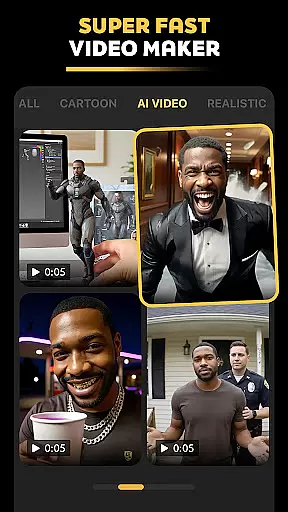
Pose distinguishes itself through its comprehensive suite of AI-driven features tailored for modern content creators. One of its standout capabilities is the AI Video Generator, which turns static images into dynamic videos using effects like bullet time, zoom in/out filters, and caricature animations. This feature empowers users to craft unique narratives by animating their selfies or photos with cinematic flair.
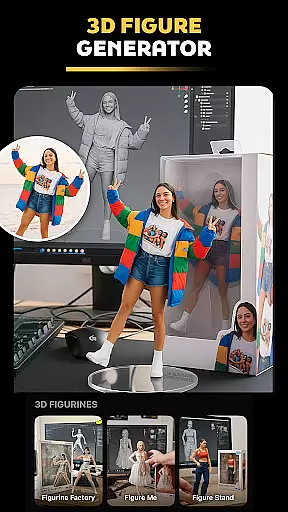
In addition to video generation, Pose offers specialized photo editing tools such as the Rain & Snow AI Photo Remake, which adds seasonal aesthetics to images, and the Viral Polaroid AI Filter, which brings retro charm to digital photography. These functionalities cater to diverse creative needs, from producing moody winter portraits to designing playful Y2K-style portraits. Furthermore, niche features like the AI Action Figure Maker allow users to create 3D figurines from their selfies, adding another layer of innovation to the app's already robust toolkit.
Real-time capture and preview functionality is essential for modern photography applications, allowing users to see exactly what the camera sees before taking a shot. Pose offers an advanced real-time preview system that ensures every photo or video taken meets professional standards. The app's AI-powered engine processes images instantly, providing users with accurate representations of final outputs including effects and filters.
This feature is particularly valuable when using Pose's specialized filters such as the AI snow effect or Polaroid AI filter. Users can preview how these effects will look in real-time, making it easier to create content that aligns with current social media trends. The instant feedback loop enables creators to fine-tune their compositions and achieve perfect results without guesswork.
The benefits of real-time capture extend beyond just previewing effects. Pose's implementation includes advanced features like exposure adjustment, focus control, and composition guides, all visible in the live viewfinder. This comprehensive approach to real-time preview empowers users to produce high-quality content consistently, whether they're creating professional business headshots or experimenting with viral photo effects.
AI beauty and enhancement features have become crucial in modern photo editing applications, but maintaining natural-looking results is key to user satisfaction. Pose implements sophisticated AI algorithms that enhance facial features while preserving authentic human characteristics. Unlike traditional beauty filters that often create artificial appearances, Pose's technology intelligently analyzes facial structures to apply enhancements that look genuine and professional.
The application offers various enhancement options including skin smoothing, feature refinement, and makeup simulation, all calibrated to maintain natural proportions. For instance, when using the AI Business Headshot feature, users can expect subtle improvements that enhance professional appearance without compromising authenticity. This approach is particularly valuable for LinkedIn profiles and other professional networking platforms where credibility matters.
Pose's commitment to natural enhancement extends to its trendy filters as well. Whether applying the Y2K portrait aesthetic or mermaid transformation, the app maintains realistic textures and proportions. This balance between enhancement and authenticity sets Pose apart from competitors, ensuring users can experiment with creative effects while maintaining believable results across all their social media platforms.
User-friendly interface
Wide variety of filters
High-quality output
Frequent updates
Creative versatility
Subscription fees apply
Some features are complex
Occasional bugs
Limited free options
Requires internet connection

How would you look like with a differently shaped nose, chin or lips?
 3.90
3.90
Create Business Headshots, Polaroid Filter, Retake Photos,Profile Pics,AI Photos
4.50
Gallery Slideshow is slideshow maker app for slideshow from your gallery photos.
3.90
Luminar: Photo Editor - easy picture editing with AI
4.20
AI photo enhancer with Sora 2! Enhance, descratch, and colorize your old photos.
4.50
Transform Photos: Edit, Beautify and Craft Memories & Make Collages!
4.10
Unblur, enhance & restore photos with powerful AI photo enhancer tools.
4.60
Turn photos into cartoons & avatars! - Photo Editor, Cartoon Face!
3.90
Snap photos remotely using your Garmin watch as the camera trigger
4.5
Perfect body tune & face app - photo retouch, makeup, slim body & beautify face.
4.80
AI Photo Editor with 100+ Filters, Effects! Remove BG, Retouch & Photo Enhancer.
4.80
Easily view, share, delete photos with Gallery.
4.70
The original Rarevision VHS look seen everywhere!
4.70
AI photo editor with hair editor, retouch tools, hair color changer & filters!
4.50
Fit multiple photos on one post. Create carousels & scroll layouts for Instagram
4.50
Turn your phone into a professional camera - full DSLR manual photography
4.30
All-in-One Editor & AI Photo Enhancer, Collage, Cartoonify, Funny Stickers & BGS
4.10
live datamoshing
4.00
Application for remote controlling DSLR
3.00


User Reviews