
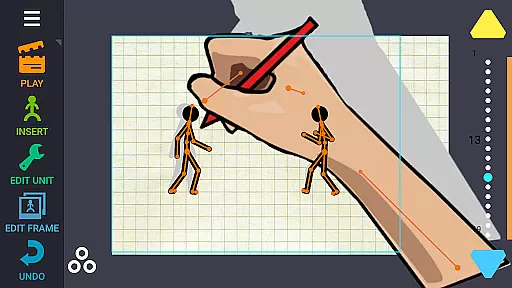
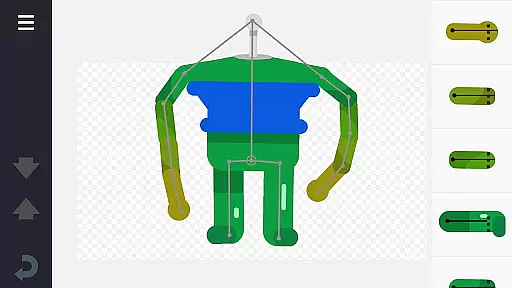
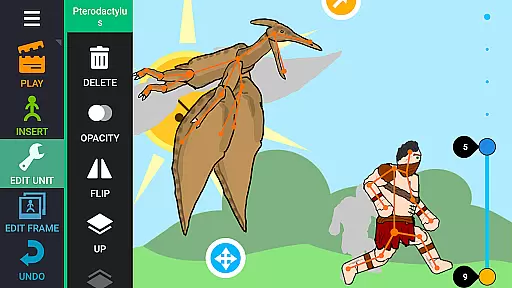
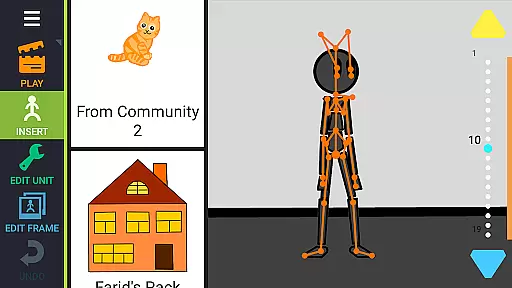
Draw Cartoons 2 PRO is a comprehensive 2D animation app that simplifies the complex process of cartoon creation. Using advanced motion smoothing techniques, users only need to set start and end positions for characters, allowing the program to generate smooth transitions automatically. The app provides a complete library of pre-made characters and objects, including dragons, people, and vehicles, while also offering a character editor for custom creations.
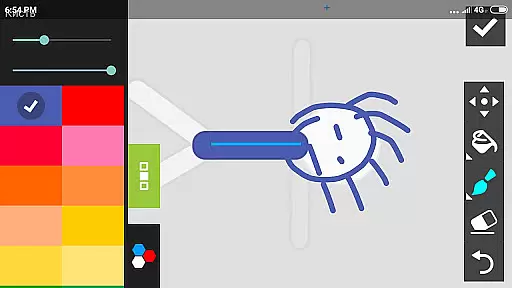
With its intuitive bone-based animation system, users can either draw directly within the app or import images to create unique characters and objects. Additional professional tools include a virtual camera for dramatic close-ups and speed effects for manipulating time in animations. Creators can enhance their projects with music and voiceovers, exporting finished works as MP4 videos or GIFs for sharing on platforms like YouTube using the #drawingcartoons2 tag.
This application is particularly valuable for both aspiring and experienced animators who want to create professional-quality 2D animations without needing extensive technical expertise. The ability to save and share individual elements fosters a collaborative community where users can exchange resources and build upon each other's work.
Draw Cartoons 2 PRO stands out with its innovative features designed to streamline the animation process. The app's core functionality revolves around its skeleton-based animation system, where each character comprises several bones with attached images. This approach enables users to create natural movements by simply defining keyframes, with the software handling the interpolation between poses.
Beyond basic animation tools, the app offers advanced features for more sophisticated projects. The built-in camera tool allows creators to implement dynamic shots and dramatic angles, while speed effects enable precise control over timing and pacing. Users can access a vast library of pre-made assets or utilize the powerful character editor to construct custom elements from scratch. The ability to import external images expands creative possibilities, while the option to add audio tracks enhances storytelling capabilities.
The app's sharing ecosystem sets it apart from other animation tools. Finished projects can be exported in multiple formats, and individual elements can be saved and shared as separate files. This feature promotes collaboration within the animation community, allowing users to contribute to and benefit from a growing collection of user-generated content. The integration with YouTube through dedicated tags further facilitates discovery and community building among animators.
In the realm of 2D animation, Draw Cartoons 2 PRO stands out by offering a comprehensive suite of creative tools that cater to both beginners and advanced animators. The application provides an extensive library of pre-made characters and objects, ranging from mythical creatures like dragons to everyday items such as cars, all constructed with a skeletal bone structure.
For those looking to push their creativity further, the built-in character editor allows users to craft unique creatures and objects by manipulating bones within the app or importing images to use as custom bones. This flexibility ensures that your imagination is the only limit when bringing your animations to life.
Advanced features such as dramatic camera angles for intense close-ups and speed effects for slowing down or speeding up scenes provide professional touches that are typically absent in amateur software. These tools enable creators to infuse their work with cinematic flair and dynamic pacing.
Moreover, the ability to add music or voiceovers enriches the storytelling aspect, allowing for more engaging and emotive cartoons. With these robust tools at your disposal, Draw Cartoons 2 PRO empowers you to produce high-quality animations that resonate with audiences across various platforms.
Draw Cartoons 2 PRO excels in providing canvas and format flexibility, ensuring that animators can tailor their projects to specific needs and preferences. The application supports a versatile workspace where users can adjust dimensions and aspect ratios, accommodating everything from square social media posts to widescreen cinematic experiences.
When it comes to exporting your masterpiece, the app offers multiple formats to suit different distribution channels. Animations can be saved as MP4 videos for high-quality playback on most devices or as GIFs for quick sharing on websites and messaging apps. This versatility ensures that your work reaches its audience in the best possible format.
Additionally, individual elements created within the app can be exported as separate files, fostering a collaborative environment among animators. By tagging creations with #drawingcartoons2, users contribute to a vibrant community where they can share assets and inspire one another.
This ecosystem not only enhances the creative process but also encourages innovation and cross-pollination of ideas, making Draw Cartoons 2 PRO an invaluable tool for anyone serious about animation.
User-friendly interface
Extensive asset library
Advanced animation tools
Community sharing options
Professional export formats
Steep learning curve
Subscription pricing
Resource-intensive
Limited free features
Occasional bugs

Create sweet, cool and unique couple avatars easily, in just a few steps!
 3.40
3.40
Create trending AI photos & videos with powerful effects and 3D styles.
3.20
AI Face Swap, Video Effects Editor, Realtime Morph, Funny Video FX,AI Filters
3.70
Design unique, funny and adorable cat stickers that reflect your own style!
3.80
Mobile pixel art editor. Simple. Fast. Portable.
4.80
Resize photos and print photos in exact size with our powerful photo printer!
3.80
Everything you need to create hand drawn animation, anywhere you go!
4.40
Kling AI is an image and video generation and editing studio powered by AI.
4.50
All-in-One art, logo & collage maker. Design photos and edit video backgrounds
4.80
See Color, Paint Color
4.90
Image resizer to resize, crop, rotate, flip, change dpi photo or picture in bulk
4.60
Discover Cartoon Dream : Unleash Your Creativity with CuttingEdge AI
4.50
Digital illustration drawing & painting pad app to paint Anime and Manga art
4.50
Painting, drawing, & sketching
4.50
Share the joy of painting with ibis Paint! Drawing anime and manga art.
4.50
Image/ Text to Video Generator
4.40
Easy 3D drawing design maker & creator. Model designing, Sculpting. Create&paint
4.00
Powerful home decoration & house design that allows you to design dream home.
3.80
Art of Combination Wear OS Watch Faces
4.5


User Reviews