
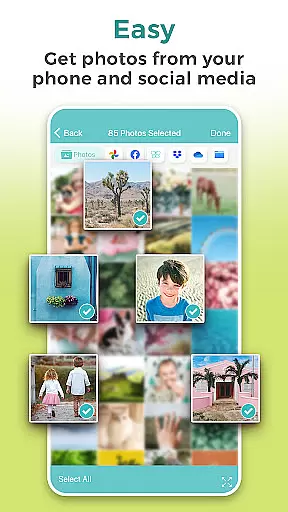
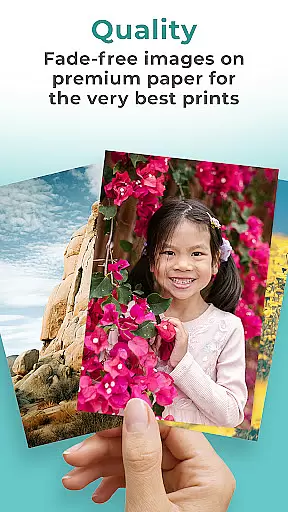
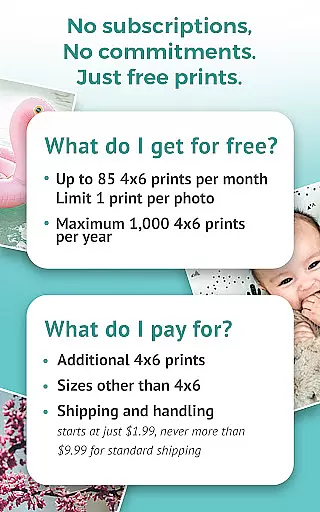
FreePrints is the world's leading photo printing application that allows users to effortlessly print and receive high-quality photos at their doorstep. The app offers up to 85 free 4x6 prints monthly, with a choice of deluxe glossy or premium matte paper options. It supports photo selection from multiple sources including Facebook, Dropbox, and Google Photos, ensuring convenience and flexibility.
Beyond its core free offering, FreePrints provides affordable enlargement options and guarantees vivid color reproduction and fade-free images. With standard shipping starting at just $1.99, the app makes photo printing accessible and cost-effective for everyone. Its user-friendly interface and reliable service have earned it over a million 5-star reviews globally.
The true value of FreePrints lies in its ability to transform digital memories into tangible keepsakes. By prioritizing quality and customer satisfaction, the app has revolutionized mobile photo printing while maintaining strict privacy and security standards for user photos.
FreePrints distinguishes itself through its seamless integration with popular photo storage platforms like Facebook, Dropbox, and Google Photos, enabling users to access and print their cherished memories without hassle. The app's hallmark feature is its 'No subscriptions, No commitments' policy, allowing users to order free prints every month while only paying a nominal shipping fee.
One standout capability is the option to choose between deluxe glossy and premium matte finishes, catering to diverse aesthetic preferences. Additionally, FreePrints ensures superior print quality by using top-tier materials and advanced printing technology, resulting in vibrant colors and long-lasting images. This commitment to excellence has positioned the app as a trusted name in photo printing.
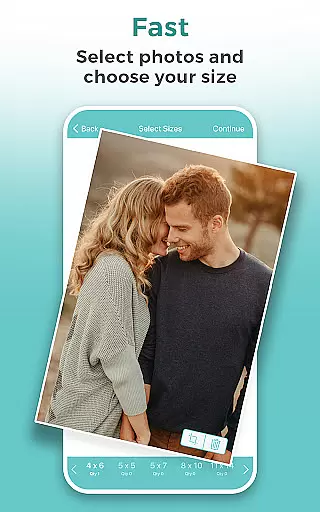
For those seeking larger formats, the app offers an array of enlargement sizes ranging from 5x5 to 20x30 inches. Furthermore, its robust security measures safeguard user data, ensuring that photos remain private and protected. These features collectively enhance the overall user experience, making FreePrints a comprehensive solution for all photo printing needs.
Real-time capture and preview functionality is essential for ensuring that users can accurately frame and adjust their photos before printing. FreePrints offers a seamless experience by allowing users to select images directly from their mobile devices, as well as from popular cloud services like Facebook, Dropbox, and Google Photos.
The app ensures that the quality of the captured image meets the high standards required for physical prints. Users can be confident that the colors, brightness, and contrast they see on their screens will translate beautifully to the printed format. This real-time feedback empowers users to make necessary adjustments, enhancing the overall print quality.
By integrating with various photo sources, FreePrints provides a versatile solution for accessing and printing memories. Whether it's a recent snapshot or a cherished memory stored in the cloud, users can easily retrieve and preview these images within the app, making the process intuitive and user-friendly.
This feature not only simplifies the photo selection process but also adds a layer of convenience and assurance. Knowing exactly how a photo will look when printed helps users avoid disappointments and ensures that each print reflects the moment as vividly as they remember it.
AI beauty and enhancement features have become increasingly popular in photography apps, offering tools that automatically improve image quality while maintaining a natural appearance. FreePrints leverages advanced AI algorithms to enhance photos without compromising their authenticity, ensuring that every print retains its original charm and character.
The AI enhancements focus on subtle improvements such as color correction, noise reduction, and sharpness adjustment. These modifications are designed to elevate the visual appeal of photos without making them appear overly processed or artificial. The result is a collection of prints that look polished yet genuine, preserving the essence of the captured moment.
FreePrints' commitment to quality extends beyond just digital enhancements. The app uses premium glossy or matte photo paper, guaranteeing that the final product meets the highest standards of excellence. This combination of AI-driven enhancements and superior printing materials ensures that users receive top-notch prints every time.
Ultimately, the AI beauty and enhancement features in FreePrints provide users with the confidence that their photos will look their best. By balancing technological advancements with a dedication to natural aesthetics, FreePrints delivers prints that truly reflect the beauty and emotion of life's special moments.
User-friendly interface
High-quality prints
Flexible photo sources
Affordable pricing
Trusted brand reputation
Limited free prints
Shipping costs apply
Premium features costly
Occasional delays
Geographic restrictions

Remote control of the phone camera from your Wear OS smartwatch
 3.70
3.70
Perfect photos with body shaping, BG changer and object remover.
3.70
Trendy TikTok time warp scan funny filter app brings you unique photos & videos.
4.40
Create funny photos and videos with the popular Time Warp Scan filter.
4.90
An interval timer to automate photo taking process for timelapse
2.90
Automatically backup your photos and videos to computer, NAS and Cloud services
4.60
Amazing Photo Effects - The most fun you can have with your photos!
4.70
The original Rarevision VHS look seen everywhere!
4.70
Effortlessly make high-quality GIFs from images & videos without any watermarks.
4.70
Android Native system HD camera app. Never been so simple and faster.
4.70
Enhance, upscale, and transform your images — on your device, without limits
4.70
Enhance, retouch & create your story - Share the moment with Photoshop Express.
4.60
AI photo editor with hair editor, retouch tools, hair color changer & filters!
4.50
Use AI Video Generator to turn your words to ai generated videos.
4.50
Virtual makeup, hair filters & body tuner—edit from face to full body!
4.20
Create & Edit with AI: AI Remove, Enhance, Retouch, Filter
4.10
Transform Photos: Edit, Beautify and Craft Memories & Make Collages!
4.10
USB Storage Access for Photos, Videos, Music and Documents
3.80
Over 800 film simulation recipes for Fujifilm. Black Friday Offer!
4.4


User Reviews