

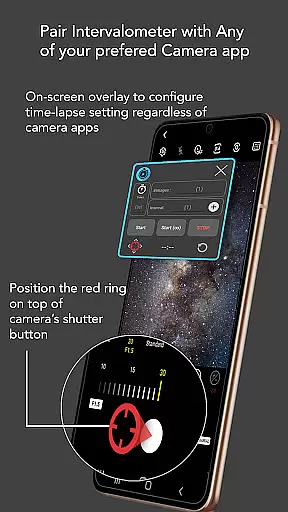
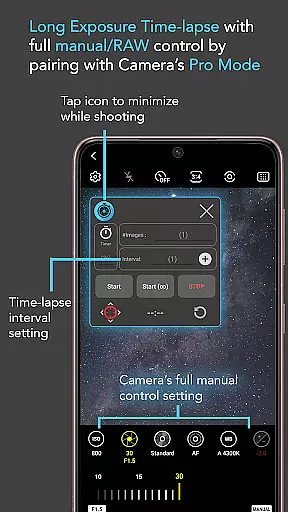
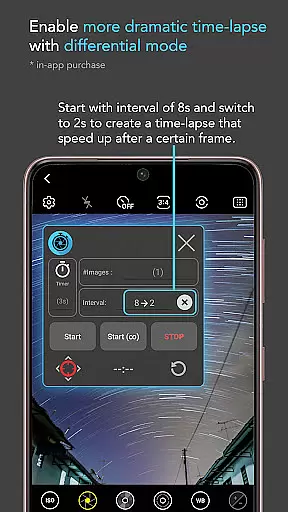
Intervalometer for TimeLapse is a powerful photography tool designed to automate the process of capturing time-lapse sequences. This app allows photographers to configure specific time intervals between shutter releases, enabling precise control over exposure settings and supporting RAW format capture. It works seamlessly with any camera app on Android devices version 7 and above.
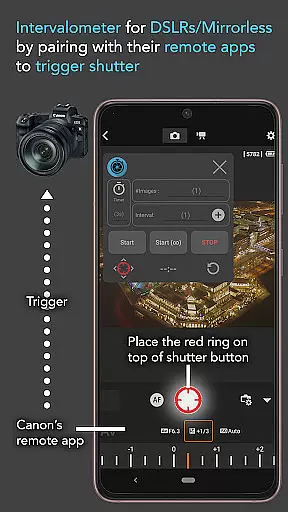
The application's versatility extends beyond basic time-lapse functionality. Users can employ it in various specialized modes such as light-painting, HDR, night mode, and more. Whether capturing ultra-wide angle shots or experimenting with long exposure techniques, Intervalometer ensures consistent and automated image capture. The app also integrates with dedicated camera remote applications from leading brands like Canon, Sony, and Nikon.
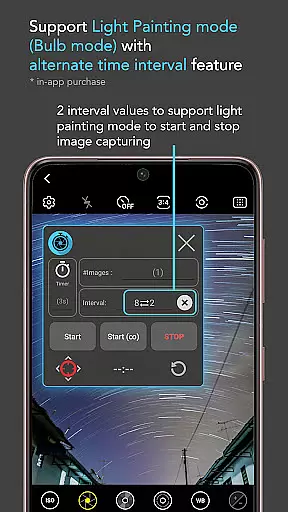
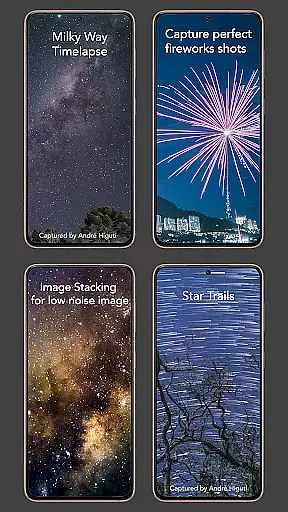
Photographers can achieve professional-grade results through features like bulb mode and infinite shooting capabilities. From creating star trail sequences to capturing holy grail transitions from day to night, this tool empowers users to explore advanced time-lapse techniques while maintaining complete creative control.
Intervalometer offers an extensive set of features that cater to both amateur and professional photographers. The app provides full control over time-lapse configurations, allowing users to customize delay timers, interval times, and the number of shots. Its infinite mode enables continuous shooting until manually stopped, while bulb mode supports extended exposure photography.
A key advantage of Intervalometer is its compatibility with any camera application. Users can reconfigure the shutter button position to match their preferred camera interface. This flexibility ensures seamless integration with existing workflows and equipment setups. The app utilizes AccessibilityService API to automate shutter triggering, mimicking the functionality of traditional intervalometers.
Advanced photographers will appreciate the app's ability to support complex time-lapse projects. From low-light scenarios to challenging holy grail transitions, Intervalometer maintains consistent performance. The application also facilitates image stacking techniques, enabling users to create high-quality composite images through post-processing methods.
Real-time capture and preview functionality is essential for photographers who need to ensure their time-lapse sequences are executed flawlessly. Intervalometer for TimeLapse offers this by integrating seamlessly with any camera app, allowing users to configure and trigger the shutter at precise intervals.
This application leverages AccessibilityService API to automate the camera shutter process on Android devices, functioning as a virtual intervalometer. This means that whether you're using a smartphone or a dedicated camera's remote app, you can rely on real-time feedback to adjust settings such as exposure, HDR, or night mode before capturing each frame.
The value of real-time capture extends beyond convenience; it ensures accuracy in complex time-lapse projects like low light, long exposure, or star trail photography. Users can monitor their setup and make necessary adjustments, ensuring every shot aligns with their creative vision without manual intervention.
While Intervalometer for TimeLapse does not focus on AI beauty enhancements typical in portrait applications, its ability to work with any camera modeu2014including manual and specialized modesu2014offers a different kind of enhancement. It provides naturalness and authenticity in time-lapse photography by giving users full control over their camera settings.
Photographers can achieve high-quality results through features like bulb mode and infinite mode, which allow for extended exposures and unlimited photo sequences. These capabilities are crucial for advanced techniques such as Holy Grail time-lapses or capturing star trails, where natural lighting changes must be preserved.
By automating the shutter release process while maintaining complete user control over the camerau2019s parameters, Intervalometer ensures that enhancements come from the photographer's skill and vision rather than post-processing effects. This approach supports professional-grade outputs across various genres including landscape, astrophotography, and urban environments.
User-friendly interface
Wide camera compatibility
Precise time-lapse control
Supports advanced techniques
Flexible configuration options
Requires device restart on some models
Limited initial setup guidance
No built-in image processing
Dependent on other camera apps
May need manual input adjustments

How old age camera Gender Swap App Face Shape Hairstyle App Hair Styler App fun!
 4.00
4.00
Edit like a pro with Hypic. Apply filters, AI effects, & magic touch.
4.40
Superimpose one photo on top of another using the original Superimpose app!
3.20
USB Storage Access for Photos, Videos, Music and Documents
3.80
Transform Photos: Edit, Beautify and Craft Memories & Make Collages!
4.10
AI-powered video creator by MiniMax - Where ideas meet cinema
4.20
Turn photos into cartoons & avatars! - Photo Editor, Cartoon Face!
3.90
live datamoshing
4.00
Snap photos remotely using your Garmin watch as the camera trigger
4.1
Collage your moments in one tap: 1000+ layouts, filters, stickers, and texts.
4.90
Gallery show photo, video, slideshow, is perfect 3D effect private photo albums.
4.80
Your personal guide to the sun and moon. Plan ahead, visualize and predict!
4.70
Take videos and pictures with the popular TikTok TIME WARP SCAN filter.
4.60
Light-weight Media Gallery app for Android made with Jetpack Compose
4.60
Photo Exif Editor allows to view, add and modify EXIF data of multiple photos
4.50
A reflected light meter with spot metering and incident light metering.
4.40
Smart, light, and fast photo and video gallery
4.30
Professional quality photo edits with the new Snapseed.
4.00
Astrophotography with your smartphone, photo live stacking and much more!
3.90


User Reviews