
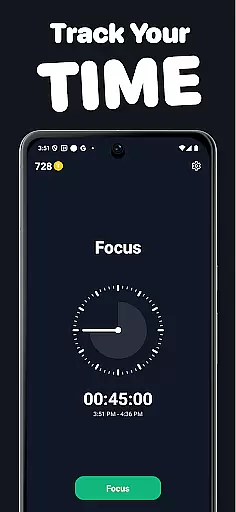
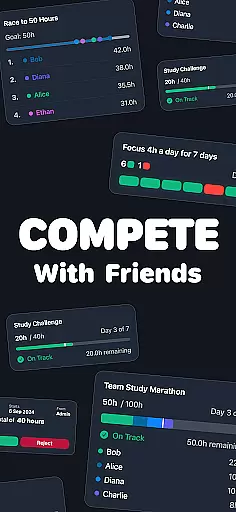
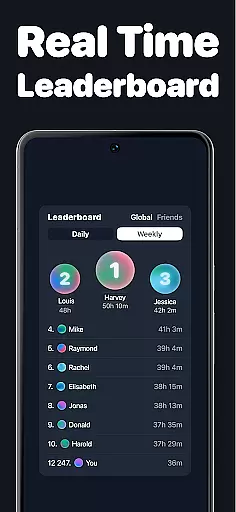
Timero is a productivity app designed to help users build better habits and boost efficiency through friendly competition. The app allows you to track your focus time while participating in various challenges, whether you're studying, working, or training. With features like real-time logging, progress visualization, and team-based goals, Timero ensures that you stay consistent and motivated.
One of the standout aspects of Timero is its ability to create accountability through social interaction. You can join challenges with friends, view live progress updates, and compete in races to achieve specific targets. This makes productivity not just a personal journey but a shared experience, helping you maintain streaks and achieve long-term goals.
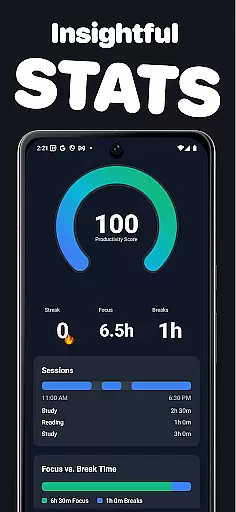
The app's tracking system provides clear insights into how you spend your time, offering weekly stats and consistency reports. Whether you're aiming for solo achievements or contributing to team objectives, Timero offers a structured yet flexible approach to productivity, making it suitable for anyone looking to enhance their focus and get more done.
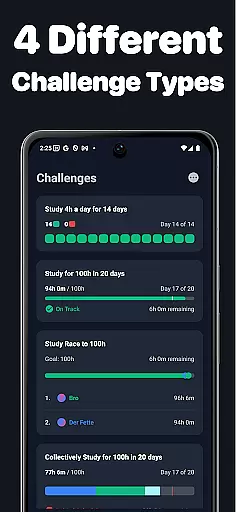
Timero stands out with its diverse range of challenge types tailored to different productivity styles. Users can choose from solo goals for personal targets, races to compete against others, team goals for collaborative efforts, and streaks to maintain daily consistency. Each challenge type is designed to cater to varying motivational triggers, ensuring that every user finds a format that works best for them.
A key feature of Timero is its robust tracking and visualization tools. The app allows users to log their time in real-time, providing instant feedback on their progress. Additionally, users can access detailed statistics and streak data, which helps them understand their productivity patterns over time. These insights enable users to adjust their strategies and optimize their focus sessions effectively.
Another notable aspect is the app's emphasis on social accountability. Timero lets you create or join challenges with friends, fostering a sense of community and shared purpose. By viewing each other's progress live, users can motivate one another and maintain momentum. This blend of individual tracking and social interaction creates a balanced environment where productivity feels rewarding and engaging.
Task management is at the heart of productivity applications, and Timero excels in this area by offering a variety of challenge types to suit different user needs. The app allows users to set personal goals, participate in competitive races, collaborate on team objectives, and maintain streaks for ongoing activities.
Timero's implementation of task management goes beyond simple to-do lists. Users can log their time in real-time, ensuring accurate tracking of their productive hours. This feature helps individuals and teams stay accountable and provides a clear overview of how much time is spent on each activity.
The benefit to users is significant; by breaking down larger objectives into manageable tasks and challenges, Timero fosters a sense of accomplishment and progress. This approach not only boosts productivity but also makes the process enjoyable through friendly competition.
Ultimately, Timero's task management system empowers users to build better habits and achieve more by leveraging social motivation and clear progress tracking. This creates a sustainable model for long-term productivity improvements.
In today's interconnected world, reliable cross-device synchronization is crucial for any productivity tool. Timero ensures that users can seamlessly track their progress across multiple devices, allowing them to stay consistent whether they're using their phone, tablet, or computer.
The app achieves this by implementing robust cloud-based synchronization. Whenever a user logs time or updates their challenge status on one device, the information is instantly updated across all linked devices. This real-time data sharing ensures that users always have access to their most current statistics and progress reports.
This feature offers substantial value to users who work or study in different environments throughout the day. They can start a focus session on their phone during their commute and continue tracking on their desktop once they reach their destination without missing a beat.
By providing dependable cross-device functionality, Timero enhances its overall effectiveness as a productivity tool. Users can maintain their momentum and consistency regardless of where they are or which device they're using, making it easier to build and sustain productive habits.
User-friendly interface
Real-time progress tracking
Customizable challenge types
Strong social accountability features
Clear and actionable insights
Limited advanced analytics
No offline functionality
Premium features require subscription
Interface may feel overwhelming
Dependent on social engagement

Auto-shutoff Alarm with Sunrise, Sunset & Fixed Options.
 3.50
3.50
Direct Chat without saving contacts & Dual WA Account on Single Device
4.70
The upgraded version of Name Wheel with AI and the power to add your own wheels.
4.5
Pwnagotchi companion app
4.20
All document reader, all in one file viewer read PDF, DOCX, XLS, PPT, TXT files.
4.60
To do list widget with a notebook organizer, checklist, simple shopping list
4.60
The ultimate file manager for rooted devices. The original and still the best.
4.00
Daily processing of PDF documents.
4.40
Put a lock on your cloud: Take the security of your data into your own hands
3.70
Android Wallet Password Manager
4.80
Scan paperwork into PDF/JPG, generate your own e-signature and send fax or email
4.70
Absolutely the best CNC machinist speed and feed calculator around. fswizard.com
4.60
Translate text/voice/photos in 150+ languages. Offline & fast translator app.
4.50
CalenGoo is a very flexible and feature-rich calendar app
4.40
Total remote control for your Android device, PC and cloud services (IFTTT)!
4.20
Cloud storage, automatic phone backup, and more.
4.10
Make your handwriting beautiful, even more than pen on paper.
3.60
Simple and reliable communication between inmates, friends and family
3.20
IP Camera Viewer - Android TV : RTSP Surveillance camera viewer for Android TV
4.0


User Reviews