
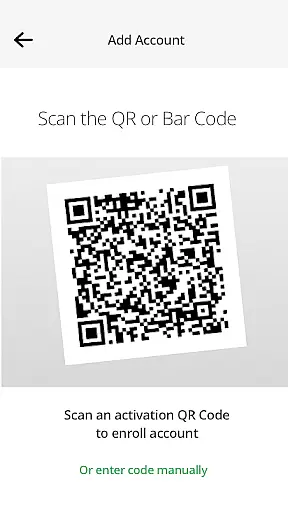
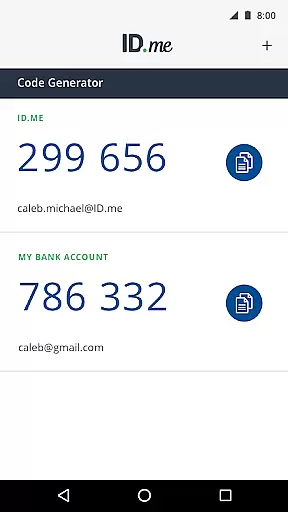
ID.me Authenticator is a productivity-focused app designed to enhance account security through Two Factor Authentication (2FA). It generates 6-digit Time-Based One-Time Passwords (TOTP) and supports PUSH-based one-touch authentication. Users can secure their online accounts on platforms supporting 2FA without requiring network or cellular connections when using TOTP. The app also simplifies the login process by allowing users to approve push notifications sent to their devices.
This app is ideal for individuals seeking an extra layer of security for their digital accounts. By scanning a QR code during setup, users can easily link the app to their accounts. Its combination of TOTP and push notification features ensures both convenience and robust protection against unauthorized access.
ID.me Authenticator offers several key features that make it a reliable choice for securing online accounts. First, its TOTP functionality generates time-sensitive 6-digit codes, ensuring secure access even without internet connectivity. This feature is particularly useful in areas with limited network coverage or when traveling.
Second, the app's PUSH-based authentication allows users to verify their identity with a single tap via push notifications. This eliminates the need to manually enter codes, streamlining the login process while maintaining high security standards. Additionally, the app integrates seamlessly with ID.me accounts, enabling quick enrollment through QR code scanning.
These features collectively provide a balance of usability and protection, making ID.me Authenticator suitable for professionals and individuals who prioritize productivity without compromising on security.
In the realm of productivity, core task management is pivotal for organizing and prioritizing tasks efficiently. ID.me Authenticator excels in this area by offering a seamless two-factor authentication process that integrates smoothly into your daily routine.
The app generates 6-digit Time-Based One-Time Passwords (TOTP) and provides PUSH notification-based one-touch authentication, ensuring that users can manage their security tasks without hassle. This functionality not only simplifies the authentication process but also enhances the overall productivity by securing multiple online accounts effortlessly.
By enabling users to enroll and connect the app to their accounts through QR code scanning, ID.me Authenticator ensures that task management related to security is both straightforward and efficient. This approach eliminates the need for network or cellular connections, making it highly accessible and reliable.
Cross-device synchronization is crucial for maintaining consistency and reliability across different platforms. ID.me Authenticator addresses this need by ensuring that your authentication data is synchronized accurately across all your devices.
Once you configure the app on one device, it automatically updates and syncs your credentials on other devices where the app is installed. This feature guarantees that you have access to your verification codes and push notifications regardless of the device you are using, enhancing both convenience and security.
This synchronization process is not only reliable but also enhances the user experience by providing peace of mind that your accounts are secure across all your devices. With ID.me Authenticator, you can trust that your two-factor authentication will be consistently available, wherever you are.
Enhanced Security
User-Friendly Interface
Offline Code Generation
Quick Push Notifications
Easy Account Linking
Limited to ID.me Accounts
No Advanced Customization
Requires Initial Setup
Dependent on QR Scanning
Push Feature Needs Internet

 4.20
4.20
Secure, fast, open-source, VNC and SSH Remote Desktop for Windows, Linux and Mac
4.70
Planet Free VPN - The best Fast Unlimited and Secure VPN Without Logs
4.50
We're working to become the best machining app on the market! www.cncdirt.com
4.80
Subscribe to Webcal & .ics calendars and keep them up-to-date!
4.50
A comprehensive suite of tools designed specifically for Lactation Consultants
4.2
To do list widget with a notebook organizer, checklist, simple shopping list
4.60
The ultimate file manager for rooted devices. The original and still the best.
4.00
Set up, print, and get support—in one place
4.20
Direct Chat without saving contacts & Dual WA Account on Single Device
4.70
Secure, fast, open-source, Remote Desktop Client for Windows and Linux with SSH
4.60
Tally and goal counter for Wear OS & mobile
4.50
A Pixel Art watchface inspired by other iconic 90s designs for Wear OS devices!
4.40
Share files & memories safely. Keep your photos and videos secure.
4.40
Wake up & get tasks done! Add alarms & reminders on the Clock Launcher.
4.00
Customizable calendar widget for seamless event sync, planning & scheduling.
4.00
⏰ Finally a timer app which can run multiple timers simultaneously on your watch
3.90
Smart PDF reader & editor to view, organize and manage PDF documents easily.
3.70
Auto-shutoff Alarm with Sunrise, Sunset & Fixed Options.
3.50


User Reviews