
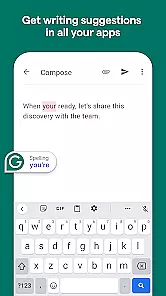
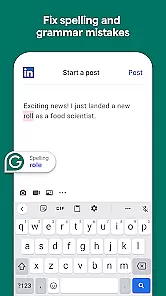
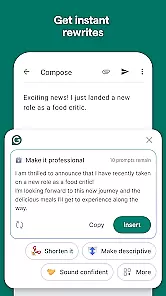
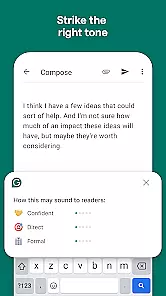
Grammarly is a productivity app designed to enhance your writing by providing real-time suggestions for grammar, spelling, punctuation, and style improvements. It functions as an intelligent writing assistant that works across various platforms including email clients, document editors, and social media.
The app's core feature is its ability to analyze text input and deliver instant feedback, helping users write more clearly and effectively. Whether you're composing an important email or drafting a report, Grammarly ensures your writing is polished and professional.
Grammarly offers a comprehensive set of features that cater to different aspects of writing enhancement. Its AI-driven engine checks for over 250 types of grammatical errors and provides context-aware suggestions to improve sentence structure and word choice.
Beyond basic grammar correction, the app includes a tone detector that helps tailor your message to the intended audience. It also features a plagiarism checker, vocabulary enhancement tools, and integration capabilities with popular writing platforms, making it an indispensable tool for writers, professionals, and students alike.
Task management is a cornerstone of productivity applications, enabling users to organize, prioritize, and track their tasks efficiently. Grammarly, primarily known for its writing assistance, integrates task management features that enhance the writing process.
The app allows users to set specific goals related to their writing, such as clarity, tone, and formality levels. These objectives act as tasks that guide users in refining their text. Additionally, Grammarly provides real-time suggestions and corrections, which serve as actionable items that users can apply instantly to improve their documents.
For the user, this means an organized approach to editing and enhancing their writing. Instead of facing a cluttered interface with numerous unrelated options, Grammarly's task management focuses on delivering relevant and prioritized actions that lead to polished writing outcomes.
Ultimately, Grammarly's task management feature ensures that writers can focus on what truly matters u2013 improving their content quality without getting overwhelmed by the mechanics of writing. This targeted assistance boosts overall productivity and results in more effective communication.
In today's interconnected world, cross-device synchronization is vital for maintaining workflow continuity. Grammarly excels in this area by providing reliable and seamless synchronization across various devices, ensuring users have uninterrupted access to their writing tools and history.
Whether switching from a desktop to a mobile device or vice versa, Grammarly ensures all edits, personal dictionaries, and saved texts are updated in real time. This synchronization is powered by robust cloud technology that keeps data consistent and secure across platforms.
Users benefit from this reliability by experiencing a smooth transition between devices without losing any progress or preferences. This feature is particularly beneficial for those who work on-the-go or use multiple devices throughout their day.
Grammarlyu2019s dependable cross-device sync not only enhances user convenience but also amplifies productivity by allowing seamless transitions and continuous access to essential writing resources wherever the user may be.
Accurate grammar checks
User-friendly interface
Wide platform compatibility
Real-time corrections
Customizable feedback options
Premium version costly
Occasional incorrect suggestions
Limited offline functionality
Privacy concerns with cloud data
Heavy on system resources

Experience Reading - Night Mode for Documents
 4.40
4.40
8 custom complications. Custom Time Fonts. Beautiful color schemes. A++ Design.
5.00
Android Wallet Password Manager
4.80
Send files, sync SMS, notifications & clipboard across devices via local network
4.40
A simple Whisper AI keyboard for reliable speech transcription and rewording
4.60
A Pixel Art watchface inspired by other iconic 90s designs for Wear OS devices!
4.40
This small app MUST BE INSTALLED after purchase, else license won't work
4.40
Use powerful, industry-leading AI tools to generate visual charts from any data
4.80
QuickEdit is a fast, stable and full featured text and code editor.
4.20
Great calculator for Android named one of USA TODAY's "25 Essential Apps".
4.90
The long-awaited modern gallery app for your Nextcloud server
4.70
Client for Nextcloud Deck
4.60
To do list widget with a notebook organizer, checklist, simple shopping list
4.60
Subscribe to Webcal & .ics calendars and keep them up-to-date!
4.50
Secure your apps with lock screens, use custom themes and different features.
4.40
Automates browsing any website and notifies you of important changes or events
4.30
Enjoy classic gameplay with customizable features and retro-style graphics.
4.30
Customizable calendar widget for seamless event sync, planning & scheduling.
4.00
Easiest event planning, volunteer signups & parent teacher conference scheduling
2.20


User Reviews