



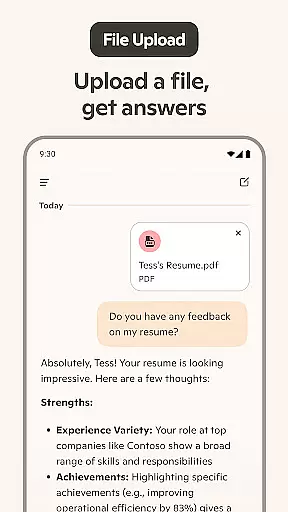
Microsoft Copilot is an advanced AI productivity tool designed to be your daily companion in both personal and professional tasks. The app integrates GPT-5, the latest in AI technology, offering users a seamless blend of reasoning and conversational capabilities. Whether you need help drafting emails, generating images from text prompts, or translating content across multiple languages, Copilot delivers smart solutions tailored to various needs.
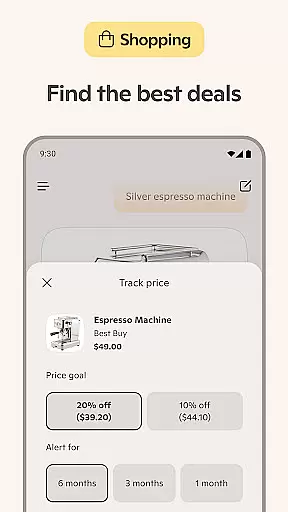
This versatile AI assistant supports users through chat and voice interactions, providing instant summaries, creative inspiration, and practical tools like shopping list generation. Its ability to assist with complex writing projects, create high-quality visuals, and even aid in developing storyboards makes it invaluable for anyone looking to enhance their productivity and creativity.
With Microsoft Copilot, users can accomplish more by leveraging cutting-edge AI technologies that simplify everyday tasks and unlock new possibilities. Whether you're managing work projects or exploring creative endeavors, this app serves as a reliable partner, boosting efficiency and sparking innovation.
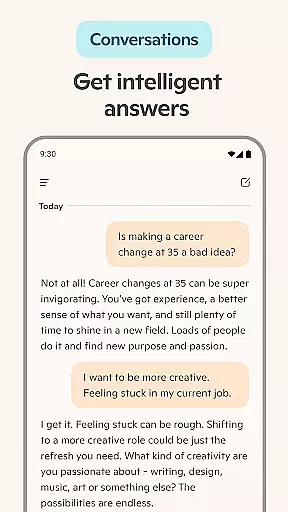
Microsoft Copilot stands out with its comprehensive suite of features designed to boost productivity and creativity. One of its core functionalities is the AI chat assistant, which provides summarized answers to complex questions, simplifies task management such as creating shopping lists, and assists in composing professional documents like emails and resumes.
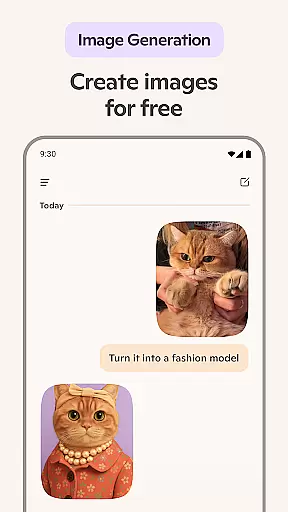
The app also includes an AI photo generator that turns text prompts into high-quality visuals, supporting everything from logo design to children's book illustrations. This feature empowers users to visualize concepts quickly and effectively, whether they are working on branding projects or curating social media content.
Additionally, Copilot offers multi-language support, enabling translation and proofreading in hundreds of languages, including regional dialects. With capabilities ranging from voice chat for storytelling to aiding in portfolio development, Microsoft Copilot ensures users have the tools they need to succeed in diverse scenarios.
At the heart of Microsoft Copilot lies its robust core task management capabilities, designed to streamline your daily workflow. This feature allows users to efficiently organize and prioritize tasks, ensuring that nothing important slips through the cracks. With intuitive controls and seamless integration across devices, managing your to-do list has never been easier.
The application leverages advanced AI models to provide smart suggestions for task allocation and scheduling. By analyzing user behavior and preferences, it can recommend optimal times for task completion and even help in breaking down complex projects into manageable steps. This not only boosts productivity but also aids in maintaining a healthy work-life balance.
Users benefit from real-time updates and notifications that keep them informed about upcoming deadlines and pending tasks. The ability to categorize and tag tasks further enhances organization, making it simple to filter and focus on specific areas of work. Whether you're handling personal errands or professional assignments, Microsoft Copilot ensures you stay on top of your game.
Moreover, the platform's adaptability means it can cater to both individual users and teams, facilitating collaborative efforts without compromising on personal efficiency. With Microsoft Copilot, achieving peak performance in task management is no longer a distant goal but an attainable reality.
In today's fast-paced digital world, reliable cross-device synchronization is paramount, and Microsoft Copilot excels in this area. This functionality ensures that all your data, from task lists to AI-generated content, is consistently updated across all your devices. Whether you're switching from your smartphone to your laptop or tablet, you'll find your workspace exactly as you left it, ready for you to pick up where you stopped.
The synchronization process is powered by cutting-edge cloud technology, guaranteeing minimal latency and maximum security. Every change made on one device is instantly mirrored on others, providing a seamless experience that keeps you productive regardless of the device you choose to use. This reliability is crucial for users who demand high availability and consistency in their digital tools.
Microsoft Copilot goes beyond mere data syncing; it maintains the context of your work environment. This means that your preferences, recent activities, and even the state of your AI assistant are preserved, offering a truly continuous experience. Such attention to detail ensures that users can transition smoothly between devices without losing momentum or focus.
Ultimately, the cross-device synchronization reliability of Microsoft Copilot stands out as a testament to its commitment to enhancing user productivity. By removing barriers between devices, it empowers users to work smarter and more efficiently, anytime and anywhere.
User-friendly interface
Advanced AI models
Versatile functionality
Multi-language support
Creative tools integration
Requires internet connection
Premium features may cost extra
Learning curve for new users
Limited offline capabilities
Dependent on third-party models

AI Video AI Image Private LLM AI Browser Llama Gemma Ollama Connect LLM Studio
 4.3
4.3
We're working to become the best machining app on the market! www.cncdirt.com
4.80
Make your handwriting beautiful, even more than pen on paper.
3.60
Fill, sign & send docs, forms, agreements & contracts via electronic signature.
4.50
Find and delete junk files & block unwanted notifications & manage files
3.70
Multilingual translator for text, voice, and image translation!
4.90
Code on-the-go with VScode for Android. Edit,debug and collaborate from mobile!!
3.10
Access, manage and transfer files on Android, PC, Mac, NAS and cloud storages.
4.30
Scientific calculator for Android - looks and operates like the real thing!
4.90
Secure, fast, open-source, VNC and SSH Remote Desktop for Windows, Linux and Mac
4.70
Absolutely the best CNC machinist speed and feed calculator around. fswizard.com
4.60
Send files, sync SMS, notifications & clipboard across devices via local network
4.40
Secure your apps with lock screens, use custom themes and different features.
4.40
Total remote control for your Android device, PC and cloud services (IFTTT)!
4.20
Easily read and manage all your PDF files
4.10
Cloud storage, automatic phone backup, and more.
4.10
Customizable calendar widget for seamless event sync, planning & scheduling.
4.00
The ultimate file manager for rooted devices. The original and still the best.
4.00
Ultimate Virtual AI Character for immersive Roleplay Chat. Perfect Companion
3.90


User Reviews