
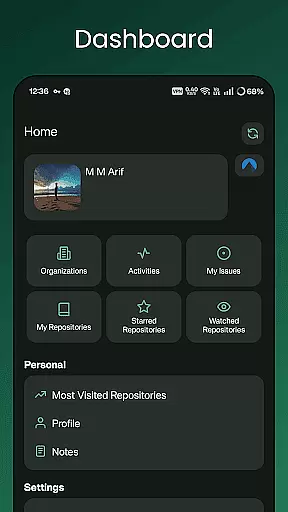
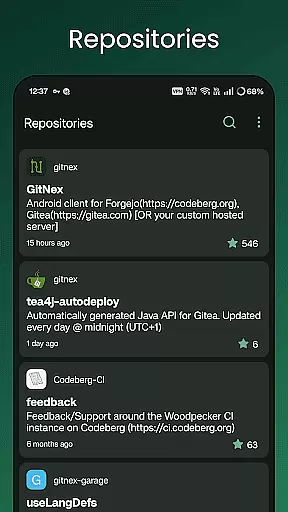
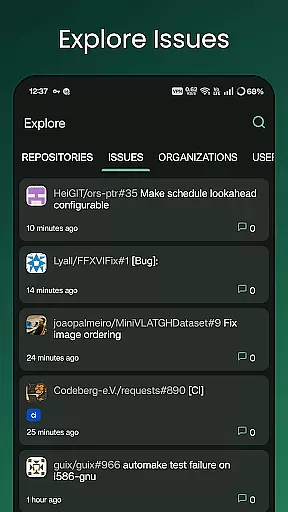
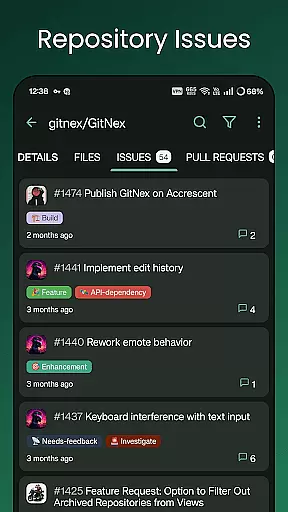
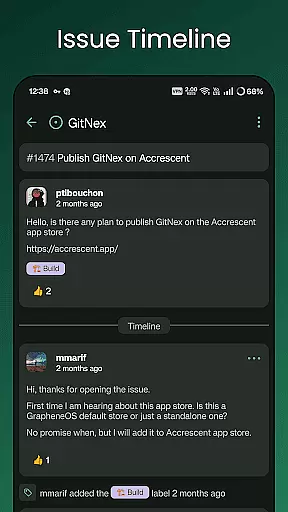
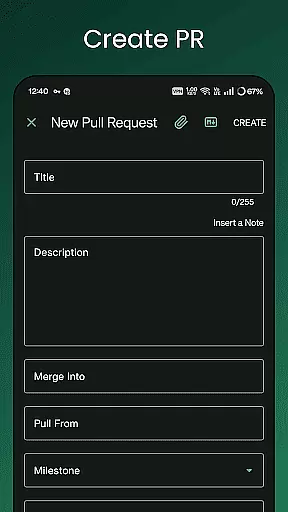
GitNex is a powerful productivity tool designed for developers and project managers who use Forgejo or Gitea for version control and repository management. This Android client enables users to efficiently manage multiple accounts, browse files and directories, and create various elements such as issues, pull requests, and wikis directly from their mobile devices.
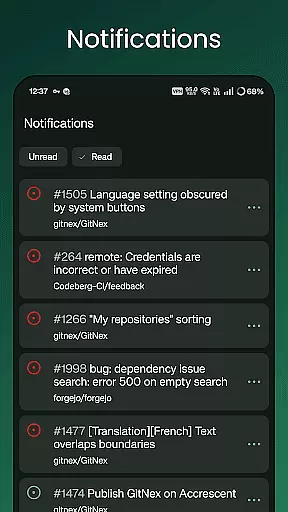
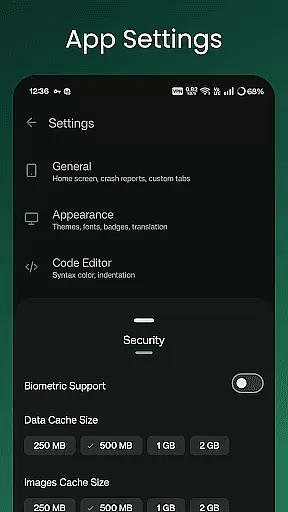
The app's comprehensive feature set includes repository exploration, issue tracking, milestone management, and release monitoring. With support for markdown, emoji, themes, and self-signed certificates, GitNex provides a versatile and secure environment for managing Git repositories on the go. Its extensive settings and notification system make it an indispensable tool for development teams.
GitNex stands out with its robust feature collection that caters to both basic and advanced repository management needs. The app supports multiple account handling, allowing users to switch between different profiles seamlessly. Its integrated file and directory browser provides convenient access to repository contents, while the built-in file viewer enables quick code reviews and modifications.
One of GitNex's key strengths lies in its comprehensive creation tools. Users can create files, issues, pull requests, wiki pages, milestones, releases, and labels directly from their mobile devices. The app also maintains detailed lists for pull requests, repositories, organizations, issues, labels, milestones, and releases, ensuring all project aspects are readily accessible. Additional features like markdown support, emoji integration, and theme customization enhance the user experience.
GitNex for Forgejo and Gitea offers robust core task management features that are essential for developers and project managers alike. The app allows users to create, manage, and track issues, pull requests, milestones, and labels directly from their mobile devices. This functionality ensures that all team members can stay updated on the progress of various tasks without needing to switch to a desktop environment.
The application supports multiple accounts, which means users can manage tasks across different repositories or even different Git platforms simultaneously. This feature is particularly beneficial for developers who contribute to several projects or organizations. With an intuitive interface, users can easily navigate through lists of repositories, issues, and pull requests, making task management straightforward and efficient.
Moreover, GitNex provides extensive settings and customization options, allowing users to tailor the task management experience to their specific needs. Whether it's adjusting notification preferences or configuring self-signed certificate support, the app empowers users to optimize their workflow. These capabilities ensure that users can focus on their work without being hindered by unnecessary distractions or limitations.
Cross-device synchronization is a critical feature for any productivity tool, and GitNex excels in this area. By ensuring reliable synchronization across multiple devices, the app allows users to seamlessly transition between their desktop and mobile environments. This means that any changes made on one device are immediately reflected on others, providing a consistent and up-to-date view of all repositories and tasks.
One of the standout aspects of GitNex is its ability to handle real-time updates efficiently. Users can receive instant notifications about new issues, comments, or pull requests, ensuring they are always in the loop. This real-time capability is supported by a stable connection to the Forgejo and Gitea servers, which minimizes delays and maximizes productivity.
In addition to real-time updates, GitNex also supports offline access to certain features. This means that users can continue working on their tasks even when they don't have an active internet connection. Once connectivity is restored, the app automatically syncs all changes, ensuring data integrity and consistency. This combination of real-time updates and offline access makes GitNex a reliable tool for managing Git repositories across different devices.
User-friendly interface
Multiple account support
Comprehensive feature set
Secure connection options
Regular updates
Steep learning curve
Occasional bugs
Limited iOS availability
No desktop version
Complex setup

Total remote control for your Android device, PC and cloud services (IFTTT)!
 4.20
4.20
All in one sketching tool. Technical and General drawing. Online Maps support.
3.70
Planet Free VPN - The best Fast Unlimited and Secure VPN Without Logs
4.50
We're working to become the best machining app on the market! www.cncdirt.com
4.80
Cloud storage, automatic phone backup, and more.
4.10
Activate Two Factor Authentication (2FA or Multi OTP), Password manager and more
4.10
Create and edit presentations with Google Slides, part of Google Workspace.
4.00
A comprehensive suite of tools designed specifically for Lactation Consultants
4.2
AT&T Internet customers can use this app to personalize their Wi-Fi network.
4.40
Simple notepad & memo. Take notes, to-do list, shopping list with reminders.
4.80
The Pro Version of Android's tiniest Notepad app. Just 0.3MB but feature-packed!
4.60
Secure your apps with lock screens, use custom themes and different features.
4.40
When you Focus, so will your Bean in this cozy focus timer
4.30
Enjoy classic gameplay with customizable features and retro-style graphics.
4.30
Easily read and manage all your PDF files
4.10
Experience real multitasking on your Android!
4.00
The ultimate file manager for rooted devices. The original and still the best.
4.00
Access your phone's notifications, calls, apps, photos & texts on your PC
3.90
Ultimate Virtual AI Character for immersive Roleplay Chat. Perfect Companion
3.90


User Reviews