
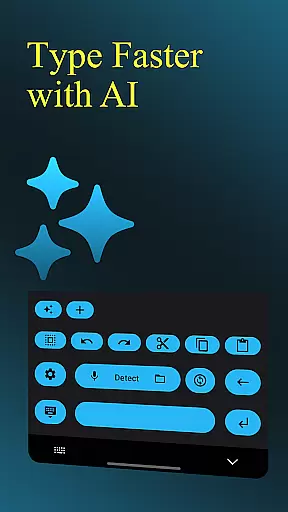
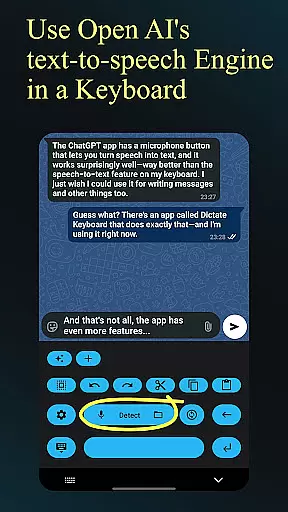
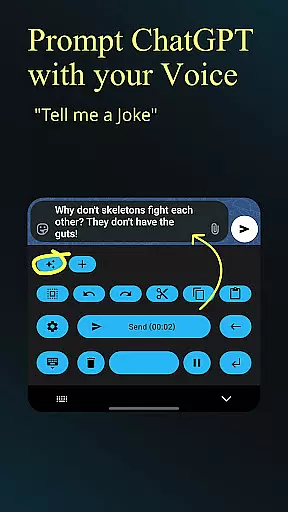
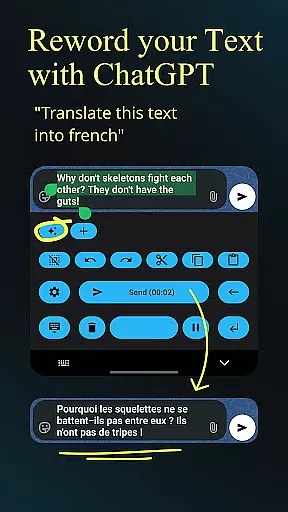
Dictate Keyboard is a productivity-focused application that revolutionizes text input by converting spoken language into written text. This innovative keyboard utilizes advanced speech recognition AI, supporting multiple languages and automatic punctuation. The app goes beyond basic dictation by offering features like custom rewording through GPT models, voice command formatting, and transcription services for audio/video files.
What sets Dictate apart is its comprehensive customization options and integration capabilities. Users can switch between different transcription models, use custom API servers, and even modify the recognition style through system prompts. The application supports both dark and light modes, haptic feedback, and quick keyboard switching. These features make it particularly useful for professionals who need efficient, hands-free documentation solutions while working on their mobile devices.
The Dictate Keyboard stands out with its impressive array of features designed to enhance productivity. At its core, the app employs powerful Whisper technology and other transcription models that deliver exceptional accuracy in speech-to-text conversion across multiple languages. The built-in AI automatically adds punctuation and understands complex voice commands for formatting, making document creation seamless and intuitive.
Advanced users will appreciate the app's support for custom rewording instructions using various AI models including GPT-5. The application allows switching between different providers like OpenAI and Groq, giving users flexibility in service selection. Additional professional features include file transcription capabilities, custom theme settings, and API server configuration options. These robust features, combined with its open-source nature, make Dictate an invaluable tool for both casual and power users seeking enhanced productivity solutions.
Dictate Keyboard revolutionizes core task management by integrating advanced speech recognition technology into a user-friendly keyboard interface. This innovative approach allows users to convert spoken language into text with remarkable accuracy, supporting all common national languages.
The app's AI-driven transcription system goes beyond basic dictation by automatically adding punctuation and formatting spoken commands. Users can create new paragraphs, insert specific phrases, and even dictate emojis and numbers without manual input, streamlining their workflow significantly.
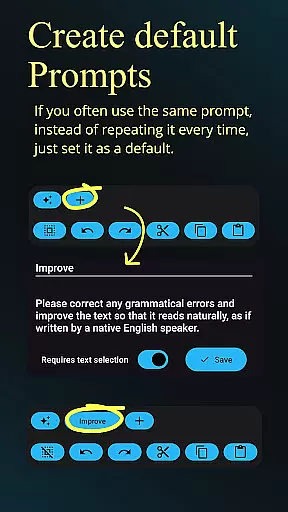
What sets Dictate apart in task management is its customizable rewording instructions and system prompts. These features enable users to translate content, summarize information, or change writing styles on the fly, making it an invaluable tool for professionals who need to manage multiple types of documentation efficiently.
The inclusion of different transcription models and providers gives users flexibility in choosing the most suitable option for their specific tasks. This adaptability, combined with quick switching to standard keyboard and haptic feedback, ensures that users maintain productivity while enjoying a comfortable typing experience.
Cross-device synchronization is where Dictate Keyboard truly shines, offering users unparalleled reliability across multiple platforms. The application maintains consistent performance through its support for various transcription models and custom API server configurations, ensuring seamless transitions between devices.
Users benefit from the app's ability to switch between different transcription providers like OpenAI, Groq, or personal transcription servers. This flexibility guarantees that work started on one device can be continued on another without losing quality or functionality, regardless of the operating system or hardware differences.
The synchronization extends to user preferences and settings, including custom themes, dark-mode and light-mode selections, and personalized system prompts. These elements transfer smoothly between devices, maintaining a consistent user experience and work environment wherever the application is used.
Furthermore, Dictate's open-source nature and detailed setup instructions ensure that users can establish reliable synchronization even when setting up the app for the first time. The comprehensive GitHub repository provides all necessary resources for maintaining consistent performance across devices, making it an excellent choice for professionals who rely on cross-platform productivity tools.
Highly accurate speech recognition
Supports multiple languages
Automatic punctuation detection
Customizable transcription models
Comprehensive formatting options
Requires API key setup
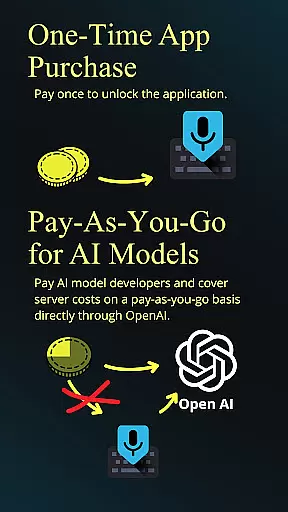
Incurs small monthly costs
Complex for beginners
Limited free usage tier
Dependent on third-party services

Experience real multitasking on your Android!
 4.00
4.00
Ads Free App! Editor, Hide File, Copy, Move, Delete and Rename.. all facility av
1.70
Enjoy classic gameplay with customizable features and retro-style graphics.
4.30
Subscribe to Webcal & .ics calendars and keep them up-to-date!
4.50
To do list widget with a notebook organizer, checklist, simple shopping list
4.60
Set up, print, and get support—in one place
4.20
Put a lock on your cloud: Take the security of your data into your own hands
3.70
QuickEdit is a fast, stable and full featured text and code editor.
4.20
Note taking, handwriting, record audio, PDF annotation, planner & journal
4.20
Great calculator for Android named one of USA TODAY's "25 Essential Apps".
4.90
The Pro Version of Android's tiniest Notepad app. Just 0.3MB but feature-packed!
4.60
All document reader, all in one file viewer read PDF, DOCX, XLS, PPT, TXT files.
4.60
Planet Free VPN - The best Fast Unlimited and Secure VPN Without Logs
4.50
All in One PDF Reader: Manage, Read and Edit your Documents
4.20
Device's storage information in a simple and clear graphical form (infographics)
4.10
Customizable calendar widget for seamless event sync, planning & scheduling.
4.00
The ultimate file manager for rooted devices. The original and still the best.
4.00
Easiest event planning, volunteer signups & parent teacher conference scheduling
2.20
The upgraded version of Name Wheel with AI and the power to add your own wheels.
4.5


User Reviews