
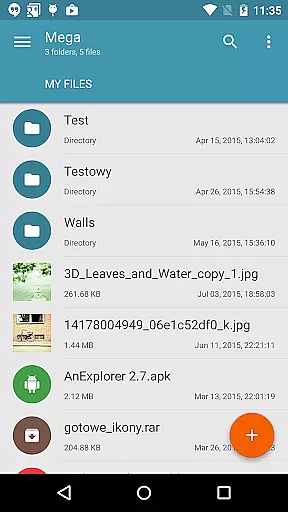
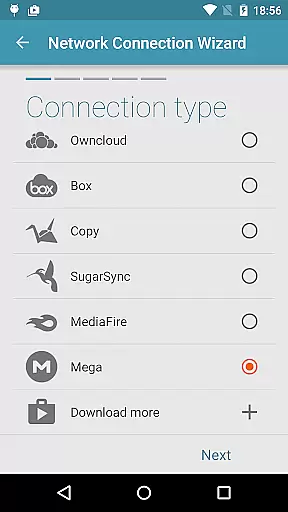
Mega Plugin for Solid Explorer is a productivity-focused extension that seamlessly integrates with your Solid Explorer file manager. This plugin allows users to directly connect to their Mega cloud storage accounts, enabling comprehensive file management capabilities. With support for essential operations such as copying, moving, renaming, and viewing files, it ensures efficient organization of cloud-stored data.
In addition to basic file handling, the plugin supports downloading and uploading files, making local-cloud transfers effortless. Users can also stream music and videos directly from their Mega storage, enhancing media accessibility. Whether you're managing documents or enjoying multimedia content, this plugin offers a versatile solution for all your productivity needs.
The Mega Plugin stands out with its robust feature set tailored for power users. The plugin's core functionality lies in its seamless integration with Solid Explorer, allowing users to manage their Mega cloud storage without leaving the file manager interface. It supports all fundamental file operations including copy, move, rename, and direct file preview, ensuring maximum usability.
Advanced features include reliable download and upload capabilities, which facilitate smooth synchronization between local and cloud environments. Additionally, the integrated media streaming option enables users to play music and videos directly from their Mega storage. By following simple connection steps - adding a cloud connection, entering login credentials, and tapping connect - users can access their entire cloud drive effortlessly.
This combination of essential file management tools and media streaming makes the plugin an indispensable tool for anyone seeking to boost their productivity through efficient cloud storage management.
Mega Plugin for Solid Explorer offers robust core task management capabilities tailored to enhance productivity.
Users can efficiently copy, move, rename, and view files directly from their Mega account, streamlining file organization tasks.
In addition to basic file operations, the plugin supports downloading and uploading files, ensuring seamless synchronization between local and cloud storage.
This functionality empowers users to manage their digital assets effectively, providing a comprehensive solution for task management within the productivity category.
Cross-device synchronization is a pivotal feature of Mega Plugin for Solid Explorer, ensuring reliable access to your files across multiple devices.
By enabling cloud connections through simple steps, users can synchronize their data effortlessly, maintaining consistency and availability.
The plugin supports streaming music and videos, allowing uninterrupted media consumption on any device with internet connectivity.
This reliable synchronization ensures that users have up-to-date access to their files, enhancing productivity by facilitating seamless transitions between devices.
Seamless cloud integration
Comprehensive file management
Effortless media streaming
User-friendly interface
Reliable synchronization
Limited to Solid Explorer
Requires Mega account
No offline access
Basic UI design
Occasional sync delays

Native client for Forgejo and Gitea
 5.00
5.00
Total remote control for your Android device, PC and cloud services (IFTTT)!
4.20
The Pro Version of Android's tiniest Notepad app. Just 0.3MB but feature-packed!
4.60
Pwnagotchi companion app
4.20
Stay on top of your to-dos with Google Tasks, part of Google Workspace.
4.60
Cloud storage, automatic phone backup, and more.
4.10
Access, manage and transfer files on Android, PC, Mac, NAS and cloud storages.
4.30
Great calculator for Android named one of USA TODAY's "25 Essential Apps".
4.90
Lightweight PDF, Word, Excel reader.
4.60
Mind Map and brainstorm, note taking and idea collection
4.80
Simple notepad & memo. Take notes, to-do list, shopping list with reminders.
4.80
aCalendar+ makes your day, week and month
4.70
Functional QR scanner and barcode reader that requires little storage space.
4.60
This small app MUST BE INSTALLED after purchase, else license won't work
4.40
Secure your apps with lock screens, use custom themes and different features.
4.40
A customizable calendar for your Wear OS watch
4.20
Professional calendar app for Google Calendar, MS Outlook & Exchange
4.20
Intelligent AI Assistant
4.10
Wake up & get tasks done! Add alarms & reminders on the Clock Launcher.
4.00


User Reviews