

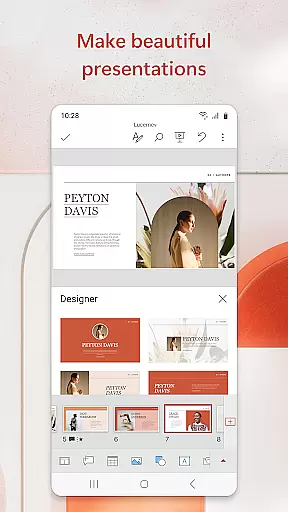
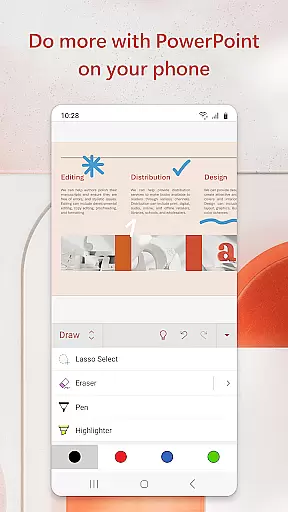
Microsoft PowerPoint is the quintessential presentation tool that empowers users to create, edit, and deliver professional slideshows from their mobile devices. With its comprehensive suite of features, this app allows you to craft visually compelling presentations enriched with music, graphics, and charts. Whether you're preparing quarterly reports or annual reviews, PowerPoint's templated slides ensure your work stands out.
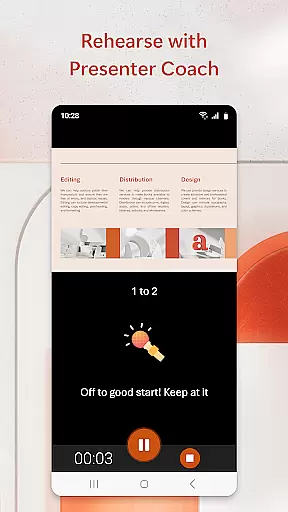
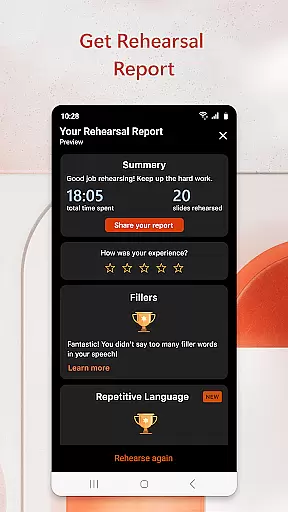
The app syncs seamlessly across all your devices, ensuring that your files are always up-to-date and accessible wherever you are. The built-in Presenter Coach leverages AI technology to refine your public speaking skills by providing real-time feedback on pacing, filler words, and overall delivery. This feature helps users present with confidence and poise, making every presentation impactful.
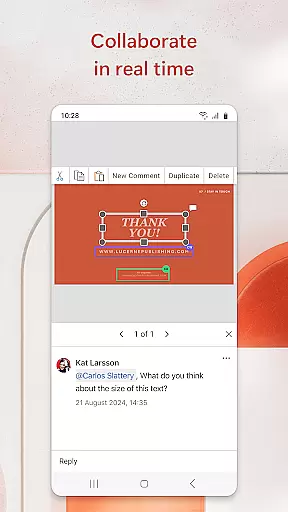
Collaboration is at the heart of Microsoft PowerPoint. You can easily share your presentations with team members for feedback and collaborative editing. Integrated comments and permissions management streamline the review process, allowing you to focus on creating content that leaves a lasting impression. With support for ppt and pptx formats, PowerPoint is an indispensable tool for productivity and effective communication.
Microsoft PowerPoint offers a robust set of features designed to enhance productivity and creativity in presentation-making. One standout feature is the Presenter Coach, which uses artificial intelligence to provide real-time suggestions as you practice your presentations. This includes tips on pacing, avoiding filler words like 'umms', and improving overall delivery—ensuring you present confidently every time.
The app also supports multimedia integration, allowing users to add photos directly from their device or capture new ones within the app itself. Videos can be inserted or recorded instantly, adding dynamic elements to your slideshows. Customizable templates enable users to design unique presentations tailored to their specific needs, whether it’s for business reports or educational lectures.
Real-time collaboration is another hallmark of Microsoft PowerPoint. Multiple users can work on the same presentation simultaneously, viewing edits and leaving comments in real-time. Permissions settings allow you to control who has access to view or modify your slides, while integrated notifications keep everyone informed about changes. These capabilities make teamwork more efficient and productive, no matter where team members are located.
Microsoft PowerPoint revolutionizes core task management by offering a seamless experience for creating, editing, and presenting slideshows. The app ensures that your presentations are always up-to-date, regardless of the device you use.
With features like real-time collaboration, multiple users can work on the same presentation simultaneously. This functionality enhances productivity by allowing teams to provide instant feedback and make edits collectively, ensuring everyone is on the same page.
The Presenter Coach tool further refines task management by helping users practice their presentations. It provides real-time suggestions, helping presenters improve their delivery, pacing, and confidence, which ultimately leads to more effective presentations.
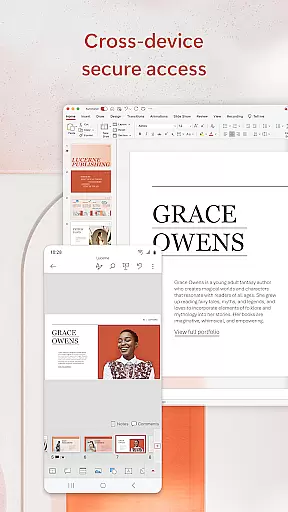
By syncing presentations across devices effortlessly, PowerPoint eliminates the hassle of managing different versions of files. This synchronization ensures that whether you're at your desk or on the move, your slideshow is always current and accessible, streamlining your workflow significantly.
Cross-device synchronization is a cornerstone of Microsoft PowerPoint's reliability, enabling users to start a presentation on one device and continue on another without missing a beat. This feature ensures that all changes are updated in real time across all devices.
PowerPoint's cloud integration guarantees that your presentations are backed up and available wherever you go. Whether you're using a smartphone, tablet, or PC, accessing your latest presentation is as simple as logging into your account, providing unparalleled convenience.
The app's robust sync capabilities mean that there's no need to worry about losing your work or dealing with conflicting file versions. Every edit, comment, or addition made on any device is automatically reflected across all platforms, maintaining consistency and saving valuable time.
This reliable synchronization empowers users to collaborate effectively, regardless of location. Teams can work together in real time, making edits and providing feedback from different parts of the world, ensuring that every team member has access to the most recent version of the presentation at all times.
User-friendly interface
Powerful customization options
Seamless cross-device syncing
AI-driven Presenter Coach
Real-time collaboration tools
Requires subscription for full features
Limited offline functionality
Occasional sync issues
Resource-intensive on older devices
Learning curve for advanced features

Auto-shutoff Alarm with Sunrise, Sunset & Fixed Options.
 3.50
3.50
A lightweight JSON & XML files creator, editor and viewer (Premium Version)
4.40
Easiest event planning, volunteer signups & parent teacher conference scheduling
2.20
Functional QR scanner and barcode reader that requires little storage space.
4.60
Code on-the-go with VScode for Android. Edit,debug and collaborate from mobile!!
3.10
Quickly and easily keep track of your work shifts
4.70
This small app MUST BE INSTALLED after purchase, else license won't work
4.40
Secure your apps with lock screens, use custom themes and different features.
4.40
Put a lock on your cloud: Take the security of your data into your own hands
3.70
Protect and view your important info on your phone and tablet with eWallet®
4.80
Scan paperwork into PDF/JPG, generate your own e-signature and send fax or email
4.70
Planet Free VPN - The best Fast Unlimited and Secure VPN Without Logs
4.50
Translate text/voice/photos in 150+ languages. Offline & fast translator app.
4.50
Enjoy classic gameplay with customizable features and retro-style graphics.
4.30
Activate Two Factor Authentication (2FA or Multi OTP), Password manager and more
4.10
Experience real multitasking on your Android!
4.00
Secure, open-source, SPICE and SSH Remote Desktop for QEMU KVM virtual machines
4.00
* block pre-roll ads, pop-up and forced redirect ads * Samsung certification app
4.00
Make your handwriting beautiful, even more than pen on paper.
3.60


User Reviews