




XPlay Browser is a cutting-edge mobile application designed for users seeking a fast, private, and video-focused browsing experience. This lightweight browser offers seamless navigation with its modern UI and smooth performance, even on older devices. The app's core functionality revolves around three main pillars: speed, privacy, and video management.
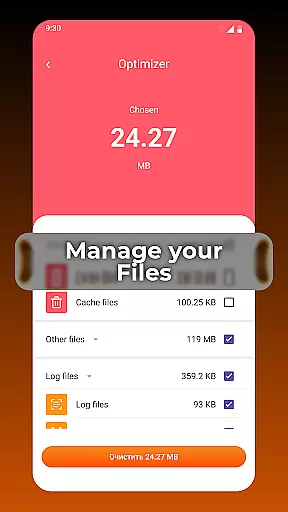
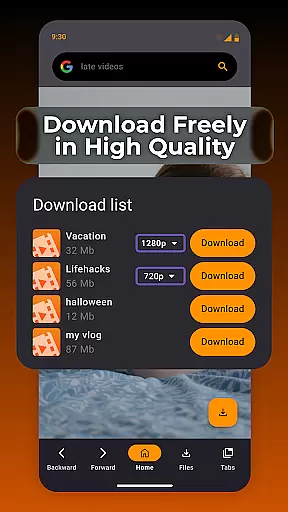
One of the standout features of XPlay Browser is its Private Browsing Mode, which ensures no history is stored and uses minimal permissions, making it ideal for confidential sessions. Additionally, the app allows users to download videos directly from supported websites, eliminating the need for third-party apps. With smart file management tools, users can keep their device storage organized while enjoying an efficient browsing experience.
Whether you're streaming content, managing files, or simply browsing the web, XPlay Browser provides a secure and convenient solution. Its battery-efficient design makes it perfect for everyday use, ensuring your device remains responsive without excessive power consumption.
XPlay Browser stands out with its comprehensive set of features tailored for modern internet users. First and foremost, the app delivers exceptionally fast browsing speeds, thanks to its lightweight architecture that minimizes resource usage. This ensures pages load quickly and navigation feels fluid, even on less powerful devices.
Privacy is another cornerstone of XPlay Browser's functionality. The Private Browsing Mode disables data tracking and doesn't save any session information, offering peace of mind for users concerned about their online security. Furthermore, the app includes intuitive video downloading capabilities, allowing users to save videos from supported sites directly to their device for offline viewing.
Beyond these highlights, XPlay Browser incorporates smart file management tools that help users maintain a clutter-free device. These tools automatically identify unnecessary files and provide easy options for cleanup. The combination of speed, privacy, and practical utilities makes this browser an excellent choice for anyone looking to enhance their mobile browsing experience.
Video format compatibility is a crucial feature for any video player, ensuring that users can enjoy content in various formats without technical barriers. XPlay Browser excels in this area by supporting an extensive range of video formats, making it versatile for different user needs.
The app's advanced decoding capabilities allow seamless playback of popular formats such as MP4, AVI, and MKV, as well as less common ones. This ensures that users won't face frustrating codec issues or need to convert files before viewing.
For XPlay Browser users, this comprehensive format support translates to convenience and time savings. Whether streaming online content or playing locally stored videos, the browser maintains smooth performance and high-quality rendering across all supported formats.
This robust compatibility feature positions XPlay Browser as an ideal choice for users who regularly work with diverse video content, from casual viewers to professional content creators.
AI-powered editing features represent the next evolution in video processing, and XPlay Browser incorporates these intelligent tools to enhance user experience. The app utilizes artificial intelligence to automate complex editing tasks while maintaining professional-grade results.
Through its smart editing system, XPlay Browser can automatically detect and enhance video quality, stabilize shaky footage, and optimize audio levels. The AI algorithms also assist in content-aware cropping and smart color correction, saving users valuable time during post-production.
These intelligent features benefit users by significantly reducing the learning curve associated with video editing. Content creators can now achieve polished results without needing extensive technical knowledge or investing in separate editing software.
XPlay Browser's implementation of AI-powered editing sets it apart from conventional video players, offering a complete solution for both playback and enhancement of video content.
Fast page loading
Private browsing
Video downloads
Smart file tools
Battery efficient
Limited video sites
No sync feature
Basic UI design
Few extensions
Occasional bugs

Online Videos Player
 3.90
3.90
Save photos and videos from social apps in one tap.
3.60
HD video maker with no watermark, no ads & vlog maker with music, PIP, text
4.50
Capture images & record videos for USB Camera, Webcam, Microscopes, Endoscopes
3.80
Live TV, anywhere in your home
3.80
An easy-to-use and all-round screen recorder with audio
4.80
AI Video Editor:AI Music, Text to Video,Text to Speech,Auto Caption,Video Effect
4.00
Cast movies, tv shows and live streams to Chromecast, Roku, DLNA, Fire TV & more
4.60
Video player with 4K & 1080P support, popup play, background play and subtitle.
4.20
Video Trimmer, Video to MP3 Converter. Extract music from video, Easy & Fast.
4.80
Pro video editor app for Instagram, edit video with song, AI, effect & slowmo.
4.80
AI Video Editor with Music, Filter, Slideshow, Effect, Merge & Trim Video.
4.80
Screen recorder with audio to take live videos & Screenshot in high quality!
4.70
KineMaster, Your Ultimate Video Editor!
4.40
Fast video downloader & private browser. Save HD clips to watch offline.
4.40
Powerful Video Editor & Photo Editing App —— Quick Edits & Stunning Effects!
4.30
Turn your phone into a wireless camera!
4.20
Connect 2 UVC devices for recording and broadcast video/audio stream
3.90
Manage your IPTV live channels and VOD playlists (no playlist included)
3.80


User Reviews