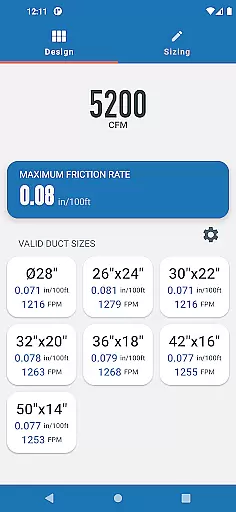
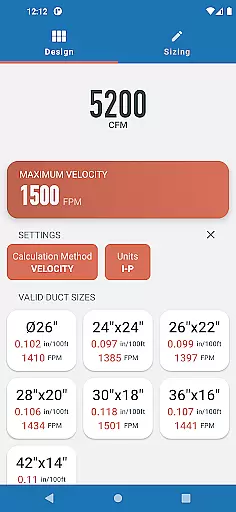
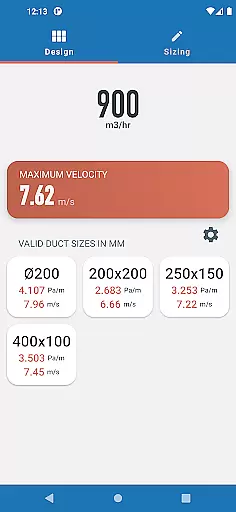
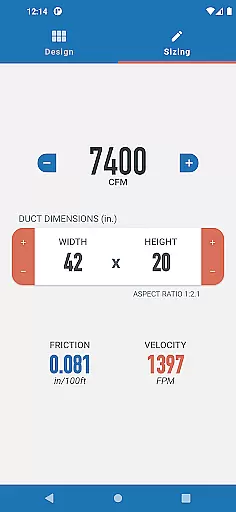
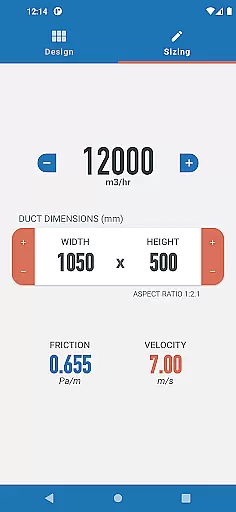
Ductulator is a productivity-focused app designed to streamline the duct sizing process for HVAC engineers. This innovative tool replaces traditional duct sizing charts, offering both Design and Sizing modes for maximum versatility. Users can switch between Imperial and SI units, making it adaptable to various regional standards.
In Design Mode, engineers input parameters such as friction rate or velocity to receive optimized duct size recommendations. The Sizing Mode allows real-time adjustments to duct dimensions and airflow rates, providing instant feedback on resulting friction and velocity values. These features make Ductulator an essential tool for both designing new duct systems and analyzing existing ones.
Whether you're working on residential or commercial HVAC projects, Ductulator saves valuable time while ensuring accurate calculations based on standard air properties in clean galvanized steel ducts. Its development was guided by direct feedback from engineering professionals, making it a practical solution for everyday duct sizing challenges.
Ductulator stands out with its dual-mode functionality that caters to different engineering needs. The Design Mode provides a comprehensive range of suitable duct sizes by simply entering either the maximum friction rate or velocity. It automatically calculates and presents appropriate rectangular and circular duct options along with their corresponding friction rates and velocities.
The Sizing Mode operates like a digital ductulator, allowing engineers to adjust duct dimensions and airflow rates while receiving real-time updates on friction and velocity values. This feature was specifically developed based on user feedback, making it particularly valuable for analyzing and optimizing existing duct systems.
Additional notable features include seamless unit conversion between Imperial and SI systems, calculations based on standard air properties (0.075 lb/ft3 or 1.2 kg/m3), and automatic result updates. These characteristics make Ductulator a versatile and reliable tool for HVAC professionals seeking efficient duct sizing solutions.
In the realm of productivity applications, core task management is pivotal for organizing and executing tasks efficiently. Ductulator excels in this area by offering engineers two distinct modes to handle duct sizing calculations.
The Design Mode allows users to input specific parameters such as maximum friction rate or velocity, providing a range of suitable duct sizes with corresponding friction rates and velocities. This feature streamlines the design process, saving valuable time and resources.
Additionally, the Sizing Mode functions akin to a traditional ductulator, enabling real-time adjustments to duct dimensions and airflow rates. As users modify these variables, they receive instantaneous feedback on the resulting friction and velocity, which proves invaluable when analyzing pre-existing duct systems.
By integrating both design and analysis capabilities into one app, Ductulator ensures that HVAC professionals can manage their tasks with unprecedented precision and adaptability.
Cross-device synchronization is essential for productivity tools, ensuring that work carried out on one device is reliably mirrored across all others. While Ductulator's primary function focuses on duct sizing, it inherently supports synchronization through its modern design.
Engineers using Ductulator can switch between Imperial and SI units seamlessly, an important feature for international projects or teams working across different regions. This flexibility guarantees that all team members are synchronized in their approach, regardless of location.
Moreover, the application's reliance on standard air properties for calculations ensures consistency and reliability of results across various devices and usage scenarios. The underlying algorithms provide uniform outputs, reinforcing trust in cross-device operations.
Although explicit cloud-syncing features aren't highlighted, the fundamental accuracy and standardization of Ductulator's computations serve as a form of synchronization, aligning engineering efforts worldwide.
Time-saving design
Real-time calculations
User-friendly interface
Unit flexibility
Professional accuracy
Limited to duct sizing
Requires technical knowledge
No offline functionality
Single material basis
Subscription required

 4.20
4.20
Send files, sync SMS, notifications & clipboard across devices via local network
4.40
The Pro Version of Android's tiniest Notepad app. Just 0.3MB but feature-packed!
4.60
CalenGoo is a very flexible and feature-rich calendar app
4.40
Stay on top of your to-dos with Google Tasks, part of Google Workspace.
4.60
Translate text/voice/photos in 150+ languages. Offline & fast translator app.
4.50
Subscribe to Webcal & .ics calendars and keep them up-to-date!
4.50
Docker, Kubernetes management over Portainer Mobile
4.40
A simple Whisper AI keyboard for reliable speech transcription and rewording
4.60
8 custom complications. Custom Time Fonts. Beautiful color schemes. A++ Design.
5.00
Best Tool for the professionals Electrician, Electrical contractors, etc.
4.90
Scientific calculator for Android - looks and operates like the real thing!
4.90
Secure, fast, open-source, VNC and SSH Remote Desktop for Windows, Linux and Mac
4.70
App lock - lock apps with fingerprint, password, pin or pattern, protect privacy
4.70
Activate Two Factor Authentication (2FA or Multi OTP), Password manager and more
4.10
Experience real multitasking on your Android!
4.00
The ultimate file manager for rooted devices. The original and still the best.
4.00
All in one sketching tool. Technical and General drawing. Online Maps support.
3.70
Remotely view listen control and record cameras.
3.70


User Reviews