
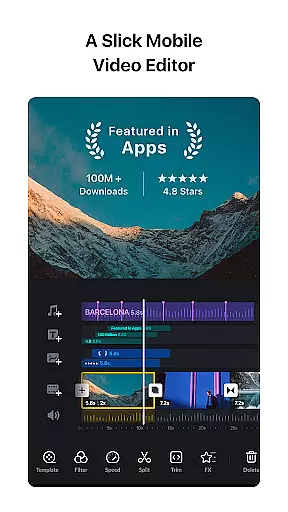


VN is a versatile video editing app designed for both professional and amateur creators. With its intuitive interface, users can easily create high-quality videos without any prior editing knowledge. The app offers advanced features such as multi-track timeline editing, keyframe animations, and color grading filters that are typically found in desktop editing software.
One of VN's standout features is its precise editing capabilities. Users can make frame-accurate cuts as short as 0.05 seconds, apply speed curves for dynamic playback effects, and utilize rich cinematic filters to enhance their videos. Additionally, the app supports seamless collaboration through cloud services like Google Drive, making it ideal for creators who work across multiple devices.
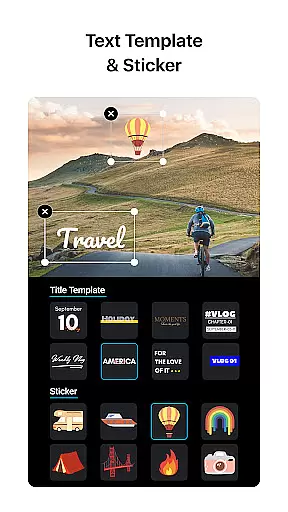
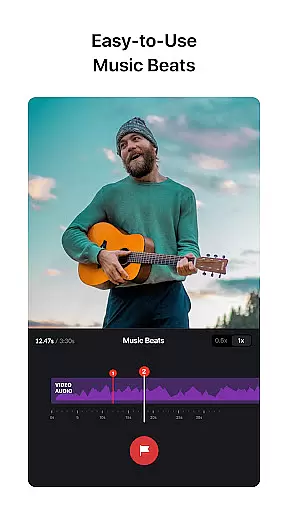
The app's value extends beyond basic editing tools. It includes creative elements such as music beats synchronization, customizable text templates, and secure sharing options. Whether you're creating short social media clips or longer vlogs, VN provides all the necessary tools to produce professional-grade content directly from your mobile device.
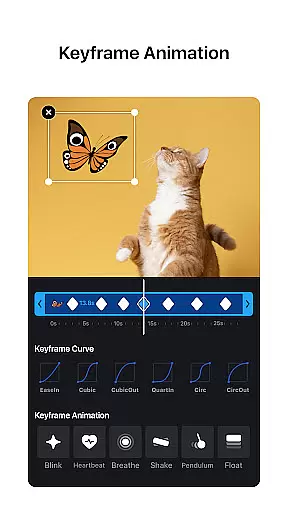
VN distinguishes itself with a comprehensive suite of video editing tools. The multi-track timeline allows users to layer videos, images, stickers, and text seamlessly. Advanced features like keyframe animation and speed curve adjustments provide granular control over video effects, enabling creators to produce polished, professional-looking content.
The app also excels in audio editing capabilities. Users can add markers to synchronize video cuts with music beats, record high-quality voiceovers, and import custom soundtracks via Wi-Fi or messaging apps. These features, combined with non-destructive editing and unlimited undo/redo functionality, make VN a powerful tool for audiovisual storytelling.
Additional notable features include reverse playback, zoom effects, and freeze-frame capabilities. The app supports 4K video export at up to 60 FPS, with customizable resolution and bit rate settings. These professional-grade features, along with secure project management through password protection and expiration dates, demonstrate VN's commitment to providing a complete mobile video editing solution.
One of VN's standout features is its extensive video format compatibility, ensuring users can work with a wide array of file types without the need for prior conversion. This flexibility allows creators to import videos from various sources seamlessly, making the editing process more efficient and less restrictive.
The app supports popular formats such as MP4, AVI, MOV, and many others, catering to both amateur and professional video editors. By accommodating diverse formats, VN empowers users to focus on their creative process rather than technical limitations, enhancing productivity and enabling a smoother workflow.
Moreover, VN's ability to export projects in multiple resolutions and frame rates, including 4K at up to 60 FPS, ensures that final outputs meet high-quality standards. This feature not only broadens the scope of project sharing and presentation but also future-proofs creations against evolving digital media standards.
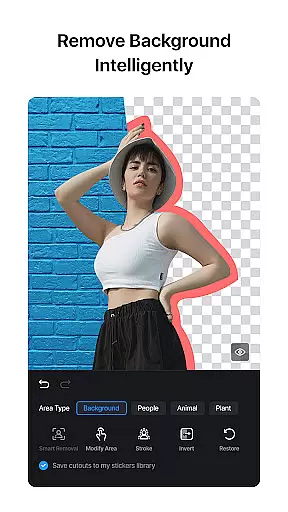
VN incorporates AI-powered editing features that significantly enhance the video production process. These intelligent tools assist users in automating complex tasks such as color correction, audio leveling, and even suggesting optimal cuts based on music beats, streamlining the path to professional-grade results.
Among these features is the advanced Keyframe Animation tool, which utilizes AI to simplify the creation of dynamic visual effects. Users can choose from 19 built-in animation effects or customize their own, allowing for unparalleled creativity and personalization in video projects. This capability democratizes access to sophisticated editing techniques previously reserved for experts.
Additionally, VN's AI-driven functionalities extend to stabilizing shaky footage and applying cinematic filters through LUT files, elevating the aesthetic quality of videos effortlessly. Such innovations not only save time but also inspire users to experiment with new styles and formats, pushing the boundaries of traditional video storytelling.
User-friendly interface
Professional-grade features
Multi-track editing
Cloud collaboration
No watermark
Advanced features may overwhelm beginners
Occasional performance issues
Limited customer support
High device requirements
Complex UI for casual users

Powerful, professional, versatile teleprompter. Developed by an active film crew
 4.00
4.00
Watch full episodes of your favorite Cartoon Network and Cartoonito shows!
3.50
Create & edit videos with AI
4.30
1)AirPlay/DLNA Mirroring/Streaming, up to 4 connections; 2)Samba/NAS/DMS Player.
4.00
Video player with powerful streaming playback and various convenient features.
2.10
Play and download HD videos from all sources — fast, simple, and all-in-one.
4.2
IPTV Player - Watch live TV from m3m & m3u8 playlist, stream IPTV on mobile
3.30
Manage your IPTV live channels and VOD playlists (no playlist included)
3.80
Livestream, news, & gaming content. Watch, chat, and upload. Join Rumble today!
3.80
Download Hub, easy and private way to download and enjoy your videos offline
4.80
Browser + Remote for Roku to stream webvideos, online movies and livestreams
4.60
Viddo: Generate Action Figure, AI Anime, AI kiss, AI hug Video from image & text
4.40
Video player, file manager for all formats, 4K/HD media player supports subtitle
4.30
Web Browser for LG TV to stream webvideos, online movies and livestreams in HD
4.20
Video player with 4K & 1080P support, popup play, background play and subtitle.
4.20
Cast to Smart TV, Fire TV. Cast video, photo - Fast & Stable!
3.90
Kodi media center, a free and open source cross-platform entertainment hub
3.60
Download videos easily & play them all in one smart, powerful video manager.
3.40
The essential companion to your Blue Iris PC software
2.50


User Reviews